
Beta diversity
Last updated on 2026-10-20 | Edit this page
Estimated time: 164 minutes
Overview
Questions
- How different are the samples from each other?
- How can we visualize the differences between many samples?
- Is the community composition different between people with colorectal cancer and healthy people?
- (Bonus) Do the samples fall into natural groups?
Objectives
- Explain what a dissimilarity between two samples is.
- Create and interpret ordination plots with PCoA and PCA, and explain why both are useful.
- Use the phylogenetic tree in a beta diversity analysis with UniFrac.
- Test whether groups differ in composition with PERMANOVA, check the homogeneity of the group spreads, and interpret the results.
- Account for another variable with distance-based redundancy analysis (dbRDA).
- (Bonus) Find groups of similar samples with clustering, and show them on an ordination plot.
Where are we?
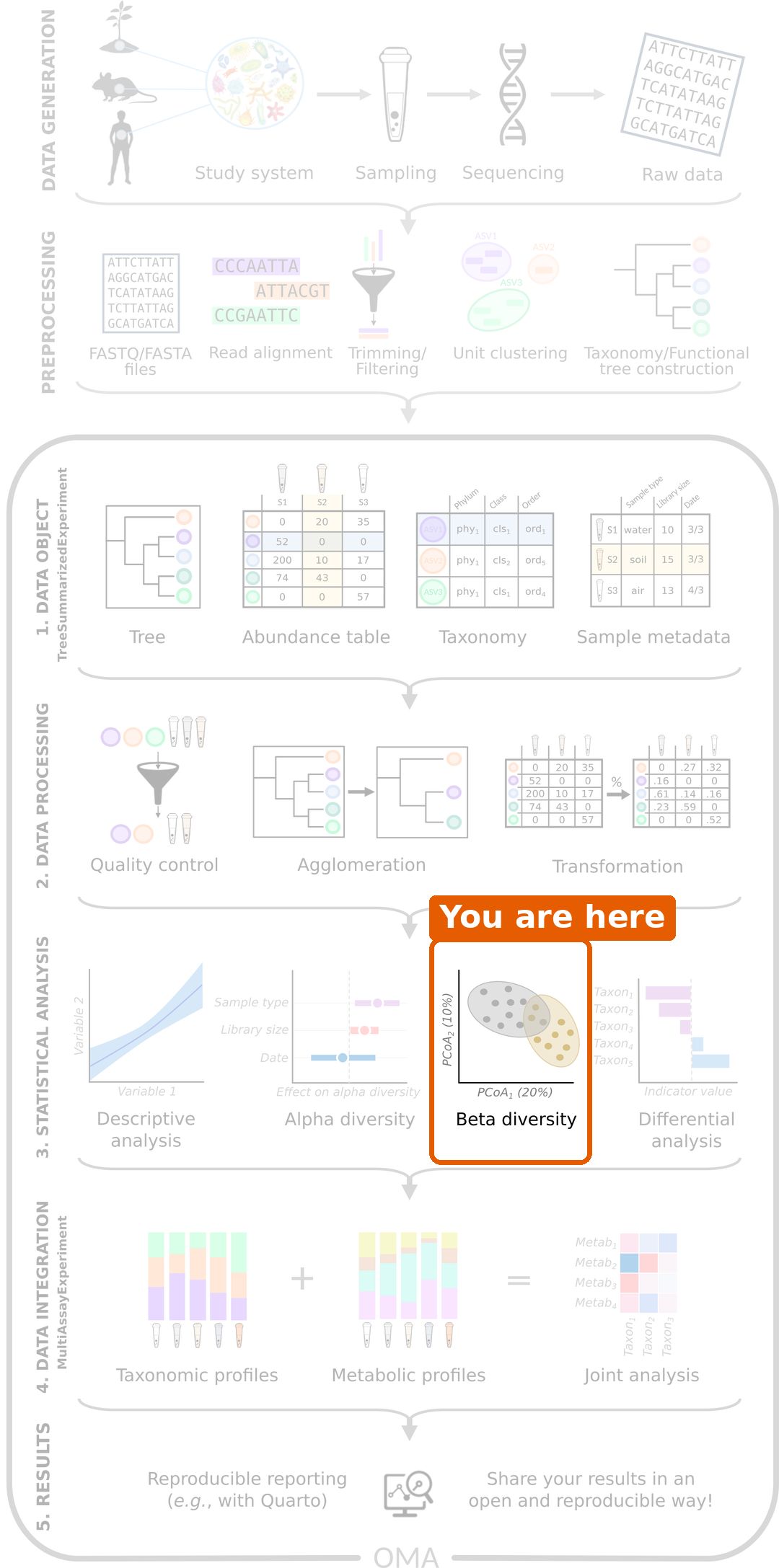
In the previous episode, we compared the diversity within samples. Now we compare whole communities between samples: is the overall composition of the gut microbiome different between people with CRC and healthy people?
Load packages and data
R
library(mia)
library(miaViz)
library(scater)
R
tse <- readRDS(file.path("data", "tse_processed.rds"))
What is beta diversity?
Alpha diversity summarizes each sample with a single number. Beta diversity compares whole communities: how different is the community of one sample from that of another?
Dissimilarity between two samples
We measure how different two samples are with a dissimilarity. The most common one in microbiome research is the Bray–Curtis dissimilarity. It goes from 0 (the samples have exactly the same composition) to 1 (the samples share no taxa at all).
Here is a small example with relative abundances of three taxa:
| Taxon A | Taxon B | Taxon C | |
|---|---|---|---|
| Sample 1 | 0.6 | 0.4 | 0.0 |
| Sample 2 | 0.2 | 0.4 | 0.4 |
For relative abundances, Bray–Curtis is half the sum of the absolute differences: (|0.6 − 0.2| + |0.4 − 0.4| + |0.0 − 0.4|) / 2 = (0.4 + 0 + 0.4) / 2 = 0.4.
Challenge 1: Calculate a dissimilarity
Calculate the Bray–Curtis dissimilarity between these two samples:
| Taxon A | Taxon B | Taxon C | |
|---|---|---|---|
| Sample 1 | 0.5 | 0.5 | 0.0 |
| Sample 3 | 0.0 | 0.0 | 1.0 |
What does the result mean?
(|0.5 − 0| + |0.5 − 0| + |0 − 1|) / 2 = 2 / 2 = 1. The two samples share no taxa, so they are as different as possible.
Ordination: a map of the samples
With 60 samples, there are 1770 pairs of samples, and so 1770 dissimilarities. That is far too many numbers to read. An ordination draws a map of the samples, in which samples that are similar are close to each other and samples that are different are far apart.
A common ordination method is the Principal Coordinate Analysis (PCoA), also called multidimensional scaling (MDS). It finds the directions that explain the most differences between the samples and uses them as the axes of the map.
PCoA with Bray–Curtis dissimilarity
The function addMDS() calculates the dissimilarities and
the PCoA in one step. We use the relative abundances, choose the
Bray–Curtis method, and name the result PCoA_BC:
R
tse <- addMDS(
    tse, assay.type = "relabundance", method = "bray", name = "PCoA_BC"
)
The result is stored in the reducedDim part of the
TreeSE. We plot it with the miaViz function
plotOrdination() and colour the samples by disease:
R
plotOrdination(tse, "PCoA_BC", colour.by = "disease")
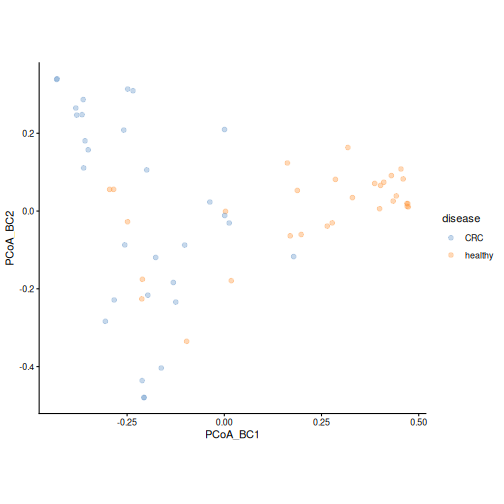
Each point is a sample. The axes have no units: what matters is how
far apart the points are. The first axis (PCoA_BC1) shows
the largest differences between the samples, the second axis the next
largest.
Result: healthy samples mostly lie on one side of the first axis and CRC samples on the other, although the groups overlap. The communities of CRC patients and healthy people seem to differ.
Challenge 2: What drives the first axis?
- Do the CRC and healthy samples separate completely?
- Which species could be driving the separation along the first axis? Hint: think back to episode 5.
- Check your idea: colour the points by the relative abundance of that
species. Hint: give the name of the species to
colour.by, and the table toassay.type.
- No. Most samples fall on “their” side, but there is clear overlap. The microbiome differs a lot between individuals, even within one group.
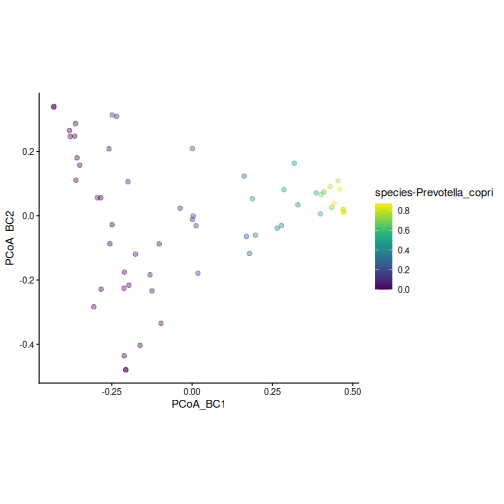
- Prevotella copri, which dominates many healthy samples.
- Samples with a lot of P. copri lie on one side of the first axis:
R
plotOrdination(
    tse, "PCoA_BC",
    colour.by = "species-Prevotella_copri", assay.type = "relabundance"
)
PCA on rclr data
Principal Component Analysis (PCA) is the most
widely used ordination method in data science in general. It works
directly on the values of the table rather than on a dissimilarity: its
axes, the principal components (PC1, PC2, …), are combinations
of the taxa. PCA works best with roughly normally distributed values,
such as the rclr table from episode
5. The function runPCA() from the scater package
calculates it:
R
tse <- runPCA(tse, assay.type = "rclr", name = "PCA", ncomponents = 5)
R
plotOrdination(tse, "PCA", colour.by = "disease")
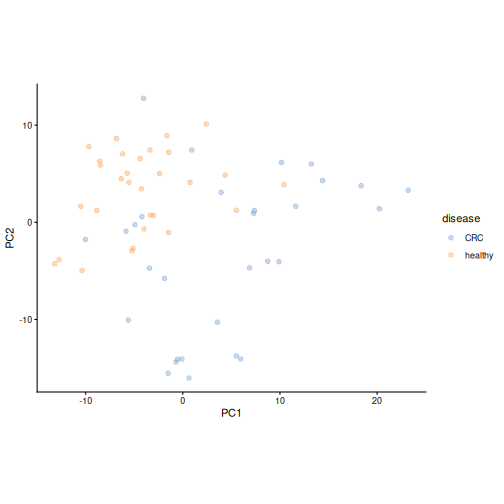
Result: the PCA also separates the two groups: the healthy samples gather in one part of the map, while the CRC samples are more spread out. The map looks different from the PCoA, because PCA looks at the data in a different way.
A big advantage of PCA is that it tells us which taxa drive each axis. Each taxon gets a loading for each axis: taxa with large positive or negative loadings pull samples towards that end of the axis.
Challenge 3: Which taxa drive the PCA?
- Plot the loadings of the first two axes with the miaViz function
plotLoadings(). Show the 10 taxa with the largest loadings (ncomponents = 2,n = 10). - Which taxa have the largest loadings on the first axis (PC1)?
- Compare with the PCA plot: on which side of PC1 are the healthy samples? Does this agree with what you know about Prevotella copri?
R
plotLoadings(tse, dimred = "PCA", ncomponents = 2, n = 10)
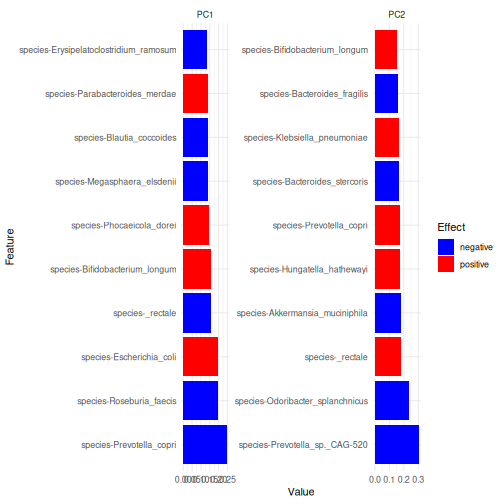
- The largest loadings on PC1 belong to species-Prevotella_copri, species-Roseburia_faecis, species-Escherichia_coli.
- Prevotella copri has a negative loading on PC1, so samples with a lot of P. copri lie on the negative side of PC1. These are mostly the healthy samples, which agrees with episode 5.
PCA and PCoA are complementary
PCoA can use any dissimilarity. Bray–Curtis on relative abundances is driven mostly by the abundant taxa. PCA on rclr values gives more weight to changes in rare taxa, and gives loadings that show which taxa drive the axes. (The straight-line distance between the rclr values of two samples is called the robust Aitchison distance; a PCA on rclr values gives the same map as a PCoA with this distance.) Because the two methods look at the data differently, they can reveal different patterns. Make both.
Using the tree: UniFrac
Bray–Curtis and PCA treat every taxon as unrelated to all the others. But two species can be genetically very similar and play similar roles in the gut. If one sample has species X and another has its close relative Y, the two samples are more similar than if they had two distant species. Standard distances miss this.
The UniFrac distance uses the phylogenetic tree to take this into account. It measures how much of the tree’s branch length is shared by two samples. Many studies ignore the phylogeny, even when it is available, so it is worth adding to your analyses.
addMDS() takes the tree from the rowTree of
the TreeSE. By default, it calculates the unweighted UniFrac,
which only uses whether a taxon is present in a sample or not:
R
tse <- addMDS(
    tse, assay.type = "counts", method = "unifrac", name = "PCoA_UniFrac"
)
WARNING
Warning: Pruning tree...R
plotOrdination(tse, "PCoA_UniFrac", colour.by = "disease")
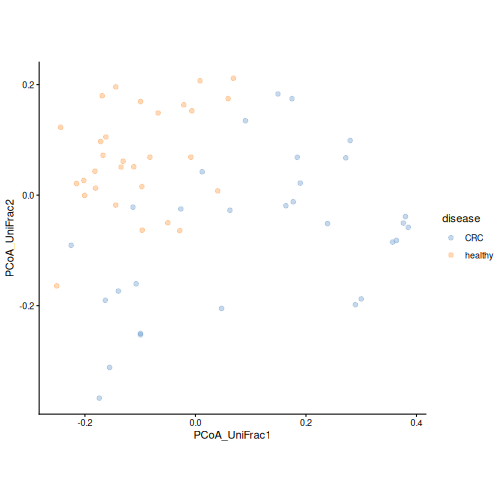
The warning Pruning tree... is harmless: the tree
contains many more taxa than our data, and it is trimmed to the taxa in
the data.
Result: the groups also tend to separate when the relatedness of the taxa is taken into account.
Challenge 4: Weighted UniFrac
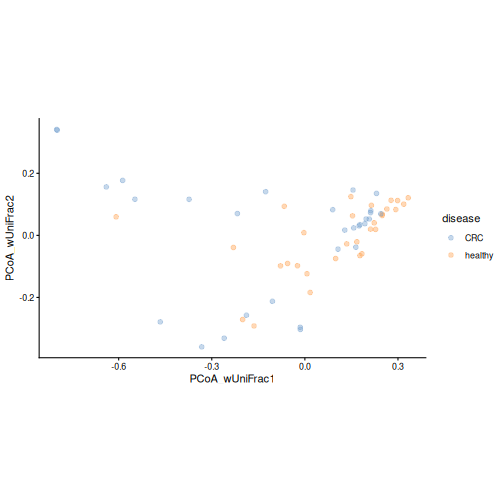
The weighted UniFrac also takes the abundances of the taxa into account.
- Make a PCoA with weighted UniFrac: add
weighted = TRUEtoaddMDS()and name the resultPCoA_wUniFrac. - Colour the plot by disease. Do the groups separate as clearly as with unweighted UniFrac?
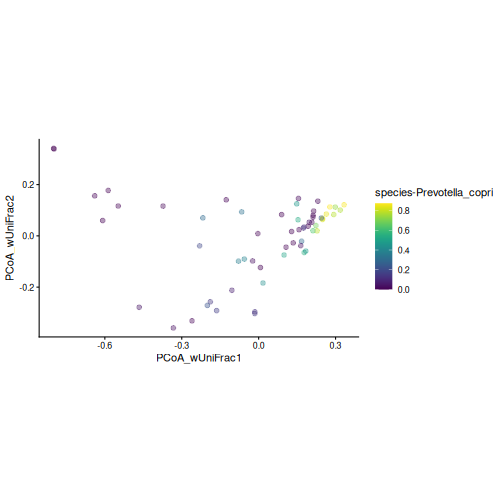
- Colour the plot by the relative abundance of Prevotella copri. What do you see?
R
tse <- addMDS(
    tse, assay.type = "counts", method = "unifrac",
    weighted = TRUE, name = "PCoA_wUniFrac"
)
WARNING
Warning: Pruning tree...R
plotOrdination(tse, "PCoA_wUniFrac", colour.by = "disease")
R
plotOrdination(
    tse, "PCoA_wUniFrac",
    colour.by = "species-Prevotella_copri", assay.type = "relabundance"
)
- The groups overlap more than with unweighted UniFrac.
- The samples with a lot of P. copri form a tight group. Weighted UniFrac is driven by the most abundant taxa, so the samples dominated by P. copri look very similar to each other. Unweighted UniFrac, in contrast, is sensitive to rare taxa. The two versions answer different questions, so it is useful to look at both.
Which distance should I use?
Bray–Curtis is the most common choice and a good default. The robust Aitchison distance (PCA on rclr) is designed for relative data. UniFrac uses the phylogenetic tree. Different distances answer slightly different questions, so it is good practice to compare a few. See the Community similarity chapter of OMA.
Is the difference real? PERMANOVA
A plot can suggest a difference, but we need a statistical test to evaluate it. PERMANOVA (permutational multivariate analysis of variance) tests whether the centres of the groups are further apart than we would expect by chance. It works directly on the dissimilarities.
R
permanova <- getPERMANOVA(
    tse, assay.type = "relabundance", method = "bray", formula = x ~ disease
)
permanova$permanova
OUTPUT
Permutation test for adonis under reduced model
Marginal effects of terms
Permutation: free
Number of permutations: 999

adonis2(formula = formula, data = data, method = ..1, by = by, na.action = na.action)
         Df SumOfSqs      R2      F Pr(>F)
disease   1   3.2088 0.16013 11.058  0.001 ***
Residual 58  16.8307 0.83987
Total    59  20.0395 1.00000
---
Signif. codes:  0 '***' 0.001 '**' 0.01 '*' 0.05 '.' 0.1 ' ' 1
In the formula, x stands for the abundance table and
disease is the variable we test. Two numbers are
important:
- R2: the share of the differences between samples that is explained by the variable.
- Pr(>F): the p-value.
Result: disease explains 16 % of the differences between samples (R2 = 0.16), with a p-value of 0.001. The communities of CRC patients and healthy people differ significantly. Still, most of the differences between people (84 %) are not explained by the disease.
PERMANOVA is a permutation test: it shuffles the group labels of the samples at random many times (999 by default) and checks how often the shuffled groups differ as much as the real ones. With 999 permutations, the smallest possible p-value is 0.001. Because the shuffling is random, your p-values may differ slightly from the ones shown here.
Check the spread of the groups
PERMANOVA assumes that the groups are about equally spread out
(homogeneity of dispersion). If one group is much more spread
out than the other, PERMANOVA can give a small p-value even when the
group centres do not differ. Always test this
assumption. getPERMANOVA() tests it for us:
R
permanova$homogeneity
OUTPUT
        Df    Sum Sq   Mean Sq        F N.Perm Pr(>F) Total variance
disease  1 0.2643238 0.2643238 8.957733    999   0.01       1.975781
        Explained variance
disease          0.1337819
We can also see the centre and the spread of each group on the PCoA
plot. With add.ellipse = TRUE,
plotOrdination() draws an ellipse around the samples of
each group:
R
plotOrdination(tse, "PCoA_BC", colour.by = "disease", add.ellipse = TRUE)
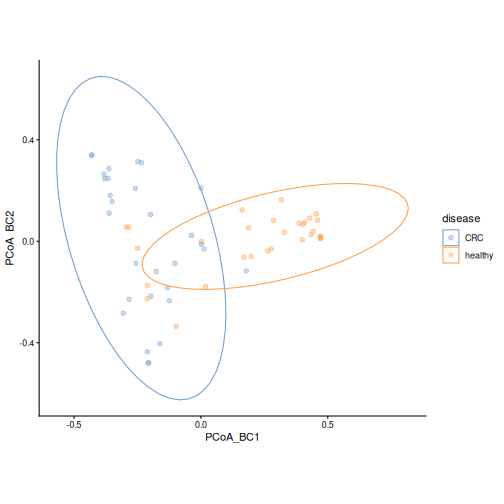
Result: the p-value is 0.01, so the groups differ in spread. The CRC samples are more spread out, while many healthy samples are close to each other, many of them being dominated by Prevotella copri. Our PERMANOVA result is therefore partly due to the difference in spread. The PCoA plot also shows that the group centres lie on different sides of the first axis, so the groups differ in both their centre and their spread. We should report both, and not the PERMANOVA p-value alone.
Challenge 5: Interpret PERMANOVA
PERMANOVA gives R2 = 0.16 and p = 0.001. Which statement is correct?
- Disease explains 84 % of the differences between samples.
- Disease explains a small but significant part of the differences between samples.
- Every CRC sample is different from every healthy sample.
- Disease explains 16 % of the differences, which is a small part, and the result is significant. Statement a) mixes up the explained and unexplained parts. Statement c) is wrong because the groups overlap in the PCoA plot.
Accounting for another variable
In episode 4, we noticed that most healthy people come from Bhopal. Could the difference we found be a difference between the two places instead? When another variable is linked to both the groups and the outcome, it can confound the comparison (episode 1).
Challenge 6: Colour by location
- Plot the Bray–Curtis PCoA, coloured by
location. - Compare it with the plot coloured by disease. What do you see?
R
plotOrdination(tse, "PCoA_BC", colour.by = "location")
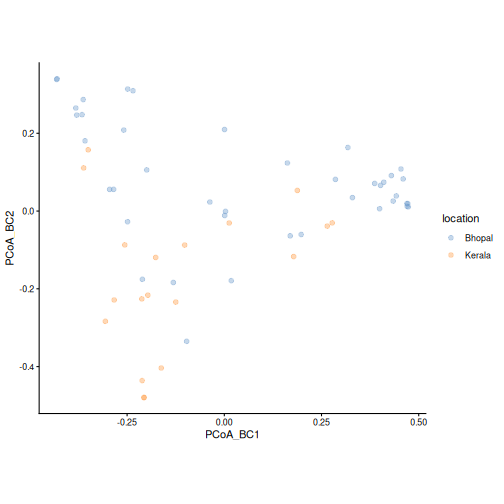
The samples from Kerala are mostly on the same side of the first axis as the CRC samples. This is expected, because most people from Kerala in this study have CRC. Many of them also lie in the lower part of the plot, along the second axis. From this plot alone, we cannot tell the effects of disease and location apart.
Distance-based redundancy analysis (dbRDA)
dbRDA is an ordination that includes variables from
colData. Like PERMANOVA, it starts from the dissimilarities
and uses a formula. Unlike PCoA, its axes are chosen to show the
differences that the variables explain. It tests how much each variable
explains while taking the other variables into account. We add
location to the formula:
R
tse <- addRDA(
    tse, assay.type = "relabundance", method = "bray",
    formula = x ~ disease + location, name = "dbRDA"
)
The miaViz function plotRDA() shows the samples together
with an arrow for each variable. The arrow points towards the samples of
the named group (for example, disease — healthy points
towards the healthy samples). Its label shows how much the variable
explains, and its p-value:
R
plotRDA(tse, "dbRDA", colour.by = "disease")
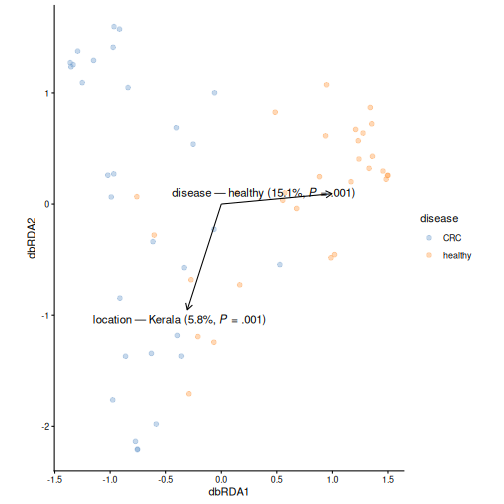
Result: disease explains 15 % (p = 0.001) and location 6 % (p = 0.001) of the differences between samples. The disease effect remains when the location is taken into account. The location also matters, so we will include it in the differential abundance analysis in the next episode.
Challenge 7: What about age?
In episode 6, we found that the CRC patients are older than the healthy people.
- Run the dbRDA again with
ageadded to the formula, and name the resultdbRDA_age. - Plot it with
plotRDA(). Does disease still explain a significant part of the differences? How much does age explain?
R
tse <- addRDA(
    tse, assay.type = "relabundance", method = "bray",
    formula = x ~ disease + location + age, name = "dbRDA_age"
)
plotRDA(tse, "dbRDA_age", colour.by = "disease")
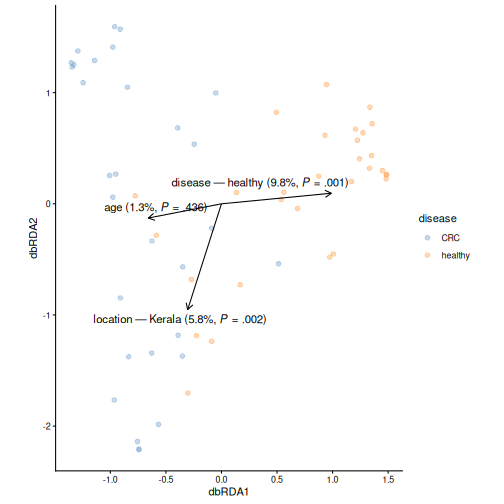
Disease now explains 10 % (p = 0.001), and age 1 % (p = 0.44). The share of disease is smaller than before, because disease and age are linked: part of the differences can be explained by either of them. Still, disease explains a significant part on its own, while age adds little. Because the two are confounded, the data cannot fully tell them apart.
Challenge 8: Beta diversity at genus level (30 minutes)
In this episode, we worked at the species level. Do the results hold at the genus level? And does gender matter?
- Agglomerate the data to the genus level with
agglomerateByRank(), and add relative abundances withtransformAssay(). - Make a Bray–Curtis PCoA of the genera and colour it by disease. Does it look like the species-level PCoA?
- Run PERMANOVA for disease at the genus level. How much does disease explain? Compare with the species level.
- Test the homogeneity of the group spreads at the genus level. Is the result different from the species level? What does this mean for the PERMANOVA result?
- Back at the species level: does gender explain differences in
composition? Run PERMANOVA with
formula = x ~ gender.
1.–2. Genus-level PCoA
R
tse_genus <- agglomerateByRank(tse, rank = "genus")
tse_genus <- transformAssay(
    tse_genus, assay.type = "counts", method = "relabundance"
)
tse_genus <- addMDS(
    tse_genus, assay.type = "relabundance", method = "bray", name = "PCoA_BC"
)
plotOrdination(tse_genus, "PCoA_BC", colour.by = "disease")
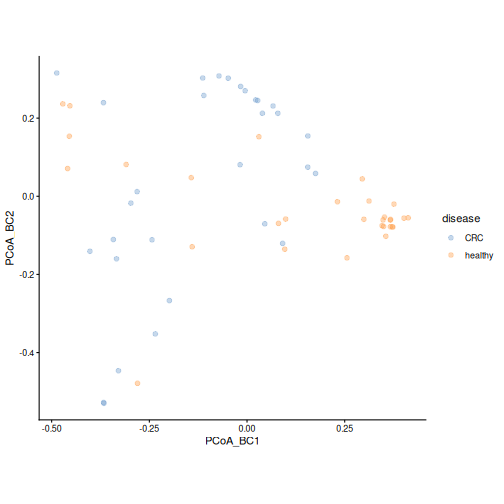
As at the species level, the groups tend to separate: many healthy samples form a tight cluster on one side. The overlap is somewhat larger.
3.–4. Genus-level PERMANOVA
R
permanova_genus <- getPERMANOVA(
    tse_genus, assay.type = "relabundance", method = "bray",
    formula = x ~ disease
)
permanova_genus$permanova
OUTPUT
Permutation test for adonis under reduced model
Marginal effects of terms
Permutation: free
Number of permutations: 999

adonis2(formula = formula, data = data, method = ..1, by = by, na.action = na.action)
         Df SumOfSqs      R2      F Pr(>F)
disease   1   1.4774 0.10404 6.7353  0.001 ***
Residual 58  12.7227 0.89596
Total    59  14.2001 1.00000
---
Signif. codes:  0 '***' 0.001 '**' 0.01 '*' 0.05 '.' 0.1 ' ' 1
R
permanova_genus$homogeneity
OUTPUT
        Df    Sum Sq   Mean Sq        F N.Perm Pr(>F) Total variance
disease  1 0.1127457 0.1127457 2.012595    999  0.165       3.361911
        Explained variance
disease          0.0335362
At the genus level, disease explains 10 % of the differences (16 % at the species level), so the effect is somewhat smaller but still clear. The homogeneity test gives p = 0.16: at the genus level, we find no evidence that the groups differ in spread. Here we can interpret the PERMANOVA result as a difference in the group centres.
5. Gender
R
permanova_gender <- getPERMANOVA(
    tse, assay.type = "relabundance", method = "bray", formula = x ~ gender
)
permanova_gender$permanova
OUTPUT
Permutation test for adonis under reduced model
Marginal effects of terms
Permutation: free
Number of permutations: 999

adonis2(formula = formula, data = data, method = ..1, by = by, na.action = na.action)
         Df SumOfSqs      R2      F Pr(>F)
gender    1   0.4765 0.02378 1.4129  0.149
Residual 58  19.5630 0.97622
Total    59  20.0395 1.00000
Gender explains only 2 % of the differences, and the result is not significant (p = 0.15).
Bonus: clustering, natural groups of samples
This section is optional.
So far, we have always started from the study groups, CRC and healthy. But would the samples fall into groups even if we did not know who has CRC?
Clustering sorts samples into groups, called clusters, so that samples in the same cluster are similar to each other and different from the samples in other clusters. It uses only the abundance table, not the sample information. This is called an unsupervised analysis. In microbiome research, clustering is used to find community types. A well-known example are enterotypes: gut microbiomes are often dominated by either Bacteroides or Prevotella.
We use hierarchical clustering. It starts with each
sample in its own group, and then joins the two most similar groups
again and again. Here, the similarity is the straight-line distance
between the rclr values of the samples (the robust Aitchison distance).
The result is a tree of samples, which we cut into the number of
clusters we want. The function addCluster() uses clustering
methods from the bluster package:
R
library(bluster)
We cluster the samples (by = "cols") on their rclr
values, join the groups with Ward’s method (ward.D2, which
keeps the clusters as compact as possible), and cut the tree into two
clusters (k = 2):
R
tse <- addCluster(
    tse,
    assay.type = "rclr",
    by = "cols",
    HclustParam(method = "ward.D2", cut.params = list(k = 2))
)
table(tse$cluster)
OUTPUT
 1  2
25 35
The cluster of each sample is stored in the colData
column cluster. We show the clusters on the PCA, with the
shape of each point showing the disease:
R
plotOrdination(tse, "PCA", colour.by = "cluster", shape.by = "disease")
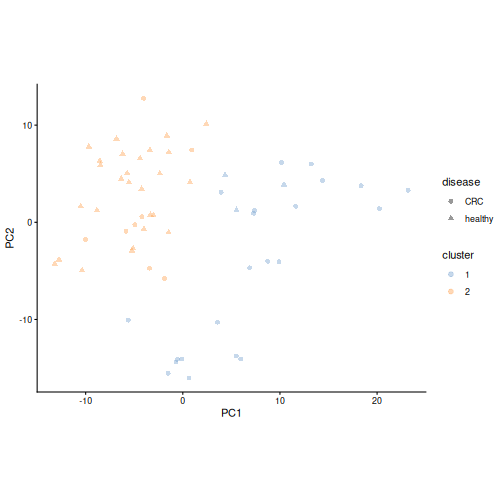
The clustering never saw the disease. Let’s compare the clusters with the study groups, and look at the species we have followed through the lesson:
R
table(cluster = tse$cluster, disease = tse$disease)
OUTPUT
       disease
cluster CRC healthy
      1  22       3
      2   8      27
R
plotBoxplot(
    tse, assay.type = "relabundance",
    features = "species-Prevotella_copri", x = "cluster"
)
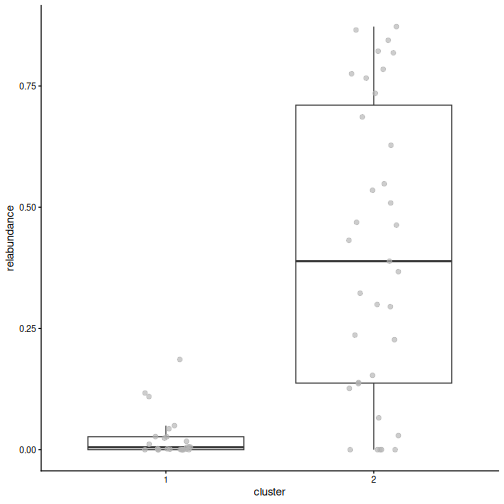
Result: cluster 2 contains 27 healthy people and 8 people with CRC, and Prevotella copri makes up a median of 39 % of their community. Cluster 1 contains 22 people with CRC and 3 healthy people, with a median of 1 % P. copri. The main structure in our data is a Prevotella community type versus a non-Prevotella type, and it is strongly linked to the disease.
Cluster the data, not the ordination
Cluster the data itself: the transformed abundance table, as above, or a dissimilarity. Do not cluster the PCA or PCoA axes. This is a common mistake: the first few axes keep only part of the variation, so the clusters would follow what the 2-D plot shows rather than the data. Use the ordination only to visualise the clusters.
Clustering also always returns clusters, even when the data has no real groups. Check whether the clusters hold up when you change the method or the number of clusters. See the Clustering chapter of OMA.
Challenge 9 (bonus): K-means clustering
K-means is another common clustering method. It
places k cluster centres and assigns each sample to the
nearest centre, then moves the centres until they settle.
- Cluster the samples with k-means and two clusters. Use
KmeansParam(centers = 2)instead ofHclustParam(), and store the result in a column calledkmeanswithclust.col = "kmeans". - Compare the k-means clusters with the hierarchical clusters using
table(). Do the two methods agree? - Try three clusters with hierarchical clustering
(
cut.params = list(k = 3),clust.col = "cluster_k3"). Which cluster is split, and how are the new clusters related to the disease?
R
tse <- addCluster(
    tse, assay.type = "rclr", by = "cols",
    KmeansParam(centers = 2), clust.col = "kmeans"
)
table(hclust = tse$cluster, kmeans = tse$kmeans)
OUTPUT
      kmeans
hclust  1  2
     1 16  9
2 28 7- The methods agree on 37 of the 60 samples. The cluster numbers themselves are arbitrary: cluster 1 of one method may be cluster 2 of the other. What matters is which samples end up together.
R
tse <- addCluster(
    tse, assay.type = "rclr", by = "cols",
    HclustParam(method = "ward.D2", cut.params = list(k = 3)),
    clust.col = "cluster_k3"
)
table(k2 = tse$cluster, k3 = tse$cluster_k3)
OUTPUT
   k3
k2   1  2  3
  1 16  0  9
  2  0 35  0
R
table(cluster = tse$cluster_k3, disease = tse$disease)
OUTPUT
       disease
cluster CRC healthy
      1  13       3
      2   8      27
3 9 0- The Prevotella cluster stays the same, and the other cluster is split in two. Cluster 3 contains only people with CRC (9 of them), so the non-Prevotella samples are not one uniform group.
- Beta diversity compares whole communities between samples, using a dissimilarity such as Bray–Curtis.
-
addMDS()calculates a PCoA from any dissimilarity,runPCA()a PCA from rclr values, andplotOrdination()draws them as a map of the samples. PCA and PCoA are complementary, and PCA loadings show which taxa drive the axes. - UniFrac uses the phylogenetic tree, so that closely related taxa count as similar. Unweighted UniFrac uses presence and absence; weighted UniFrac also uses the abundances.
- PERMANOVA (
getPERMANOVA()) tests whether groups differ in composition; R2 tells how much of the differences the group explains. Always check whether the groups differ in spread, because this affects the PERMANOVA result. - dbRDA (
addRDA()) takes other variables into account, which is important when groups differ in more than one way. - (Bonus) Clustering (
addCluster()) finds groups of similar samples without using the sample information. Cluster the data itself, never the ordination axes, and use the ordination only to show the clusters. - In our study, the gut microbiome of people with CRC differs from that of healthy people, even when the location is taken into account. The samples fall into a Prevotella and a non-Prevotella community type, which is strongly linked to the disease.