
All in One View
Content from Introduction to microbiome data
Last updated on 2026-10-20 | Edit this page
Estimated time: 55 minutes
Overview
Questions
- What is microbiome data?
- How is microbiome data produced?
- What will we learn to do with it in this lesson?
Objectives
- Describe the steps of a microbiome study, and point out which steps this lesson covers.
- Name the four parts of a microbiome dataset.
- Explain why we compare proportions instead of raw read counts.
- State the research question of the study used in this lesson, and name factors other than the disease that could affect the answer.
What is a microbiome?
Our bodies, as well as soil, oceans and plants, are home to huge communities of microorganisms: bacteria, archaea, fungi and viruses. Such a community, together with its environment, is called a microbiome.
The gut microbiome helps us digest food, trains our immune system and protects us from pathogens. Changes in the gut microbiome have been linked to many diseases, including colorectal cancer, which is the topic of our example study.
To study a microbiome, we need to know who is there and how much of each. This is what microbiome sequencing measures.
The microbiome data science workflow
A microbiome study goes through the same steps from start to finish. The figure below shows them as a workflow, from top to bottom.
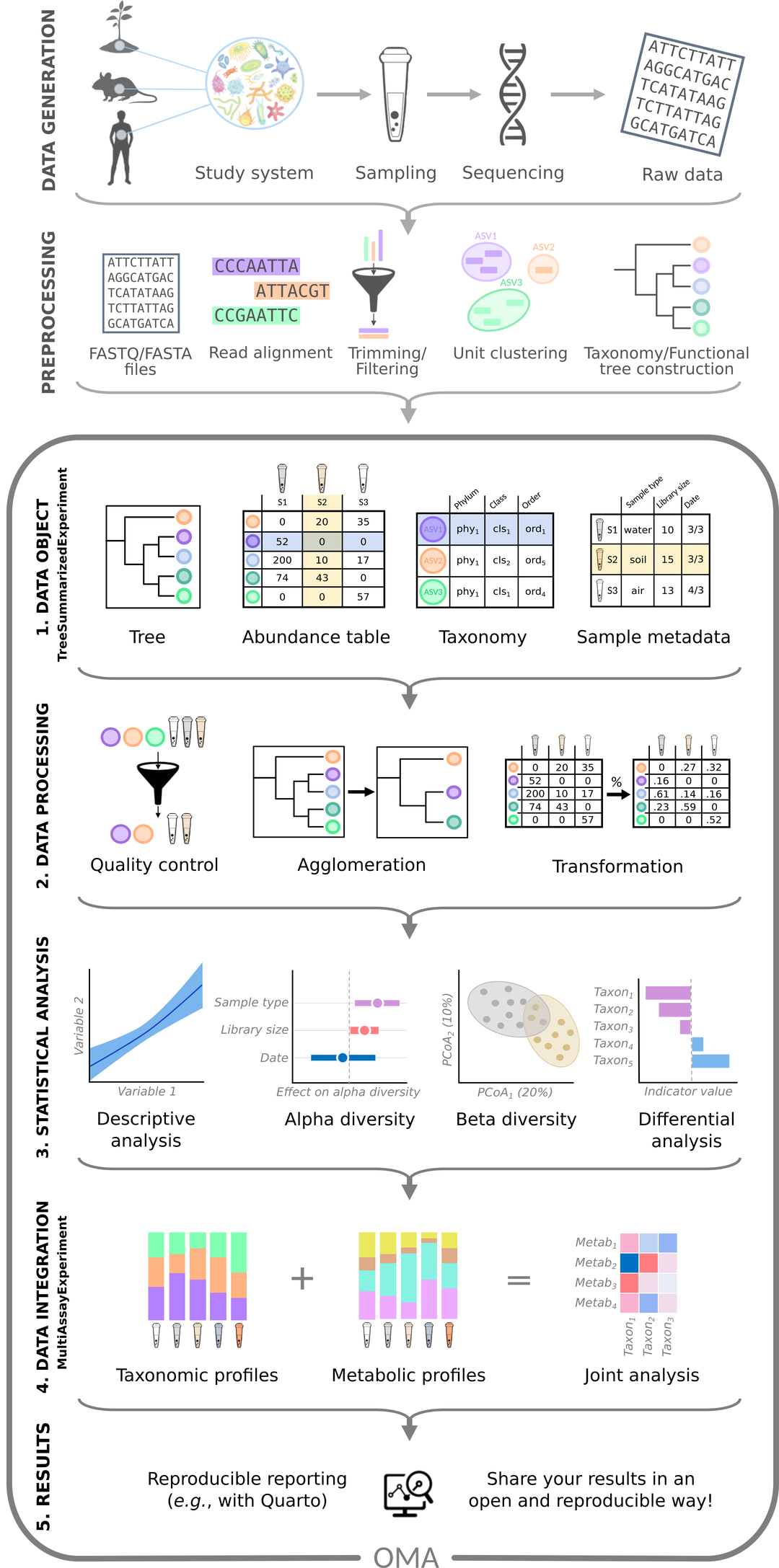
Figure: microbiome data science workflow. Source: OMA.
First, the data is produced:
- Data generation: a study system, such as people, animals or soil, is sampled. The DNA of each sample is sequenced, which gives the raw data: millions of short DNA sequences, called reads.
- Pre-processing: specialized tools clean the reads, group them and find out which taxa (groups of related organisms, such as species) they come from. The result is a set of tables.
Then the tables are analysed, in five numbered steps:
- Data object: the tables (abundance table, taxonomy, sample metadata and tree) are imported into R and stored together in one object.
- Data processing: the data is checked, summarized at different taxonomic levels (agglomeration) and transformed.
- Statistical analysis: we answer the research question, for example with alpha diversity, beta diversity and differential abundance analysis.
- Data integration: the microbiome is combined with other data types measured from the same samples, such as metabolites.
- Results: we report what we found, in a reproducible way.
This lesson covers the analysis of a single abundance table: steps 1–3, highlighted in the figure below. The R/Bioconductor packages that we use, from the OMA framework, are made for these steps. Data generation and pre-processing have already been done for us with other tools; episode 2 introduces them and what to keep in mind about them. Combining several tables (step 4) is the topic of a follow-up lesson, the multi-omics lesson.
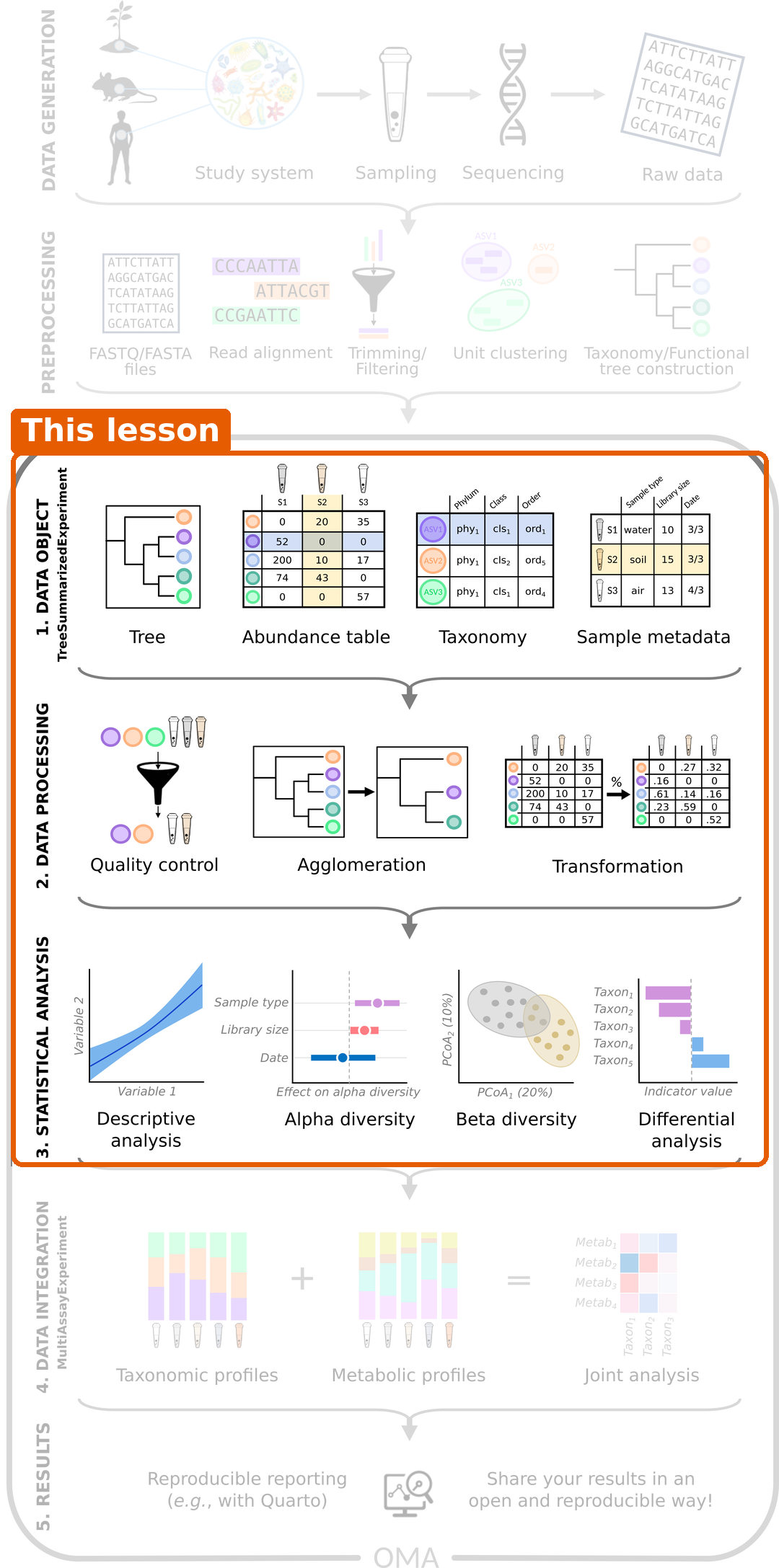
At the start of each episode, the same figure shows where we are in the workflow.
From a sample to a table
Two sequencing approaches are common:
- Amplicon sequencing (e.g. 16S rRNA) reads one marker gene. It is cheap and tells us mainly which bacteria are present.
- Shotgun metagenomics reads all DNA in the sample. It gives a more detailed picture, often down to species, and also tells us about genes and functions.
The data in this lesson come from shotgun metagenomics. The reads were compared with a database of marker genes by a tool called MetaPhlAn, which reports how much of each species is in each sample.
Challenge 1: Which steps does this lesson cover?
Which of these tasks belong to this lesson? For the others, say where they happen instead.
- Collecting stool samples and sequencing their DNA.
- Running MetaPhlAn on the sequencing reads.
- Importing the abundance table into R.
- Testing whether diversity differs between people with and without cancer.
- Combining the microbiome with metabolite measurements of the same people.
Tasks 3 and 4 belong to this lesson (data object and statistical analysis). Tasks 1 and 2 are data generation and pre-processing; they were done before we received the data. Task 5 is data integration, the topic of the multi-omics lesson.
The parts of a microbiome dataset
Whatever the sequencing approach, the result is a set of related tables. Here is a small made-up example with four taxa and three samples:
Abundance table: how many reads of each taxon were found in each sample.
| Sample 1 | Sample 2 | Sample 3 | |
|---|---|---|---|
| Bacteroides | 500 | 120 | 0 |
| Prevotella | 0 | 800 | 900 |
| Faecalibacterium | 300 | 60 | 80 |
| Escherichia | 200 | 20 | 20 |
Taxonomy: where each taxon belongs in the tree of life.
| Phylum | Family | Genus | |
|---|---|---|---|
| Bacteroides | Bacteroidota | Bacteroidaceae | Bacteroides |
| Prevotella | Bacteroidota | Prevotellaceae | Prevotella |
| … | … | … | … |
Sample information (also called metadata): what we know about each sample.
| Disease | Age | Location | |
|---|---|---|---|
| Sample 1 | CRC | 61 | Bhopal |
| Sample 2 | healthy | 45 | Bhopal |
| Sample 3 | healthy | 38 | Kerala |
Phylogenetic tree: how closely the taxa are related to each other.
In the next episodes, we will store all of these together in a single R object.
Challenge 2: Which part of the dataset do you need?
For each question below, decide which part of the dataset (abundance table, taxonomy, sample information or phylogenetic tree) you need to answer it. Some questions need more than one part.
- How many Prevotella reads were found in Sample 2?
- Is Prevotella more common in healthy people than in people with CRC?
- What share of Sample 1 belongs to the phylum Bacteroidota?
- Are the taxa in Sample 1 more closely related to each other than the taxa in Sample 3?
- The abundance table only.
- The abundance table and the sample information (to know who has CRC).
- The abundance table and the taxonomy (to know which taxa belong to Bacteroidota). In the toy example, Bacteroides and Prevotella are both Bacteroidota, so the share is 500 / 1000 = 50 %.
- The abundance table (which taxa are in each sample) and the phylogenetic tree (how related they are).
Most analyses combine several parts. This is why, in episode 4, we store them together in one object.
Two things to keep in mind
The numbers are relative
The number of reads we get from a sample depends on the sequencing machine and on how many samples were sequenced together. It does not depend on how many bacteria were in the gut. This total number of reads per sample is called the library size (or sequencing depth). In our study, the library sizes range from 3.3 to 27.7 million reads.
Look at Sample 1 above: it has 1000 reads in total. If we had sequenced it twice as deep, every number would double, but the community would be exactly the same. This is why we usually compare proportions (relative abundances) rather than raw counts. In Sample 1, Bacteroides makes up 500 / 1000 = 50 % of the community.
Proportions bring their own catch. They always add up to 100 %, so if one taxon grows, the shares of all the others shrink, even if their real amounts did not change. Data like this is called compositional. In episode 5, we use a transformation (rclr) that is designed for compositional data.
There are lots of zeros
Most taxa are found in only a few samples. In our study dataset, 84 % of the abundance table is zeros. Some zeros mean that a taxon is truly absent; others mean that it was too rare to be detected.
These two properties, relative (compositional) numbers and many zeros, are why microbiome data needs methods that are designed for it.
Challenge 3: More reads, more bacteria?
Sample A has 10 000 reads of Escherichia coli and sample B has 20 000 reads of E. coli.
- Can you conclude that sample B contains more E. coli than sample A?
- What else would you need to know?
- No. Sample B might have been sequenced more deeply.
- You need the total number of reads (library size) of each sample. For example, if sample A has 100 000 reads in total and sample B has 400 000, then E. coli makes up 10 % of sample A but only 5 % of sample B.
Our study: the gut microbiome in colorectal cancer
Throughout this lesson, we analyse data from Gupta et al. (2019). The researchers collected stool samples from 60 people in India:
- 30 people with colorectal cancer (CRC)
- 30 healthy people
The samples were sequenced with shotgun metagenomics. After pre-processing, the abundance table has 308 species and 60 samples: many more taxa than samples, which is typical for microbiome data. For each person, we also know their age, gender and where they live: Bhopal (a city in central India) or Kerala (a state in southern India).
Our research question is:
Is the gut microbiome of people with colorectal cancer different from that of healthy people, and which bacteria differ?
Challenge 4: What else could differ?
We want to compare people with CRC to healthy people. Apart from the disease, what else could make their microbiomes differ? Why might it matter where each person lives?
Write down your ideas before you look at the solution. In a workshop, share them with the other learners, for example in the shared notes.
Diet, age, medication, lifestyle and geography all affect the gut microbiome. If, for example, most healthy people came from one place and most CRC patients from another, we could not tell whether a difference is caused by the disease or by the place. Such a mix-up of two variables is called confounding. We check our data for it in episode 4.
Where are we heading?
Episode 2 introduces data generation and pre-processing, and episode 3 sets up the project. After that, each episode answers one part of our research question:
| Episode | Topic | Question |
|---|---|---|
| 4 | Data object | What is in our data? |
| 5 | Data processing | Which bacteria dominate the samples? |
| 6 | Alpha diversity | Do the groups differ in diversity within samples? |
| 7 | Beta diversity | Do the groups differ in overall composition? Are there natural groups of samples? |
| 8 | Differential abundance and prevalence | Which bacteria differ? |
| 9 | Machine learning | How well can we predict an outcome, here the disease, from the microbiome? |
| 10 | Capstone | Can you do the whole analysis yourself, on new data? |
Alpha diversity, beta diversity and differential abundance are the analyses that most microbiome studies report. For some studies they are all that is needed. When a study goes further, for example with machine learning or multi-omics, these analyses are still the first steps for understanding the data.
We will use packages from the OMA framework, a set of R/Bioconductor packages for microbiome data science. When you want to learn more after this lesson, the online book Orchestrating Microbiome Analysis (OMA) covers all of these topics in more depth.
- A microbiome study goes from data generation and pre-processing to the data object, data processing and statistical analysis. This lesson covers the data object, data processing and statistical analysis steps; data integration is covered in the follow-up multi-omics lesson.
- Microbiome data consists of an abundance table (taxa × samples), taxonomy, sample information and often a phylogenetic tree.
- The number of reads per sample depends on sequencing depth, so we usually compare relative abundances.
- Relative abundances are compositional: they add up to 100 %, so a change in one taxon changes the shares of all others.
- Microbiome data contains many zeros and many more taxa than samples.
- Alpha diversity, beta diversity and differential abundance are the standard first analyses of a microbiome study, and for some studies they are enough.
- This lesson follows one study, on colorectal cancer, from data to results. Other differences between the groups, such as where people live, can confound the comparison.
Content from From samples to tables
Last updated on 2026-10-20 | Edit this page
Estimated time: 40 minutes
Overview
Questions
- Where do the samples come from, and what should we keep in mind about them?
- How do sequencing reads become the tables that we analyse in R?
- How do I import the output of these pipelines into R?
Objectives
- Name steps of data generation that can affect the results, such as sample storage, DNA extraction and batches.
- Describe the main steps of amplicon and shotgun pre-processing pipelines.
- Match the outputs of a pipeline to the parts of a
TreeSummarizedExperiment. - Choose the mia function that imports the output of a given pipeline.
Where are we?
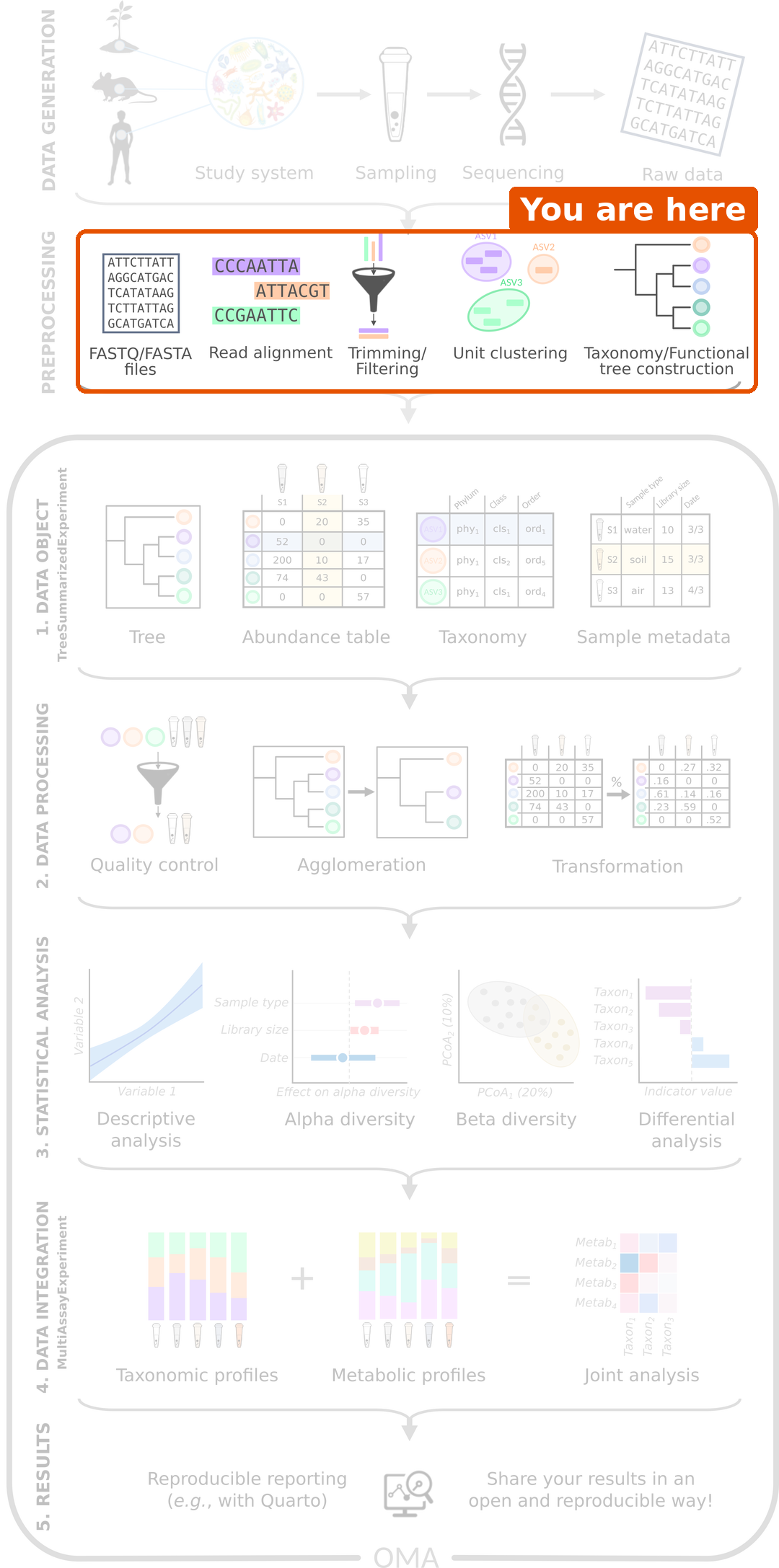
Before any analysis in R, samples must be collected and sequenced (data generation), and the raw sequencing reads must be turned into tables (pre-processing). Pre-processing is usually run on the command line, with tools made for this purpose. The R/Bioconductor packages of the OMA framework start after these steps, from the tables.
In this lesson, these steps have already been done for us. This short episode explains what happens to the samples before we receive the data, what to keep in mind about it, and how you can bring the output of your own pipeline into R.
Data generation: from a sample to reads
The analysis can only be as good as the samples. Many choices are made before any data reaches R, and each of them can leave a mark on the data:
- Study design. Which groups are compared, and how many samples are collected? Information about the samples, such as age, diet, medication (especially antibiotics) and place of living, is collected at the same time. We need it later to interpret the results.
- Sampling and storage. How a sample is collected, how long it waits at room temperature and how it is stored (for example frozen) can change its microbial composition.
- DNA extraction and library preparation. The DNA is extracted from the sample and prepared for sequencing. Extraction kits differ, for example in how well they break open different bacteria, so the same sample can give different compositions with different kits.
- Batches. Samples are often processed and sequenced in batches. Samples of the same batch tend to be more similar to each other (a batch effect). If all samples of one study group are in one batch, the batch and the group cannot be told apart. Mixing the groups across batches avoids this.
- Controls. Negative controls (samples without any material) reveal contamination from the lab and the reagents. This matters most for samples with few bacteria, such as skin or tissue. Positive controls (mock communities with known composition) show how accurate the whole process is.
Finally, a sequencer reads short pieces of DNA, called reads, and writes them into FASTQ files: one sequence and its quality scores per read. A single sample typically gives tens of thousands (amplicon) to tens of millions (shotgun) of reads.
In our study, stool samples were collected from people with colorectal cancer and healthy people in two places in India, and sequenced with shotgun metagenomics (Gupta et al. 2019). The paper describes how the samples were collected and processed. When you analyse a dataset, always read this part of the methods: it tells you which variables, such as batches or locations, you may need to take into account.
Pre-processing: from reads to tables
The reads are not yet a table of taxa; a pipeline must first find out which organism each read comes from.
| Amplicon sequencing (e.g. 16S rRNA) | Shotgun metagenomics | |
|---|---|---|
| What is sequenced | One marker gene | All DNA in the sample |
| Main steps | Quality control and trimming → grouping reads into ASVs or OTUs → assigning taxonomy with a reference database (e.g. SILVA, GTDB) → building a tree | Quality control → removing host (human) reads → taxonomic profiling with marker genes → functional profiling |
| Common tools | DADA2, QIIME 2, mothur | MetaPhlAn (taxa), HUMAnN (genes and pathways) |
ASVs (amplicon sequence variants) are groups of identical reads, and OTUs (operational taxonomic units) are groups of very similar reads. In amplicon data, they are the rows of the abundance table, in the same way as the species are the rows in our data.
DADA2 is itself a Bioconductor package, so amplicon pre-processing can also be done in R. Shotgun tools such as MetaPhlAn and HUMAnN run on the command line.
What are the numbers in the table?
To find out which taxon a read (or an ASV) comes from, the pipeline compares its sequence with a reference database of known sequences. The reads assigned to each taxon are then summarized per sample. Depending on the tool, the abundance table holds the number of reads of each taxon, or each taxon’s share of the sample (relative abundance).
Whatever the tool, the numbers tell us about the sequenced DNA, not directly about the number of bacteria in the gut. The total of a sample depends on how deeply it was sequenced. This is why we transform the data before comparing samples (episode 5).
Challenge 1: From samples to tables
- Put these steps of an amplicon pipeline in order: assign taxonomy, quality control and trimming, build a tree, group reads into ASVs.
- You open a shotgun abundance table and see that every column sums to 100. What kind of numbers does it hold? Can you tell from the table how many reads each sample had?
- In a study, all samples of patients were sent to the sequencing facility in January and all samples of healthy controls in March. In March, the facility switched to a new DNA extraction kit. What could go wrong in the analysis?
- Quality control and trimming → group reads into ASVs → assign taxonomy → build a tree.
- Relative abundances, in percent. No: the number of reads is not visible. You need it from elsewhere, for example the sample information.
- The extraction kit (a batch effect) and the study group are mixed up. Any difference between patients and controls could be caused by the kit, and no analysis can tell the two apart afterwards. Mixing the groups across batches when the samples are processed avoids this.
Where do the outputs go in R?
In R, we store all outputs of a pipeline in one object of the
TreeSummarizedExperiment class (TreeSE for short), which we
build in episode 4. It has a place
for each output:
-
assay: the abundance table, with taxa as rows and samples as columns. -
rowData: information about the rows (taxa), such as the taxonomy. -
colData: information about the columns (samples). -
rowTree: a tree that connects the rows.
Challenge 2: Where does each output go?
A colleague ran an amplicon pipeline and sent you these files. In
which part of a TreeSummarizedExperiment
(assay, rowData, colData or
rowTree) would each one go?
- A table with the number of reads of each ASV in each sample.
- A table that gives the phylum, family and genus of each ASV.
- A spreadsheet with the age, sex and treatment group of each mouse.
- A Newick file that describes how the ASVs are related.
- A file with the raw reads of each sample (FASTQ).
-
assay: the abundance table, with ASVs as rows and samples as columns. -
rowData: information about the rows (taxa). -
colData: information about the columns (samples). -
rowTree: the phylogenetic tree of the rows. - Nowhere. Raw reads are the input of the pipeline; the TreeSE holds its output.
Importing pipeline output into R
In episode 4, we build a TreeSE from plain tables, so that we see each part. For the output of the common pipelines, the mia package has ready-made functions that build the TreeSE directly:
| Source | Function |
|---|---|
QIIME 2 (.qza files) |
importQIIME2() |
| DADA2 (in R) | convertFromDADA2() |
| mothur | importMothur() |
| BIOM files | importBIOM() |
| MetaPhlAn | importMetaPhlAn() |
| HUMAnN | importHUMAnN() |
| taxpasta (standardized output of many shotgun profilers) | importTaxpasta() |
| phyloseq objects | convertFromPhyloseq() |
For example, importing a MetaPhlAn table or a QIIME 2 feature table looks like this (the file names are placeholders):
R
tse <- importMetaPhlAn(file.path("data", "metaphlan_merged.txt"))

tse <- importQIIME2(
    assay.file = file.path("data", "table.qza"),
    row.file = file.path("data", "taxonomy.qza"),
    col.file = file.path("data", "sample-metadata.tsv"),
    tree.file = file.path("data", "rooted-tree.qza")
)
Many public shotgun datasets, including the one used in this lesson, are also available as TreeSE objects directly from the curatedMetagenomicData package.
Challenge 3: Which import function?
Which function would you use in each case?
- You received a
.biomfile from a sequencing facility. - Your previous analysis was done with the phyloseq package, and you
have the phyloseq object saved in an
.rdsfile. - You profiled shotgun samples with MetaPhlAn and merged the outputs into one table.
- You profiled the same shotgun samples with HUMAnN to get pathway abundances.
-
importBIOM(). - Read the object with
readRDS(), then convert it withconvertFromPhyloseq(). -
importMetaPhlAn(). -
importHUMAnN(). The pathways describe the same samples but different features, so they form a second table. Combining several tables is the topic of the multi-omics lesson.
- Choices made during data generation, such as sample storage, DNA extraction and batches, leave a mark on the data. Read how the samples were collected and processed before you analyse them.
- Pre-processing turns raw reads (FASTQ files) into tables of taxa. It is usually done outside R, before the analysis that this lesson covers.
- The numbers in the abundance table describe the sequenced DNA, and their total depends on the sequencing depth.
- The outputs go into the parts of a TreeSE: the abundance table into
assay, the taxonomy intorowData, the sample information intocolDataand the tree intorowTree. - mia has import functions, such as
importQIIME2(),importMetaPhlAn()andconvertFromPhyloseq(), that build a TreeSE directly from pipeline output.
Content from RStudio project and experimental data
Last updated on 2026-10-20 | Edit this page
Estimated time: 25 minutes
Overview
Questions
- How do I organize my work for this lesson?
- How do I get the data used in this lesson?
Objectives
- Create an RStudio project with a folder for the data.
- Download the lesson data.
- Check that the required packages are installed.
Create an RStudio project
It is good practice to keep all files of one analysis in one folder. An RStudio project helps with this: when you open the project, R automatically uses the project folder as its working directory. All file paths in this lesson are relative to this folder.
- In RStudio, choose File → New Project → New Directory → New Project.
- Name the project
microbiome-lessonand choose where to save it. - Click Create Project.
Next, create a folder called data inside the project for
the input files. You can use the New Folder button in the
Files pane, or run:
R
dir.create("data")
Finally, open a new R script (File → New File →
R Script) and save it in the project folder, for example as
microbiome-analysis.R. Write the code of the following
episodes into this script, so that you can run it again later.
New to R and RStudio?
This lesson assumes you know the basics of R and RStudio. If you need a refresher, see the Introduction to data analysis with R and Bioconductor lesson.
Download the data
The data consists of the four parts of a microbiome dataset (see episode 1), each in its own file:
| File | Content |
|---|---|
taxonomy_abundance.csv |
Abundance table: taxa × samples |
taxonomy_table.csv |
Taxonomy of each taxon |
sample_metadata.csv |
Information about each sample |
phylogeny.tree |
Phylogenetic tree of the taxa |
We download them into the data folder with
download.file(). Here is the first one:
R
download.file(
    url = "https://raw.githubusercontent.com/microbiome/microbiome-lesson/main/episodes/data/taxonomy_abundance.csv",
    destfile = file.path("data", "taxonomy_abundance.csv")
)
File paths with file.path()
The function file.path() joins folder and file names
into a path: file.path("data", "taxonomy_abundance.csv")
gives "data/taxonomy_abundance.csv". Forward slashes work
on Windows, macOS and Linux alike, but file.path() saves
you from typing the separators yourself, so we use it for all file paths
in this lesson.
Challenge 1: Download the other files
Download the remaining three files (taxonomy_table.csv,
sample_metadata.csv and phylogeny.tree) into
the data folder. Then check that all four files are
there.
R
url <- "https://raw.githubusercontent.com/microbiome/microbiome-lesson/main/episodes/data/"

download.file(paste0(url, "taxonomy_table.csv"), file.path("data", "taxonomy_table.csv"))
download.file(paste0(url, "sample_metadata.csv"), file.path("data", "sample_metadata.csv"))
download.file(paste0(url, "phylogeny.tree"), file.path("data", "phylogeny.tree"))

list.files("data")
Check the packages
We use these packages:
| Package | Used for | Episodes |
|---|---|---|
| mia | Microbiome analysis | all |
| miaViz | Microbiome visualization | all |
| ape | Reading the phylogenetic tree | 4 |
| scater | Principal component analysis (PCA) | 7 |
| bluster | Clustering | 7, 10 |
| daa | Simple statistical tests (Wilcoxon test, t-test, linear model) | 5, 6, 8 |
| maaslin3 | Differential abundance and prevalence | 8, 10 |
| mikropml | Machine learning | 9 |
mia, miaViz and daa belong to the OMA framework. Each episode loads
the packages it needs with library().
If you followed the setup instructions, the packages are already installed. Check that they load without errors:
R
library(mia)
library(miaViz)
library(ape)
library(scater)
library(bluster)
library(maaslin3)
library(mikropml)
We do not load the daa package with library(). Instead,
we call its functions with daa:: in front, as in
daa::getLm(). Check that it is installed by asking for its
version:
R
packageVersion("daa")
OUTPUT
[1] '0.99.0'Messages are normal. If you see an error such as
there is no package called 'mia', go back to the setup instructions.
- Use an RStudio project to keep the data, code and results of an analysis together.
- Use
download.file()to download data from the internet, andfile.path()to build file paths. - The main packages of this lesson are mia and miaViz from the OMA framework; later episodes also use ape, scater, bluster, daa, maaslin3 and mikropml.
Content from Importing data into TreeSummarizedExperiment
Last updated on 2026-10-20 | Edit this page
Estimated time: 75 minutes
Overview
Questions
- How do we load microbiome data into R?
- Why do we store the data in a single object?
- What is in our study data?
Objectives
- Create a
TreeSummarizedExperimentobject from an abundance table, a taxonomy table, sample information and a tree. - Access the abundance table, the taxonomy and the sample information of the object.
- Select a subset of the samples.
- Plot how many samples are in each study group.
Where are we?
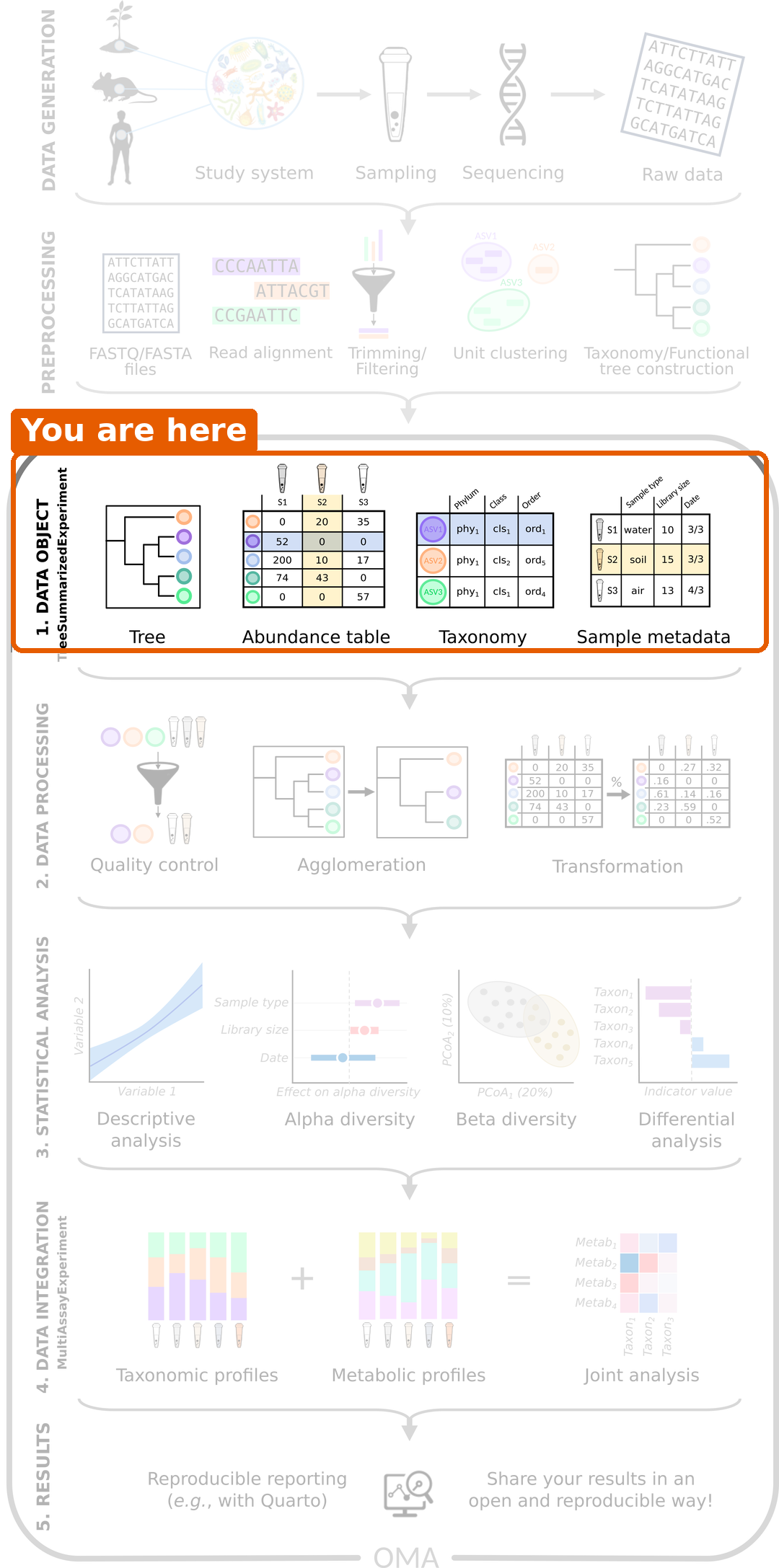
The sequencing reads of our study have already been turned into tables. In this episode, we bring these tables into R and combine them into a single data object. All later steps start from this object.
Load packages
R
library(mia)
library(miaViz)
Read the data files
We start by reading the four files from episode 3 into R. The first column of each CSV
file contains the row names, so we use row.names = 1.
R
counts  <- read.csv(file.path("data", "taxonomy_abundance.csv"), row.names = 1)
taxa    <- read.csv(file.path("data", "taxonomy_table.csv"), row.names = 1)
samples <- read.csv(file.path("data", "sample_metadata.csv"), row.names = 1)
tree    <- ape::read.tree(file.path("data", "phylogeny.tree"))
Let’s take a quick look at each of them. The abundance table has one
row per taxon and one column per sample. The row names start with the
taxonomic rank of the taxon, such as species-, and the
column names are sample IDs:
R
dim(counts)
OUTPUT
[1] 308 60R
counts[1:3, 1:3]
OUTPUT
                                      GupDM_A_11 GupDM_A_15 GupDM_A1
species-Escherichia_coli                 1632336    5666898  6814491
species-Alistipes_putredinis              964884          0   225222
species-Porphyromonas_asaccharolytica     463162          0    92810
The taxonomy table has one row per taxon:
R
head(taxa, n = 3)
OUTPUT
                                      superkingdom         phylum
species-Escherichia_coli                  Bacteria Proteobacteria
species-Alistipes_putredinis              Bacteria   Bacteroidota
species-Porphyromonas_asaccharolytica     Bacteria   Bacteroidota
                                                    class            order
species-Escherichia_coli              Gammaproteobacteria Enterobacterales
species-Alistipes_putredinis                  Bacteroidia    Bacteroidales
species-Porphyromonas_asaccharolytica         Bacteroidia    Bacteroidales
                                                  family         genus
species-Escherichia_coli              Enterobacteriaceae   Escherichia
species-Alistipes_putredinis               Rikenellaceae     Alistipes
species-Porphyromonas_asaccharolytica Porphyromonadaceae Porphyromonas
                                                            species
species-Escherichia_coli                           Escherichia coli
species-Alistipes_putredinis                   Alistipes putredinis
species-Porphyromonas_asaccharolytica Porphyromonas asaccharolytica
The sample information has one row per sample:
R
samples[1:3, c("disease", "age", "gender", "location")]
OUTPUT
           disease age gender location
GupDM_A_11     CRC  41 female   Kerala
GupDM_A_15     CRC  59   male   Kerala
GupDM_A1       CRC  62   male   Kerala
And the tree connects the taxa:
R
tree
OUTPUT
Phylogenetic tree with 10430 tips and 10429 internal nodes.

Tip labels:
  k__Archaea|p__Candidatus_Micrarchaeota|c__Candidatus_Micrarchaeota_unclassified|o__Candidatus_Micrarchaeota_unclassified|f__Candidatus_Micrarchaeota_unclassified|g__Candidatus_Micrarchaeota_unclassified|s__Candidatus_Micrarchaeota_archaeon_CG1_02_55_22, k__Archaea|p__Archaea_unclassified|c__Archaea_unclassified|o__Archaea_unclassified|f__Archaea_unclassified|g__Archaea_unclassified|s__archaeon_GW2011_AR15, k__Archaea|p__Candidatus_Diapherotrites|c__Candidatus_Diapherotrites_unclassified|o__Candidatus_Diapherotrites_unclassified|f__Candidatus_Diapherotrites_unclassified|g__Candidatus_Diapherotrites_unclassified|s__Candidatus_Diapherotrites_archaeon_CG08_land_8_20_14_0_20_34_12, k__Archaea|p__Archaea_unclassified|c__Archaea_unclassified|o__Archaea_unclassified|f__Archaea_unclassified|g__Archaea_unclassified|s__archaeon_GW2011_AR10, k__Archaea|p__Candidatus_Diapherotrites|c__Candidatus_Diapherotrites_unclassified|o__Candidatus_Diapherotrites_unclassified|f__Candidatus_Diapherotrites_unclassified|g__Candidatus_Diapherotrites_unclassified|s__Candidatus_Diapherotrites_archaeon_CG11_big_fil_rev_8_21_14_0_20_37_9, k__Archaea|p__Euryarchaeota|c__Euryarchaeota_unclassified|o__Euryarchaeota_unclassified|f__Euryarchaeota_unclassified|g__Euryarchaeota_unclassified|s__Euryarchaeota_archaeon_TMED173, ...

Rooted; includes branch length(s).
The tree is a reference tree from MetaPhlAn, the tool that produced our tables. It contains 10430 species, many more than the 308 in our data. That is fine: each of our taxa has a tip with the same name in the tree, and this is how R knows which tip belongs to which taxon. The printout shows the first few tip labels, which belong to species that are not in our data.
Why put everything into one object?
We now have four separate objects that describe the same data. This is risky: if we remove a sample from the abundance table, we have to remember to remove it from the sample information too. If we forget, the tables no longer match, and our results will be wrong without any warning.
The solution is to store everything in a single object that keeps the
parts in sync. In Bioconductor, microbiome data is stored in a
TreeSummarizedExperiment (TreeSE for
short).
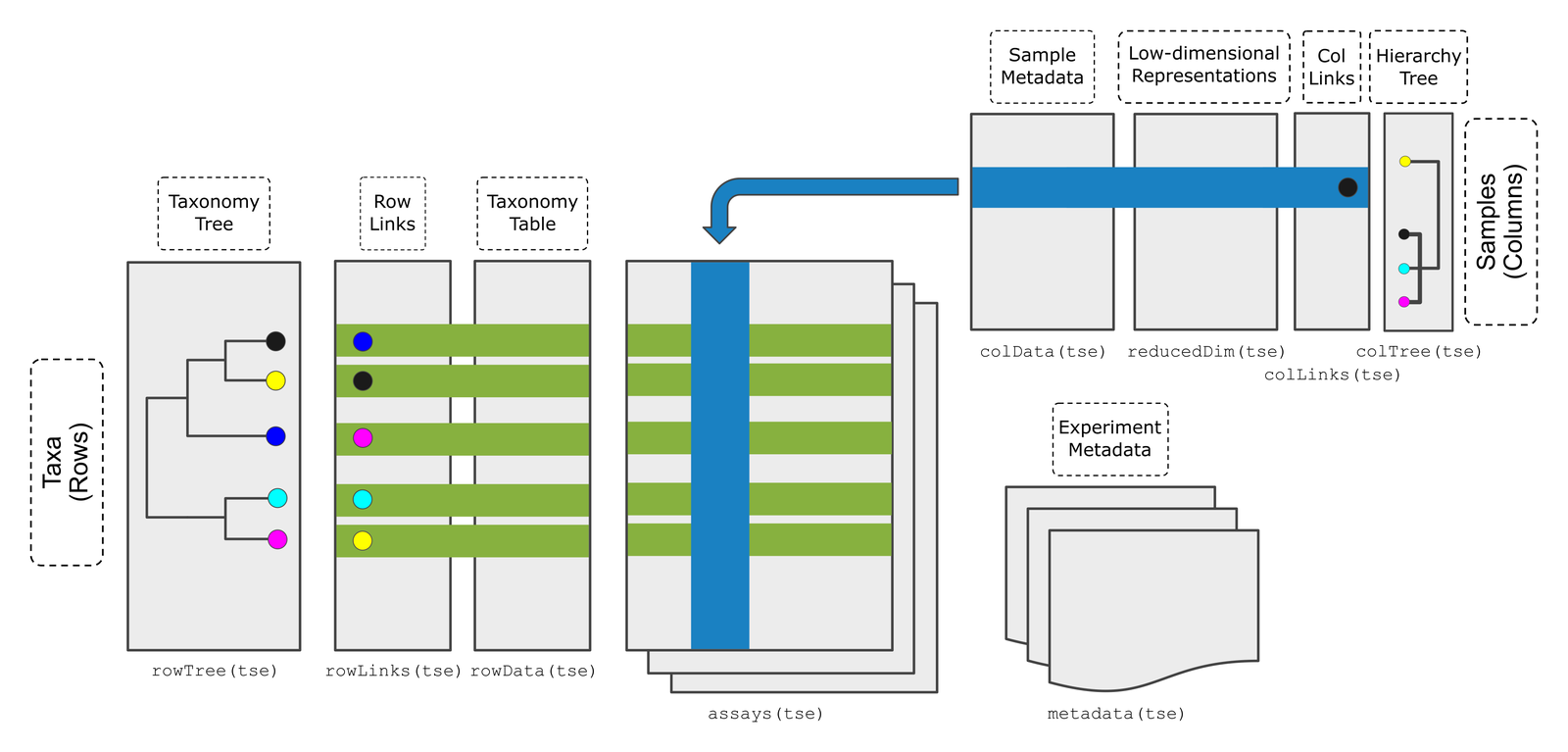
Figure: the TreeSummarizedExperiment class (Huang et al. 2021, F1000Research). Source: OMA.
The figure shows all the parts a TreeSE can hold. In this lesson, we only need these four:
| Part | Contains | In our data |
|---|---|---|
assays |
The abundance tables. Rows are taxa, columns are samples. | Read counts |
rowData |
Information about the rows (taxa) | Taxonomy |
colData |
Information about the columns (samples) | Disease, age, gender, location, … |
rowTree |
A tree that connects the rows | Phylogenetic tree |
TreeSE and SummarizedExperiment
If you have used the SummarizedExperiment class before,
for example in the Introduction
to data analysis with R and Bioconductor lesson: a TreeSE is a
SummarizedExperiment with extra room for trees. Everything
you know about SummarizedExperiment also works for TreeSE.
The only difference in our data is what the rows are: genes in that
lesson, taxa here. The functions assay(),
rowData() and colData() and subsetting with
[ , ] work exactly as you learned there.
Create the TreeSE
We combine the four parts with the function
TreeSummarizedExperiment(). The abundance table must be a
matrix, so we convert it with as.matrix(). We also give the
data a name with mainExpName. This becomes useful in the
bonus section of the next episode, where we store the data at several
taxonomic ranks in the same object.
R
tse <- TreeSummarizedExperiment(
    assays  = list(counts = as.matrix(counts)),
    rowData = taxa,
    colData = samples,
    rowTree = tree,
    mainExpName = "main"
)
tse
OUTPUT
class: TreeSummarizedExperiment
dim: 308 60
metadata(0):
assays(1): counts
rownames(308): species-Escherichia_coli species-Alistipes_putredinis
  ... species-Campylobacter_ureolyticus
  species-Prevotella_sp._oral_taxon_376
rowData names(7): superkingdom phylum ... genus species
colnames(60): GupDM_A_11 GupDM_A_15 ... GupDM_JO GupDM_JP
colData names(27): study_name subject_id ... disease_stage
  disease_location
reducedDimNames(0):
mainExpName: main
altExpNames(0):
rowLinks: a LinkDataFrame (308 rows)
rowTree: 1 phylo tree(s) (10430 leaves)
colLinks: NULL
colTree: NULL
The printout summarizes the object:
-
dim: 308 taxa (rows) and 60 samples (columns). -
assays(1): counts: one abundance table, namedcounts. -
rowData names(7): the taxonomy columns. -
colData names(27): the columns of sample information. -
rowTree: the phylogenetic tree.
Look inside the TreeSE
Each part has its own accessor function.
The abundance table is accessed with assay():
R
assay(tse, "counts")[1:3, 1:3]
OUTPUT
                                      GupDM_A_11 GupDM_A_15 GupDM_A1
species-Escherichia_coli                 1632336    5666898  6814491
species-Alistipes_putredinis              964884          0   225222
species-Porphyromonas_asaccharolytica     463162          0    92810
The taxonomy is accessed with rowData():
R
rowData(tse)
OUTPUT
DataFrame with 308 rows and 7 columns
                                      superkingdom         phylum
                                       <character>    <character>
species-Escherichia_coli                  Bacteria Proteobacteria
species-Alistipes_putredinis              Bacteria   Bacteroidota
species-Porphyromonas_asaccharolytica     Bacteria   Bacteroidota
species-Bacteroides_uniformis             Bacteria   Bacteroidota
species-Prevotella_stercorea              Bacteria   Bacteroidota
...                                            ...            ...
species-Ruminococcus_obeum_CAG-39         Bacteria     Firmicutes
species-Streptococcus_lutetiensis         Bacteria     Firmicutes
species-Prevotella_timonensis             Bacteria   Bacteroidota
species-Campylobacter_ureolyticus         Bacteria Proteobacteria
species-Prevotella_sp._oral_taxon_376     Bacteria   Bacteroidota
                                                      class             order
                                                <character>       <character>
species-Escherichia_coli                Gammaproteobacteria  Enterobacterales
species-Alistipes_putredinis                    Bacteroidia     Bacteroidales
species-Porphyromonas_asaccharolytica           Bacteroidia     Bacteroidales
species-Bacteroides_uniformis                   Bacteroidia     Bacteroidales
species-Prevotella_stercorea                    Bacteroidia     Bacteroidales
...                                                     ...               ...
species-Ruminococcus_obeum_CAG-39                Clostridia     Eubacteriales
species-Streptococcus_lutetiensis                   Bacilli   Lactobacillales
species-Prevotella_timonensis                   Bacteroidia     Bacteroidales
species-Campylobacter_ureolyticus     Epsilonproteobacteria Campylobacterales
species-Prevotella_sp._oral_taxon_376           Bacteroidia     Bacteroidales
                                                  family         genus
                                             <character>   <character>
species-Escherichia_coli              Enterobacteriaceae   Escherichia
species-Alistipes_putredinis               Rikenellaceae     Alistipes
species-Porphyromonas_asaccharolytica Porphyromonadaceae Porphyromonas
species-Bacteroides_uniformis             Bacteroidaceae   Bacteroides
species-Prevotella_stercorea              Prevotellaceae    Prevotella
...                                                  ...           ...
species-Ruminococcus_obeum_CAG-39       Oscillospiraceae  Ruminococcus
species-Streptococcus_lutetiensis       Streptococcaceae Streptococcus
species-Prevotella_timonensis             Prevotellaceae    Prevotella
species-Campylobacter_ureolyticus     Campylobacteraceae Campylobacter
species-Prevotella_sp._oral_taxon_376     Prevotellaceae    Prevotella
                                                     species
                                                 <character>
species-Escherichia_coli                    Escherichia coli
species-Alistipes_putredinis            Alistipes putredinis
species-Porphyromonas_asaccharolytica Porphyromonas asacch..
species-Bacteroides_uniformis          Bacteroides uniformis
species-Prevotella_stercorea            Prevotella stercorea
...                                                      ...
species-Ruminococcus_obeum_CAG-39     Ruminococcus obeum C..
species-Streptococcus_lutetiensis     Streptococcus luteti..
species-Prevotella_timonensis          Prevotella timonensis
species-Campylobacter_ureolyticus     Campylobacter ureoly..
species-Prevotella_sp._oral_taxon_376 Prevotella sp. oral ..
The sample information is accessed with colData():
R
colData(tse)
OUTPUT
DataFrame with 60 rows and 27 columns
            study_name  subject_id   body_site antibiotics_current_use
           <character> <character> <character>             <character>
GupDM_A_11 GuptaA_2019   GupDM_A11       stool                      no
GupDM_A_15 GuptaA_2019   GupDM_A15       stool                      no
GupDM_A1   GuptaA_2019    GupDM_A1       stool                      no
GupDM_A10  GuptaA_2019   GupDM_A10       stool                      no
GupDM_A12  GuptaA_2019   GupDM_A12       stool                      no
...                ...         ...         ...                     ...
GupDM_JL   GuptaA_2019    GupDM_JL       stool                      no
GupDM_JM   GuptaA_2019    GupDM_JM       stool                      no
GupDM_JN   GuptaA_2019    GupDM_JN       stool                      no
GupDM_JO   GuptaA_2019    GupDM_JO       stool                      no
GupDM_JP   GuptaA_2019    GupDM_JP       stool                      no
           study_condition     disease       age age_category      gender
               <character> <character> <integer>  <character> <character>
GupDM_A_11             CRC         CRC        41        adult      female
GupDM_A_15             CRC         CRC        59        adult        male
GupDM_A1               CRC         CRC        62        adult        male
GupDM_A10              CRC         CRC        65        adult      female
GupDM_A12              CRC         CRC        65        adult        male
...                    ...         ...       ...          ...         ...
GupDM_JL               CRC         CRC        59        adult      female
GupDM_JM               CRC         CRC        60        adult        male
GupDM_JN               CRC         CRC        58        adult        male
GupDM_JO               CRC         CRC        71       senior        male
GupDM_JP               CRC         CRC        67       senior        male
               country    location non_westernized sequencing_platform
           <character> <character>     <character>         <character>
GupDM_A_11         IND      Kerala              no     IlluminaNextSeq
GupDM_A_15         IND      Kerala              no     IlluminaNextSeq
GupDM_A1           IND      Kerala              no     IlluminaNextSeq
GupDM_A10          IND      Kerala              no     IlluminaNextSeq
GupDM_A12          IND      Kerala              no     IlluminaNextSeq
...                ...         ...             ...                 ...
GupDM_JL           IND      Bhopal              no     IlluminaNextSeq
GupDM_JM           IND      Bhopal              no     IlluminaNextSeq
GupDM_JN           IND      Bhopal              no     IlluminaNextSeq
GupDM_JO           IND      Bhopal              no     IlluminaNextSeq
GupDM_JP           IND      Bhopal              no     IlluminaNextSeq
           DNA_extraction_kit      PMID number_reads number_bases
                  <character> <integer>    <integer>    <numeric>
GupDM_A_11             Qiagen  31719139      6227234    883347281
GupDM_A_15             Qiagen  31719139      9884266   1384530792
GupDM_A1               Qiagen  31719139     27687226   3808647004
GupDM_A10              Qiagen  31719139      8468208   1174245166
GupDM_A12              Qiagen  31719139      6988838    984235167
...                       ...       ...          ...          ...
GupDM_JL               Qiagen  31719139      9878044   1387793557
GupDM_JM               Qiagen  31719139     10328094   1435043694
GupDM_JN               Qiagen  31719139      9789278   1347588954
GupDM_JO               Qiagen  31719139     11274338   1501226163
GupDM_JP               Qiagen  31719139     10400668   1428270555
           minimum_read_length median_read_length NCBI_accession
                     <integer>          <integer>    <character>
GupDM_A_11                  60                151     SRR8865600
GupDM_A_15                  60                150     SRR8865596
GupDM_A1                    60                150     SRR8865598
GupDM_A10                   60                150     SRR8865599
GupDM_A12                   60                150     SRR8865601
...                        ...                ...            ...
GupDM_JL                    60                151     SRR8865572
GupDM_JM                    60                150     SRR8865575
GupDM_JN                    60                150     SRR8865574
GupDM_JO                    60                150     SRR8865581
GupDM_JP                    60                150     SRR8865580
                          curator       BMI disease_subtype         tnm
                      <character> <numeric>     <character> <character>
GupDM_A_11 Arianna_Bonetti;Paol..     19.22  adenocarcinoma      t2m0n0
GupDM_A_15 Arianna_Bonetti;Paol..     21.40  adenocarcinoma      t2n0m0
GupDM_A1   Arianna_Bonetti;Paol..     20.08  adenocarcinoma      t2n0m0
GupDM_A10  Arianna_Bonetti;Paol..     21.01  adenocarcinoma      t3n2m0
GupDM_A12  Arianna_Bonetti;Paol..     20.32  adenocarcinoma      t2n2m0
...                           ...       ...             ...         ...
GupDM_JL   Arianna_Bonetti;Paol..     20.34  adenocarcinoma      t4n1m0
GupDM_JM   Arianna_Bonetti;Paol..     18.33  adenocarcinoma      t2n0m0
GupDM_JN   Arianna_Bonetti;Paol..     19.92  adenocarcinoma      t2n0m0
GupDM_JO   Arianna_Bonetti;Paol..     20.03  adenocarcinoma      t4n1m0
GupDM_JP   Arianna_Bonetti;Paol..     17.69  adenocarcinoma      t3n2m0
                  fobt disease_stage disease_location
           <character>   <character>      <character>
GupDM_A_11         yes             I           rectum
GupDM_A_15         yes             I           rectum
GupDM_A1           yes             I           rectum
GupDM_A10          yes           III            colon
GupDM_A12          yes           III           rectum
...                ...           ...              ...
GupDM_JL           yes           III           rectum
GupDM_JM           yes             I           rectum
GupDM_JN           yes             I           rectum
GupDM_JO           yes           III    sigmoid_colon
GupDM_JP           yes           III           rectum
A single column of the sample information can be accessed with
$, just as in a data frame:
R
table(tse$disease)
OUTPUT
    CRC healthy
     30      30
rowData() and colData() return a
DataFrame, the Bioconductor version of a data frame. It
works like a data.frame, but prints only the first and last
rows. The tree is accessed with rowTree(tse). We do not
need to look at it now: functions that use the tree, such as
phylogenetic diversity in episode
6, find it there on their own.
Challenge 1: Where is the information?
In which part of tse would you find the age of each
person?
assay(tse, "counts")rowData(tse)colData(tse)rowTree(tse)
-
colData(tse). Age describes a sample (a person), and information about samples is stored incolData. You can get the ages withtse$age.
Challenge 2: Which phylum?
Find out which phylum the first taxon in tse belongs
to.
Hint: the taxonomy is in rowData(tse), and its
columns are named superkingdom, phylum,
class, …
R
rownames(tse)[1]
OUTPUT
[1] "species-Escherichia_coli"R
rowData(tse)$phylum[1]
OUTPUT
[1] "Proteobacteria"Select a subset of samples
A TreeSE can be subset with square brackets
[rows, columns], just like a data frame. Rows are taxa and
columns are samples. To keep only the samples from people with CRC, we
select the columns where disease is "CRC":
R
tse_crc <- tse[, tse$disease == "CRC"]
tse_crc
OUTPUT
class: TreeSummarizedExperiment
dim: 308 30
metadata(0):
assays(1): counts
rownames(308): species-Escherichia_coli species-Alistipes_putredinis
  ... species-Campylobacter_ureolyticus
  species-Prevotella_sp._oral_taxon_376
rowData names(7): superkingdom phylum ... genus species
colnames(30): GupDM_A_11 GupDM_A_15 ... GupDM_JO GupDM_JP
colData names(27): study_name subject_id ... disease_stage
  disease_location
reducedDimNames(0):
mainExpName: main
altExpNames(0):
rowLinks: a LinkDataFrame (308 rows)
rowTree: 1 phylo tree(s) (10430 leaves)
colLinks: NULL
colTree: NULL
Result: the new object has 30 samples. The abundance table and the sample information were subset together, so they still match. This is the main reason we use a TreeSE.
Challenge 3: Healthy people only
- Create an object
tse_healthythat contains only the samples from healthy people. - How many samples does it have?
R
tse_healthy <- tse[, tse$disease == "healthy"]
ncol(tse_healthy)
OUTPUT
[1] 30A first look at the study
Before any analysis, it is good to know who is in the study. The
miaViz function plotBarplot() counts the samples in each
group of a colData column (col.var):
R
plotBarplot(tse, col.var = "disease")
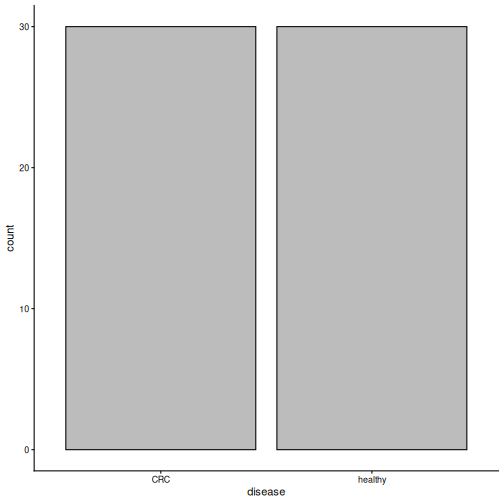
Result: the study has 30 people with CRC and 30 healthy people.
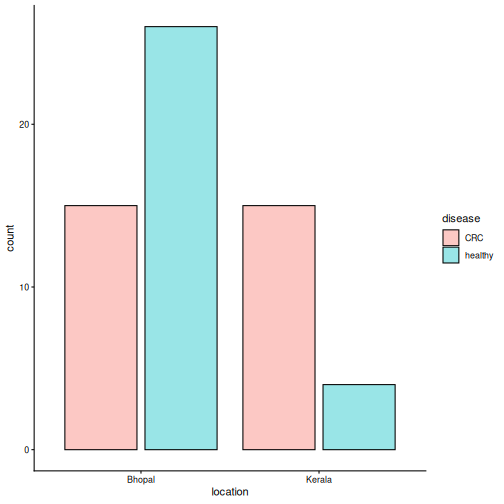
The people come from two places: the city of Bhopal and the state of
Kerala. With fill.by, we can colour the bars by a second
variable:
R
plotBarplot(tse, col.var = "location", fill.by = "disease")
Challenge 4: What do you notice?
Look at the plot above.
- From which location do most of the healthy people come?
- Suppose we find that the microbiome of CRC patients differs from that of healthy people. Why could this be a problem?
- Most healthy people come from Bhopal, while the CRC patients come
equally from both places. You can check the numbers with
table(tse$location, tse$disease). - Diet and lifestyle differ between the places, and they affect the gut microbiome. A difference between CRC and healthy people could therefore be partly a difference between the two places. We will take this into account in the episodes on beta diversity and differential abundance.
Save the object
We save the TreeSE so that we can load it again in the next episode, without repeating the import steps.
R
saveRDS(tse, file.path("data", "tse.rds"))
Importing your own data
In this lesson, we built the TreeSE from plain tables. Your own data probably comes from a tool such as QIIME 2, MetaPhlAn or mothur, or is stored as a phyloseq object. The mia package has functions that import these formats directly into a TreeSE. See the Import chapter of OMA.
- A
TreeSummarizedExperimentkeeps the abundance table, taxonomy, sample information and tree together and in sync. - Rows are taxa and columns are samples.
-
assay(),rowData()andcolData()access the abundance table, the taxonomy and the sample information. - Subsetting with
[rows, columns]keeps all parts of the object in sync. -
plotBarplot()gives a quick overview of the study groups. In our study, the groups differ in more than disease: most healthy people come from Bhopal.
Content from Exploring and preparing microbiome data
Last updated on 2026-10-20 | Edit this page
Estimated time: 130 minutes
Overview
Questions
- How deeply was each sample sequenced?
- How do we look at the data at a higher taxonomic level, such as phylum?
- Why and how do we transform the counts?
- Which bacteria dominate the gut of the people in our study?
Objectives
- Plot the library sizes of the samples and explain why they matter.
- Agglomerate the data to a higher taxonomic rank.
- Transform counts into relative abundances and robust CLR (rclr) values, and explain what rclr does with the zeros.
- Plot the community composition of the samples and the abundance of a single taxon.
- Remove rare taxa with a prevalence filter.
- (Bonus) Store all taxonomic ranks in one object, and work with one
rank using
altExp()andswapAltExp().
Where are we?
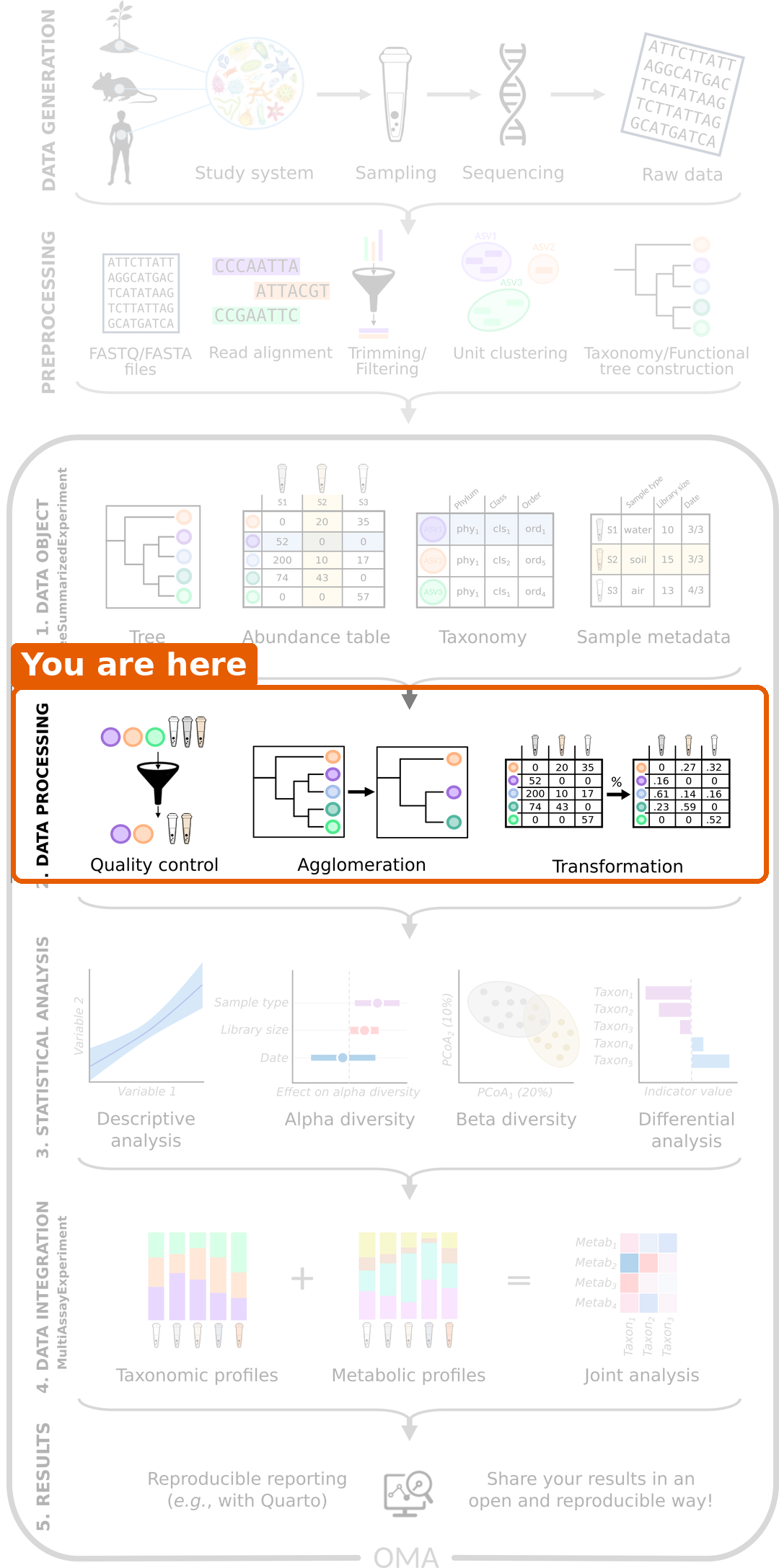
We have our data in a TreeSE. Before we can answer our research question, we need to process the data: check its quality, summarize it and transform it. We also take a first look at which bacteria are in the samples.
Load packages and data
R
library(mia)
library(miaViz)
We load the TreeSE that we saved in the previous episode.
R
tse <- readRDS(file.path("data", "tse.rds"))
Library size
In episode 1, we learned that
the total number of reads per sample, the library size,
depends on the sequencing and not on the biology. Let’s check how much
it varies. We sum the counts of each sample (column) and store the
result as a new column in colData:
R
tse$library_size <- colSums(assay(tse, "counts"))
summary(tse$library_size)
OUTPUT
    Min.  1st Qu.   Median     Mean  3rd Qu.     Max.
 3283981  6947241  8709694  9222329 10478061 27686725
The miaViz function plotHistogram() shows the
distribution. With binwidth, we set the width of each bar,
here one million reads:
R
plotHistogram(tse, col.var = "library_size", binwidth = 1e6)
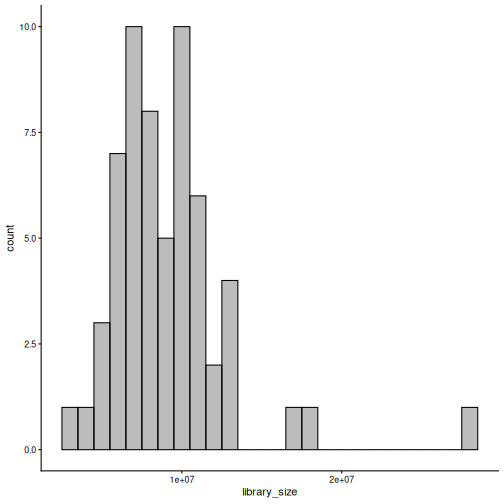
Result: the largest sample has about 8 times more reads than the smallest. If we compared raw counts, the samples with more reads would seem to have more of everything. We fix this with a transformation below.
Agglomeration: moving up the tree of life
Our data is at the species level. Sometimes it is easier to look at bigger groups, such as genera or phyla. Combining all taxa that belong to the same group is called agglomeration. The counts of the taxa in a group are summed.
R
tse_phylum <- agglomerateByRank(tse, rank = "phylum")
rownames(tse_phylum)
OUTPUT
 [1] "Actinobacteria"             "Bacteroidota"
 [3] "Candidatus Melainabacteria" "Euryarchaeota"
 [5] "Firmicutes"                 "Fusobacteria"
 [7] "Lentisphaerae"              "Proteobacteria"
 [9] "Spirochaetes"               "Synergistetes"
[11] "Verrucomicrobia"
Result: the 308 species belong to 11 phyla.
Challenge 1: How many genera?
- Agglomerate the data to the genus level and save the result as
tse_genus. - How many genera are in the data?
R
tse_genus <- agglomerateByRank(tse, rank = "genus")
nrow(tse_genus)
OUTPUT
[1] 104Relative abundance
To compare samples with different library sizes, we transform the counts. The simplest transformation is the relative abundance: each count is divided by the library size of its sample. The result is the share of each taxon in the sample. For example, a taxon with 500 reads in a sample of 1000 reads has a relative abundance of 0.5 (50 %).
The function transformAssay() adds a transformed table
to the TreeSE:
R
tse <- transformAssay(tse, assay.type = "counts", method = "relabundance")
assayNames(tse)
OUTPUT
[1] "counts" "relabundance"The TreeSE now holds two tables: the original counts and
the new relabundance table. The original counts are
kept.
Challenge 2: Relative abundances
- What do you expect the relative abundances of each sample (column) to sum to?
- Check your answer for the first five samples.
Hint: colSums() sums the columns of a
table.
- They sum to 1, because each value is the share of one taxon in the sample.
- Check with
colSums():
R
colSums(assay(tse, "relabundance"))[1:5]
OUTPUT
GupDM_A_11 GupDM_A_15   GupDM_A1  GupDM_A10  GupDM_A12
         1          1          1          1          1
Community composition
Which bacteria dominate the gut of the people in our study? The
miaViz function plotAbundance() draws a stacked bar for
each sample. With group = "phylum", the taxa are
agglomerated to phyla for the plot, and col.var = "disease"
together with facet.cols = TRUE splits the samples into one
panel per disease group. scales = "free_x" lets each panel
show only its own samples.
R
plotAbundance(
    tse, assay.type = "relabundance", group = "phylum",
    col.var = "disease", facet.cols = TRUE, scales = "free_x"
)
WARNING
Warning: Removed 355 rows containing missing values or values outside the scale range
(`geom_bar()`).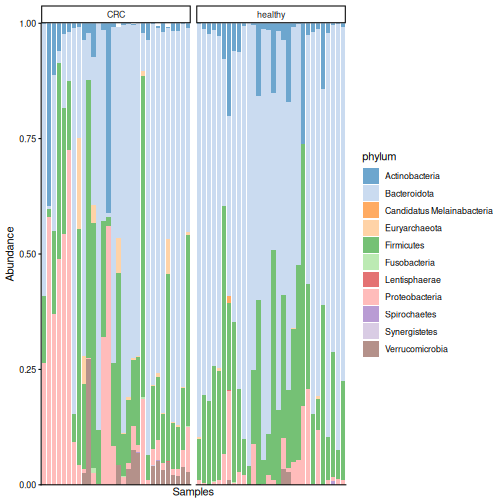
Result: each bar is one person. Bacteroidota dominate most samples in both groups, followed by Firmicutes, but the communities vary a lot between people. Our eyes cannot tell from this plot whether the two groups differ. The analyses in the next episodes can.
plotAbundance() may print a warning such as
Removed 355 rows containing missing values. It is harmless:
the plot does not draw bars for taxa with zero abundance.
Challenge 3: The most abundant genera
Which five genera are the most abundant in the data?
Hint: use tse_genus from challenge 1 and the
function getTop().
R
getTop(tse_genus, top = 5)
OUTPUT
[1] "Prevotella"      "Bacteroides"     "Phocaeicola"     "Escherichia"
[5] "Bifidobacterium"
getTop() ranks the taxa by their mean abundance across
the samples (by default in the counts table).
Prevotella is the most abundant genus.
A closer look at one species
The most abundant species in the data is Prevotella copri.
The miaViz function plotBoxplot() shows its relative
abundance in each group. With features, we choose the taxon
to plot, and with x, the groups:
R
plotBoxplot(
    tse, assay.type = "relabundance",
    features = "species-Prevotella_copri", x = "disease"
)
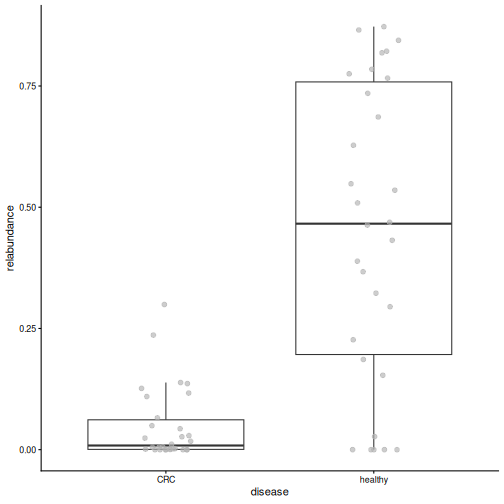
Result: in healthy people, P. copri makes up a median of 47 % of the whole community, compared to 1 % in people with CRC. A single species dominates the gut of many healthy people in this study. Keep this species in mind: we will meet it again in every episode that follows.
Robust CLR transformation
Relative abundances are intuitive, but they have a catch that we met in episode 1: because the shares of a sample always sum to 1, an increase of one taxon makes all the others look smaller. Log-ratio transformations are designed for this kind of relative (compositional) data. A ratio compares two taxa in the same sample, so it does not change when the sample is sequenced more deeply. The logarithm makes the ratios symmetric: a taxon that is twice as abundant as another gets log(2) = 0.69, and one that is half as abundant gets log(1/2) = -0.69.
The centred log-ratio (CLR) compares each taxon to the “average” taxon of the same sample (the geometric mean), on a log scale:
- a positive value means that the taxon is more abundant than average in that sample;
- a negative value means that it is less abundant than average;
- zero means that it is exactly average.
The logarithm of zero is not defined, and 84 % of our table is zeros. The robust CLR (rclr) solves this in two steps. First, it calculates the average from the non-zero values only. Then it fills in the zeros with estimates based on the main patterns in the whole table (matrix completion). In the version we use, all values are replaced by these smoothed estimates. The rclr values therefore describe the broad patterns in the data well, but a single value is an estimate, not a measurement. This is why we use rclr for methods that look at the whole table, such as PCA in episode 7, and relative abundances to plot single taxa.
R
tse <- transformAssay(tse, assay.type = "counts", method = "rclr")
assayNames(tse)
OUTPUT
[1] "counts" "relabundance" "rclr" The TreeSE now holds three tables: counts,
relabundance and rclr.
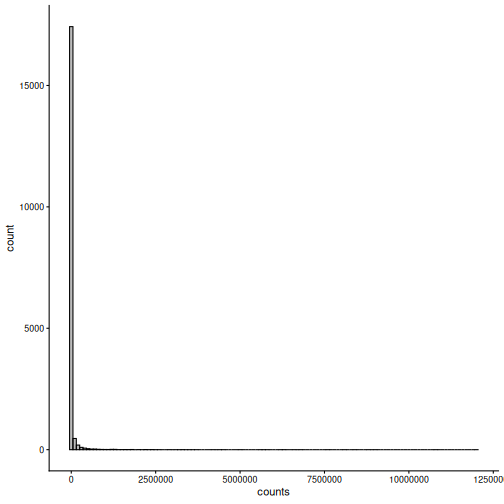
Why transform at all? Many statistical methods, such as PCA and the
t-test, work best when the values are roughly normally distributed.
Let’s compare the distribution of all values in the counts
and rclr tables:
R
plotHistogram(tse, assay.type = "counts", binwidth = 1e5)
R
plotHistogram(tse, assay.type = "rclr", binwidth = 0.25)
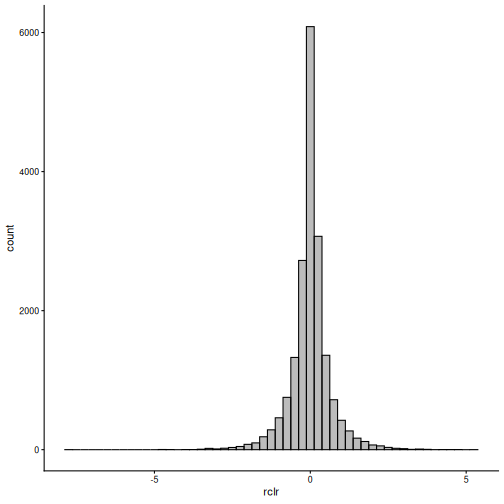
Result: the counts are mostly zeros with a long tail of very large values. The rclr values form a bell-shaped distribution around zero, which suits many statistical methods much better.
Challenge 4: What happened to the zeros?
Compare the counts and the rclr values of the first three taxa in the first three samples:
R
assay(tse, "counts")[1:3, 1:3]
OUTPUT
                                      GupDM_A_11 GupDM_A_15 GupDM_A1
species-Escherichia_coli                 1632336    5666898  6814491
species-Alistipes_putredinis              964884          0   225222
species-Porphyromonas_asaccharolytica     463162          0    92810
R
assay(tse, "rclr")[1:3, 1:3]
OUTPUT
                                      GupDM_A_11 GupDM_A_15 GupDM_A1
species-Escherichia_coli               1.0405323  1.7524587 4.724694
species-Alistipes_putredinis           0.6682048  1.3053407 2.961278
species-Porphyromonas_asaccharolytica 0.2550027 0.4543376 1.192139- Is Escherichia coli more or less abundant than the average taxon in the first sample?
- In the second sample, two taxa have a count of zero. Which rclr values did they get? Were these taxa measured in that sample?
- Its rclr value is 1.04. It is positive, so E. coli is more abundant than the average taxon in that sample.
- They got the values 1.31 and 0.45, although the taxa were not detected in that sample. The rclr filled in the zeros with estimates based on the patterns in the whole table. Keep in mind that these values are estimates, not measurements.
Removing rare taxa
Many taxa are found in only a few samples. The share of samples in which a taxon is found is called its prevalence. For some analyses, such as differential abundance in episode 8, it is useful to remove rare taxa: they carry little information and add many tests.
The function subsetByPrevalent() keeps only taxa that
are found in at least a given share of the samples. Here, a taxon must
have a relative abundance of at least 0.1 %
(detection = 0.001) in at least 10 % of the samples
(prevalence = 0.1):
R
tse_prevalent <- subsetByPrevalent(
    tse, assay.type = "relabundance",
    detection = 0.001, prevalence = 0.1
)
dim(tse_prevalent)
OUTPUT
[1] 94 60Result: only 94 of the 308 species remain.
Filter or not?
Rare taxa are part of the diversity of a community. For the diversity analyses in episodes 6 and 7, we therefore use all taxa. We use the filtered data only for differential abundance analysis in episode 8.
Challenge 5: A stricter filter
- How many species remain if a species must be found in at least 50 % of the samples?
- What does this tell you about the gut microbiomes of the people in this study?
R
tse_prevalent50 <- subsetByPrevalent(
    tse, assay.type = "relabundance",
    detection = 0.001, prevalence = 0.5
)
nrow(tse_prevalent50)
OUTPUT
[1] 13- Only 13 species are found in at least half of the people.
- Most species are found in only a few people: every gut microbiome is different.
Save the object
We save the TreeSE, which now contains the library sizes and the transformed tables, for the next episodes.
R
saveRDS(tse, file.path("data", "tse_processed.rds"))
Which table for which analysis?
There is no fixed rule: the right table depends on the method and on its assumptions. Some common choices:
- Alpha diversity is usually calculated from counts or relative abundances.
- Composition plots and Bray–Curtis dissimilarity use relative abundances.
- PCA and other methods that expect roughly normal values use rclr (or CLR) values.
- Differential abundance methods differ: some use log-transformed relative abundances (as we do in episode 8), some CLR values, and some model the counts directly.
Always check what the method you use expects. Many more transformations are available; see the Transformation chapter of OMA.
Challenge 6: Explore the data at family level (30 minutes)
In this exercise, you use what you learned in this episode to explore the data at the family level.
- Check that the library sizes do not differ between the disease
groups: plot
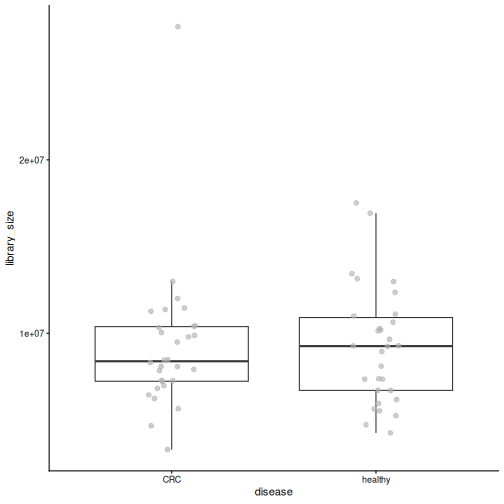
library_sizebydiseasewithplotBoxplot()and test the difference with the Wilcoxon test,daa::getWilcoxonTest(tse, library_size ~ disease)(we explain this test in the next episode). Why is it good news if they do not differ? - Agglomerate the data to the family level with
agglomerateByRank(), and add relative abundances withtransformAssay(). - Find the five most abundant families with
getTop()(use therelabundancetable). - Plot the relative abundance of these five families by disease with
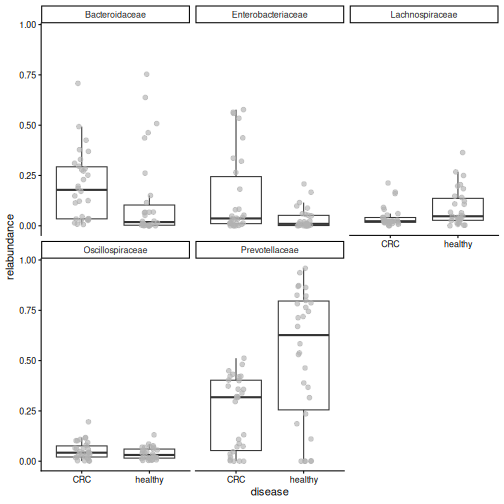
plotBoxplot(). - Which family dominates the healthy samples? Which family is more abundant in CRC? Write two sentences on how this fits with what you learned about Prevotella copri.
1. Library size
R
plotBoxplot(tse, col.var = "library_size", x = "disease")
R
library_test <- daa::getWilcoxonTest(tse, library_size ~ disease)
library_test
OUTPUT
# A tibble: 1 × 8
  rownames     .y.          group1 group2     n1    n2 statistic     p
* <chr>        <chr>        <chr>  <chr>   <int> <int>     <dbl> <dbl>
1 library_size library_size CRC    healthy    30    30       438 0.866
The library sizes do not differ between the groups (p = 0.87). This is good news: if one group had been sequenced much more deeply, differences between the groups could partly be caused by the sequencing.
2.–4. Family level
R
tse_family <- agglomerateByRank(tse, rank = "family")
WARNING
Warning: 'rclr' includes negative values.
Agglomeration of it might lead to meaningless values.
Check the assay, and consider doing transformation againmanually with agglomerated data.
R
tse_family <- transformAssay(
    tse_family, assay.type = "counts", method = "relabundance"
)
top_families <- getTop(tse_family, top = 5, assay.type = "relabundance")
top_families
OUTPUT
[1] "Prevotellaceae"     "Bacteroidaceae"     "Enterobacteriaceae"
[4] "Lachnospiraceae"    "Oscillospiraceae"
R
plotBoxplot(
    tse_family, assay.type = "relabundance", x = "disease",
    features = top_families, facet.by = "rownames"
)
agglomerateByRank() warns that
'rclr' includes negative values. Agglomeration
sums the values of all tables. Summed counts are fine, but
summed rclr values are meaningless. The rule is: agglomerate
first, then transform. This is why we calculated the relative
abundances again after agglomerating.
5. Prevotellaceae dominate the healthy samples (median 63 % vs 32 % in CRC), while Bacteroidaceae are more abundant in CRC (median 18 % vs 2 %). Most of the Prevotellaceae in healthy people is Prevotella copri; in CRC, its place is partly taken by Bacteroides.
Bonus: all ranks in one object
This section is optional. It shows a way to keep the data at all taxonomic ranks in one object, which is handy in larger analyses. The next episodes do not need it.
So far, we created a separate object for each rank
(tse_phylum, tse_genus,
tse_family). With many ranks, this quickly becomes hard to
manage: each object must be transformed, subset and saved on its
own.
Instead, we can keep all ranks in one object. The
function agglomerateByRanks() agglomerates the data to
every taxonomic rank at once:
R
tse <- agglomerateByRanks(tse)
altExpNames(tse)
OUTPUT
[1] "superkingdom" "phylum"       "class"        "order"        "family"
[6] "genus"        "species"
When you run this, R prints a warning for each rank (we hide them on
this page): 'rclr' includes negative values. Agglomeration
sums the values of all tables. Summed counts are fine, but
summed rclr values are meaningless. The rule is: agglomerate
first, then transform. We therefore transform the agglomerated
data again below.
The main data is still the species-level data that we named
"main" in episode 4.
Each rank is stored inside the TreeSE as an alternative
experiment (altExp): a complete TreeSE of its own,
with the same samples. We pick one with altExp():
R
altExp(tse, "phylum")
OUTPUT
class: TreeSummarizedExperiment
dim: 11 60
metadata(1): agglomerated_by_rank
assays(3): counts relabundance rclr
rownames(11): Actinobacteria Bacteroidota ... Synergistetes
  Verrucomicrobia
rowData names(7): superkingdom phylum ... genus species
colnames(60): GupDM_A_11 GupDM_A_15 ... GupDM_JO GupDM_JP
colData names(28): study_name subject_id ... disease_location
  library_size
reducedDimNames(0):
mainExpName: main
altExpNames(0):
rowLinks: a LinkDataFrame (11 rows)
rowTree: 1 phylo tree(s) (11 leaves)
colLinks: NULL
colTree: NULL
With the altexp argument, transformAssay()
transforms the main data and all the alternative experiments with a
single command:
R
tse <- transformAssay(
    tse, assay.type = "counts", method = "relabundance",
    altexp = altExpNames(tse)
)
tse <- transformAssay(
    tse, assay.type = "counts", method = "rclr",
    altexp = altExpNames(tse)
)
assayNames(altExp(tse, "phylum"))
OUTPUT
[1] "counts" "relabundance" "rclr" The table names are the same as before, but the meaningless summed
relabundance and rclr tables have now been
replaced by tables calculated from the agglomerated counts.
Most functions work on the main data of a TreeSE. To analyse another
rank, we make it the main data with swapAltExp(). The
family-level data already has the sample information, so
withColData = FALSE tells the function not to copy it a
second time from the old main data:
R
tse_family <- swapAltExp(tse, "family", withColData = FALSE)
tse_family
OUTPUT
class: TreeSummarizedExperiment
dim: 48 60
metadata(1): agglomerated_by_rank
assays(3): counts relabundance rclr
rownames(48): Acidaminococcaceae Actinomycetaceae ... Veillonellaceae
  Victivallaceae
rowData names(7): superkingdom phylum ... genus species
colnames(60): GupDM_A_11 GupDM_A_15 ... GupDM_JO GupDM_JP
colData names(28): study_name subject_id ... disease_location
  library_size
reducedDimNames(0):
mainExpName: family
altExpNames(7): superkingdom phylum ... species main
rowLinks: a LinkDataFrame (48 rows)
rowTree: 1 phylo tree(s) (48 leaves)
colLinks: NULL
colTree: NULL
tse_family has families as its rows
(mainExpName: family), and its other ranks, including the
original "main" data, are still available as alternative
experiments.
Why alternative experiments?
Alternative experiments are harder to understand than separate objects, but they have big advantages: all ranks share the same sample information, they stay in sync when we subset samples, one command transforms all of them, and we save a single object.
Challenge 7 (bonus): Working at the genus level
- Use
swapAltExp()to make the genus level the main data. Store the result intse_genus. - Which tables (assays) does it have?
- Find the five most abundant genera with
getTop(). Do you get the same answer as in challenge 3?
R
tse_genus <- swapAltExp(tse, "genus", withColData = FALSE)
assayNames(tse_genus)
OUTPUT
[1] "counts" "relabundance" "rclr" R
getTop(tse_genus, top = 5)
OUTPUT
[1] "Prevotella"      "Bacteroides"     "Phocaeicola"     "Escherichia"
[5] "Bifidobacterium"
The genus-level data already has the relabundance and
rclr tables, and the top genera are the same as in
challenge 3.
- Library sizes differ between samples, so we compare relative values instead of raw counts.
-
agglomerateByRank()combines taxa into a higher taxonomic rank. - (Bonus)
agglomerateByRanks()stores the data at every rank as alternative experiments in one object;altExp()picks one, andswapAltExp()makes one the main data. -
transformAssay()adds transformed tables, such as relative abundance and robust CLR (rclr), and keeps the original counts. - rclr compares each taxon to the average taxon of its sample on a log scale. It fills in the zeros with estimates, so single rclr values are estimates, not measurements.
- Which table to use depends on the method and its assumptions. The rclr values are closer to a normal distribution than the counts.
-
plotAbundance()shows the community composition of each sample, andplotBoxplot()the abundance of a single taxon by group. -
subsetByPrevalent()removes rare taxa. Use it for differential abundance, but not for diversity. - In our study, one species, Prevotella copri, dominates the gut of many healthy people.
Content from Alpha diversity
Last updated on 2026-10-20 | Edit this page
Estimated time: 105 minutes
Overview
Questions
- What is alpha diversity?
- How do we calculate alpha diversity?
- Does alpha diversity differ between people with colorectal cancer and healthy people?
Objectives
- Explain the difference between richness, evenness and diversity.
- Calculate alpha diversity indices with
addAlpha(). - Plot alpha diversity by study group.
- Test whether alpha diversity differs between two groups with the Wilcoxon test, and interpret the result.
Where are we?
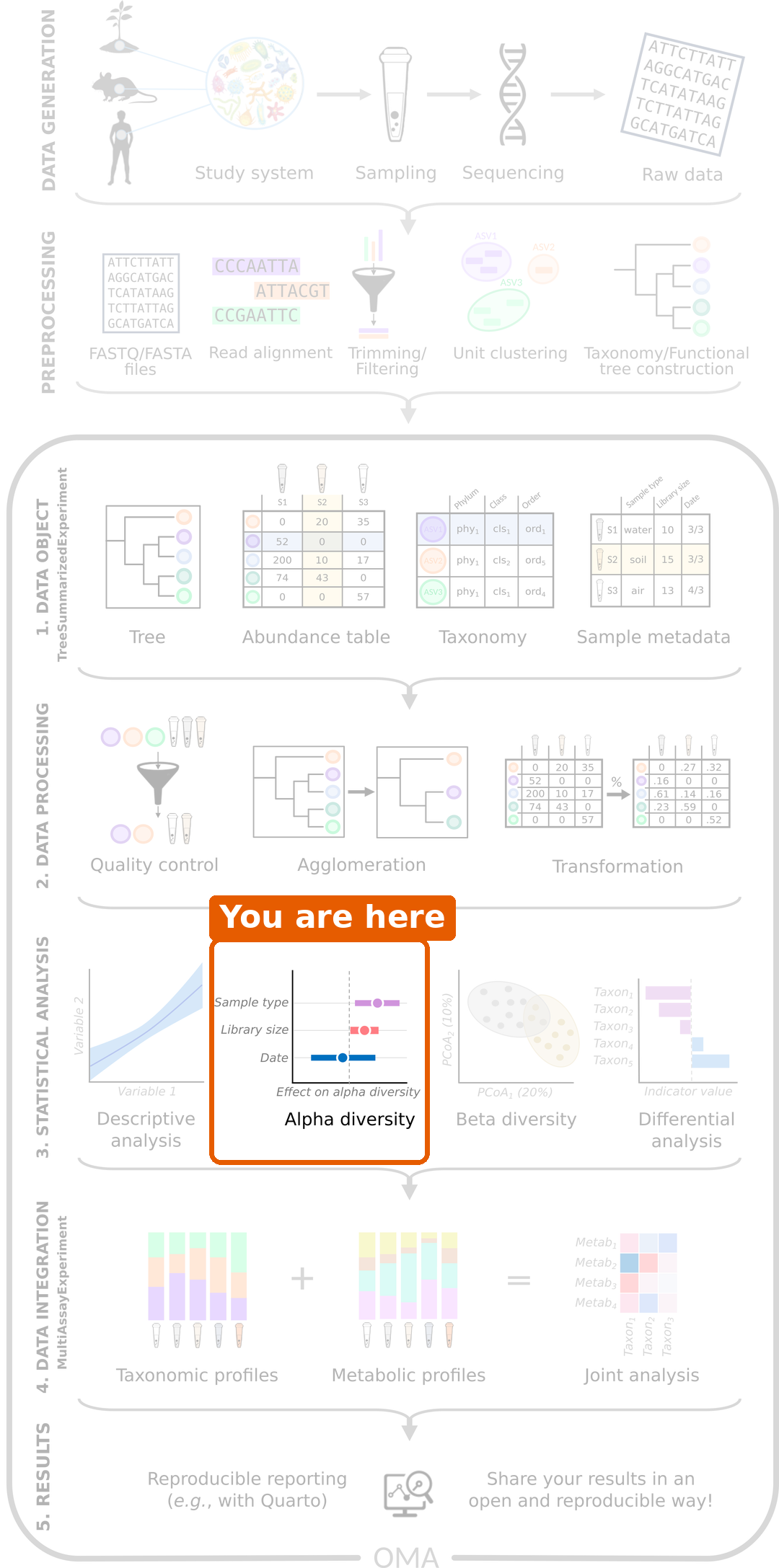
Our data is imported and processed. Now we start the statistical analysis that answers our research question. The first question is: do people with CRC and healthy people differ in the diversity of their gut microbiome?
Load packages and data
R
library(mia)
library(miaViz)
R
tse <- readRDS(file.path("data", "tse_processed.rds"))
What is alpha diversity?
Alpha diversity describes the diversity within one sample. Imagine two gardens with the same ten kinds of flowers:
- In garden A, all ten kinds are equally common.
- In garden B, one kind makes up 91 % of all flowers, and the other nine are rare.
In the picture below, each point is one flower and each colour is one kind:
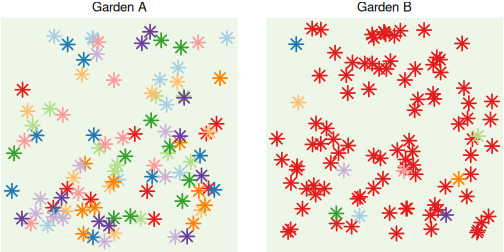
Both gardens have the same number of flower kinds, but garden A feels more diverse. Alpha diversity captures this with different measures, called indices:
| Index | Question it answers | Values |
|---|---|---|
| Richness (observed richness) | How many different taxa are there? | The number of taxa |
| Evenness (Pielou’s evenness) | Are the taxa equally common, or do a few dominate? | From 0 (one taxon dominates) to 1 (all equally common) |
| Diversity (Shannon index) | Combines richness and evenness into one number. | From 0 upwards; typically 1–5 in gut samples |
| Phylogenetic diversity (Faith’s index) | How much of the tree of life do the taxa cover? | The total branch length of the tree |
For all indices, a higher value means a more diverse sample.
These indices give complementary information. Two samples can have the same richness but a different evenness, as in the gardens above, or the same Shannon diversity for different reasons. Phylogenetic diversity adds whether the taxa are close relatives or come from distant branches of the tree. It is therefore good practice to look at several indices, not only one.
Challenge 1: What does alpha diversity measure?
- The diversity between different habitats
- The diversity within a single community or habitat
- The total number of ecosystems in a region
- The diversity within a single community or habitat. The differences between communities are called beta diversity, the topic of the next episode.
Challenge 2: Two gardens
Look at gardens A and B in the figure above.
- Which garden has the higher richness?
- Which garden has the higher evenness?
- Which garden has the higher Shannon diversity?
- Neither: both have ten kinds of flowers, so the richness is the same.
- Garden A, because all kinds are equally common.
- Garden A. Shannon diversity combines richness and evenness, and garden A has the same richness but a higher evenness.
Calculate alpha diversity
The function addAlpha() calculates alpha diversity
indices from the counts. The transformations of the previous episode are
not needed here. We choose the indices with the index
argument:
R
tse <- addAlpha(
    tse, assay.type = "counts",
    index = c(
        "observed_richness", "pielou_evenness",
        "shannon_diversity", "faith_diversity"
    )
)
The results are added as new columns to colData, next to
the other sample information:
R
colData(tse)[, c(
    "disease", "observed_richness", "pielou_evenness",
    "shannon_diversity", "faith_diversity"
)]
OUTPUT
DataFrame with 60 rows and 5 columns
               disease observed_richness pielou_evenness shannon_diversity
           <character>         <numeric>       <numeric>         <numeric>
GupDM_A_11         CRC                55        0.687513           2.75509
GupDM_A_15         CRC                29        0.310196           1.04452
GupDM_A1           CRC               149        0.665661           3.33093
GupDM_A10          CRC                69        0.653870           2.76856
GupDM_A12          CRC                64        0.633120           2.63307
...                ...               ...             ...               ...
GupDM_JL           CRC                46        0.684066           2.61904
GupDM_JM           CRC                70        0.682164           2.89817
GupDM_JN           CRC                71        0.685038           2.92010
GupDM_JO           CRC                89        0.696916           3.12820
GupDM_JP           CRC                86        0.778372           3.46714
           faith_diversity
                 <numeric>
GupDM_A_11         8.49226
GupDM_A_15         5.49297
GupDM_A1          17.55391
GupDM_A10          9.41595
GupDM_A12          9.41699
...                    ...
GupDM_JL           8.90981
GupDM_JM          11.20033
GupDM_JN          11.08878
GupDM_JO          13.03100
GupDM_JP          13.87034
Faith’s index needs the phylogenetic tree, which
addAlpha() finds in the rowTree of the
TreeSE.
Plot alpha diversity
The miaViz function plotBoxplot() shows the values of a
colData column (col.var) for each group
(x):
R
plotBoxplot(tse, col.var = "shannon_diversity", x = "disease")
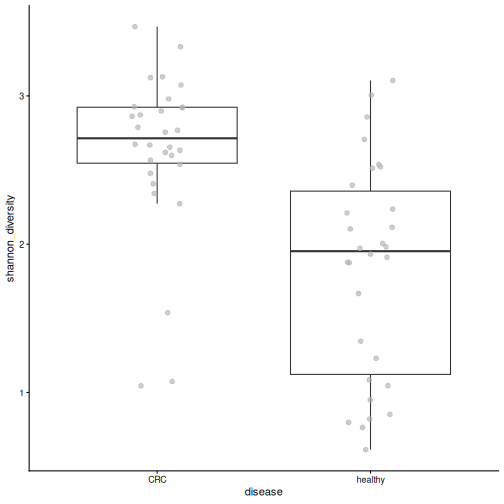
Each point is one person. The Shannon diversity appears higher in the CRC group. But is the difference larger than we would expect by chance?
Compare the groups with a statistical test
To compare two groups, we use the Wilcoxon test
(also called the Mann–Whitney test). It sorts all values from smallest
to largest and checks whether the values of one group tend to rank
higher than those of the other. Because it uses only the order of the
values, it does not assume that they follow a normal distribution, and a
few extreme values do not distort it. This makes it a safe choice for
diversity indices, which are often skewed. For more than two groups, the
Kruskal–Wallis test (kruskal.test()) works in the same
way.
The test gives a p-value: the probability of seeing a difference at least this large if the two groups did not really differ. In this lesson, we call a result significant when p < 0.05.
We run the test with daa::getWilcoxonTest() from the daa
package. As explained in the setup episode,
we write daa:: in front of its functions instead of loading
the package. The formula reads “Shannon diversity by disease group”. The
left side can be a column of colData, as here, or an assay,
as we will see in the differential abundance episode.
R
shannon_test <- daa::getWilcoxonTest(tse, shannon_diversity ~ disease)
shannon_test
OUTPUT
# A tibble: 1 × 8
  rownames          .y.              group1 group2    n1    n2 statistic       p
* <chr>             <chr>            <chr>  <chr>  <int> <int>     <dbl>   <dbl>
1 shannon_diversity shannon_diversi… CRC    healt…    30    30       747 4.11e-6
Result: the median Shannon diversity is 2.71 in people with CRC and 1.95 in healthy people. The p-value is 4.1e-06, so the difference is very unlikely to be due to chance. People with CRC have a higher Shannon diversity than healthy people.
Challenge 3: Richness
- Plot the observed richness by disease group.
- Test whether the richness differs between the groups.
- Which group has more species?
R
plotBoxplot(tse, col.var = "observed_richness", x = "disease")
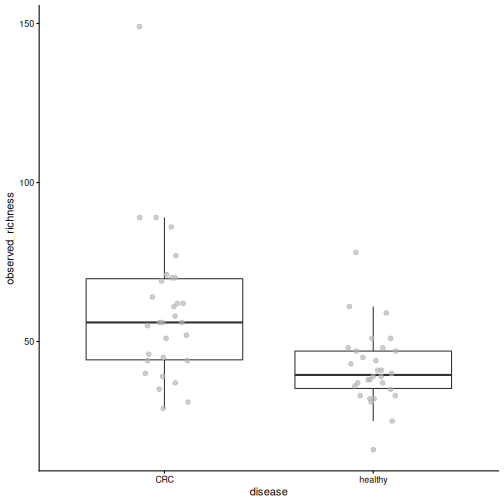
R
richness_test <- daa::getWilcoxonTest(tse, observed_richness ~ disease)
richness_test
OUTPUT
# A tibble: 1 × 8
  rownames          .y.              group1 group2    n1    n2 statistic       p
* <chr>             <chr>            <chr>  <chr>  <int> <int>     <dbl>   <dbl>
1 observed_richness observed_richne… CRC    healt…    30    30      700. 1.35e-4
People with CRC have more species in their gut sample than healthy people (p = 0.00014).
Is higher diversity healthier?
A more diverse gut microbiome is often described as a healthy one. Why, then, is diversity lower in the healthy people of our study? Evenness gives a clue.
Challenge 4: Evenness
- Plot Pielou’s evenness by disease group. Which group is less even?
- Think back to the previous episode: which species makes up about half of the community in many healthy people?
- Use your answers to explain why healthy people have a lower Shannon diversity.
R
plotBoxplot(tse, col.var = "pielou_evenness", x = "disease")
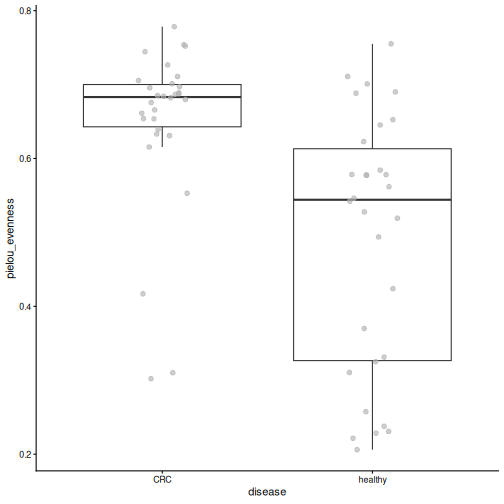
- Healthy samples are less even.
- Prevotella copri.
- When one species takes up a large part of the community, the community is uneven, like garden B. A low evenness gives a low Shannon diversity.
So “higher diversity” does not automatically mean “healthier”. Diet, geography and lifestyle shape the gut microbiome, and Prevotella-dominated guts are common in many non-Western populations. Always interpret diversity in the context of the study.
Result: the median evenness is 0.54 in healthy people and 0.68 in people with CRC (p = 5.4e-05). The lower Shannon diversity of healthy people is largely due to their lower evenness: in many of them, one species dominates. Richness is higher in CRC too, so evenness is not the whole story. We will see in the next episodes which taxa differ between the groups.
Challenge 5: Phylogenetic diversity
- Does Faith’s phylogenetic diversity differ between the groups? Plot it and run the test.
- Which part of the TreeSE does this index use that the other indices do not?
R
plotBoxplot(tse, col.var = "faith_diversity", x = "disease")
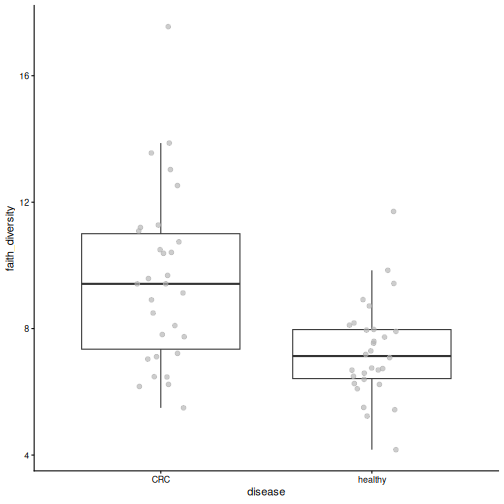
R
faith_test <- daa::getWilcoxonTest(tse, faith_diversity ~ disease)
faith_test
OUTPUT
# A tibble: 1 × 8
  rownames        .y.             group1 group2     n1    n2 statistic        p
* <chr>           <chr>           <chr>  <chr>   <int> <int>     <dbl>    <dbl>
1 faith_diversity faith_diversity CRC healthy 30 30 679 0.000543- Yes, it is higher in CRC (p = 0.00054).
- The phylogenetic tree (
rowTree). Faith’s index measures the total branch length of the tree covered by the taxa in a sample.
Sequencing depth and rarefaction
The deeper a sample is sequenced, the more rare taxa we find, so
richness partly depends on the library size. This is often checked with
rarefaction curves, or by randomly subsampling all samples to
the same number of reads (rarefying). This applies to both
amplicon and shotgun data; addAlpha() can rarefy with its
sample and niter arguments.
Rarefying throws data away, and whether to do it is debated. A simple first check is whether richness is related to the library size. In our data, it is not clearly related (Spearman correlation rho = 0.16, p = 0.23), and the library sizes do not differ between the groups (p = 0.87), so we do not rarefy here. See the Alpha diversity chapter of OMA.
Challenge 6: Diversity, age and gender (30 minutes)
Disease is not the only thing we know about the people in our study. Is diversity also related to their age or gender?
- Does the Shannon diversity differ between women and men? Make the plot and run the test.
- Is the Shannon diversity related to age? Use a correlation test:
cor.test(tse$age, tse$shannon_diversity, method = "spearman"). - Plot the age of the people by disease group. What do you notice?
- Repeat the correlation test separately for the CRC patients and for
the healthy people. Is diversity still related to age? Hint: subset
the TreeSE to one group, as for any SummarizedExperiment:
tse[, tse$disease == "CRC"]. - Make age groups with
tse$age_group <- cut(tse$age, breaks = c(0, 40, 60, 100), labels = c("under 40", "40-60", "over 60"))and plot the Shannon diversity by age group, coloured by disease (fill.by = "disease"). - Write two or three sentences: is diversity related to age in this study?
1. Gender
R
plotBoxplot(tse, col.var = "shannon_diversity", x = "gender")
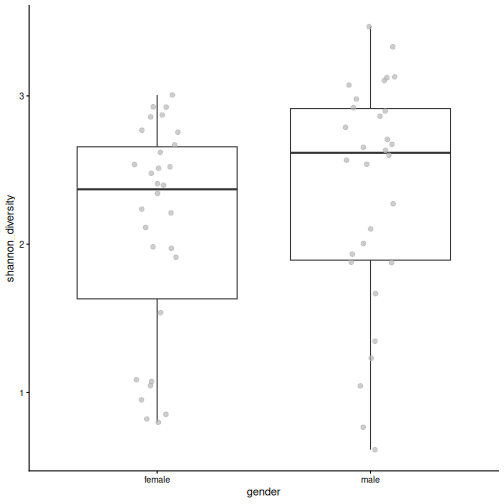
R
gender_test <- daa::getWilcoxonTest(tse, shannon_diversity ~ gender)
gender_test
OUTPUT
# A tibble: 1 × 8
  rownames          .y.               group1 group2    n1    n2 statistic     p
* <chr>             <chr>             <chr>  <chr>  <int> <int>     <dbl> <dbl>
1 shannon_diversity shannon_diversity female male      30    30       346 0.127
There is no clear difference between women and men (p = 0.13).
2. Age
R
age_test <- cor.test(
    tse$age, tse$shannon_diversity, method = "spearman", exact = FALSE
)
age_test
OUTPUT
	Spearman's rank correlation rho

data:  tse$age and tse$shannon_diversity
S = 24173, p-value = 0.01043
alternative hypothesis: true rho is not equal to 0
sample estimates:
     rho
0.328331
Older people seem to have a higher diversity (rho = 0.33, p = 0.01).
3. Age by disease
R
plotBoxplot(tse, col.var = "age", x = "disease")
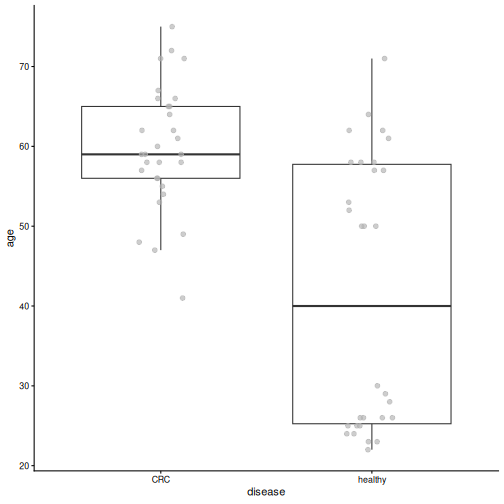
The CRC patients are much older (median 59 years) than the healthy people (median 40 years).
4. Within each group
R
tse_crc <- tse[, tse$disease == "CRC"]
age_test_crc <- cor.test(
    tse_crc$age, tse_crc$shannon_diversity, method = "spearman", exact = FALSE
)
age_test_crc
OUTPUT
	Spearman's rank correlation rho

data:  tse_crc$age and tse_crc$shannon_diversity
S = 3454.5, p-value = 0.2184
alternative hypothesis: true rho is not equal to 0
sample estimates:
      rho
0.2314807
R
tse_healthy <- tse[, tse$disease == "healthy"]
age_test_healthy <- cor.test(
    tse_healthy$age, tse_healthy$shannon_diversity,
    method = "spearman", exact = FALSE
)
age_test_healthy
OUTPUT
	Spearman's rank correlation rho

data:  tse_healthy$age and tse_healthy$shannon_diversity
S = 4712.6, p-value = 0.7994
alternative hypothesis: true rho is not equal to 0
sample estimates:
        rho
-0.04841609
Within each group, diversity is not clearly related to age (CRC: p = 0.22; healthy: p = 0.8).
5. Age groups
R
tse$age_group <- cut(
    tse$age, breaks = c(0, 40, 60, 100),
    labels = c("under 40", "40-60", "over 60")
)
plotBoxplot(
    tse, col.var = "shannon_diversity", x = "age_group", fill.by = "disease"
)
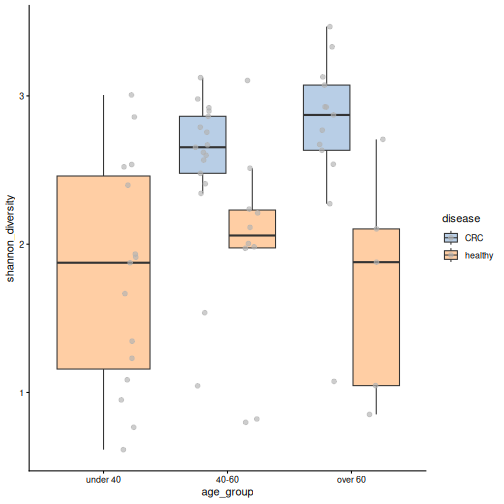
The youngest age group contains only healthy people. In the two older age groups, the CRC samples are more diverse than the healthy ones.
6. The link between age and diversity is most likely not a direct effect of age: it appears because the CRC patients, who have a higher diversity, are also older. Within each disease group, diversity is not clearly related to age, and within the same age group, CRC patients are still more diverse. When two variables are linked like this, it is called confounding (episode 1). We will meet it again with the location in episode 7. Always check how the variables in a study are related to each other.
- Alpha diversity describes the diversity within a sample: richness (how many taxa), evenness (how equal), both (Shannon), or the share of the tree of life covered (Faith). The indices give complementary information.
-
addAlpha()calculates diversity indices and adds them tocolData. -
plotBoxplot()anddaa::getWilcoxonTest()compare alpha diversity between two groups. The Wilcoxon test does not assume normally distributed values. - In our study, people with CRC have a higher diversity, partly because the gut of many healthy people is dominated by one species. Higher diversity is not automatically healthier.
- Check for confounding: in our study, the CRC patients are also older than the healthy people.
Content from Beta diversity
Last updated on 2026-10-20 | Edit this page
Estimated time: 164 minutes
Overview
Questions
- How different are the samples from each other?
- How can we visualize the differences between many samples?
- Is the community composition different between people with colorectal cancer and healthy people?
- (Bonus) Do the samples fall into natural groups?
Objectives
- Explain what a dissimilarity between two samples is.
- Create and interpret ordination plots with PCoA and PCA, and explain why both are useful.
- Use the phylogenetic tree in a beta diversity analysis with UniFrac.
- Test whether groups differ in composition with PERMANOVA, check the homogeneity of the group spreads, and interpret the results.
- Account for another variable with distance-based redundancy analysis (dbRDA).
- (Bonus) Find groups of similar samples with clustering, and show them on an ordination plot.
Where are we?
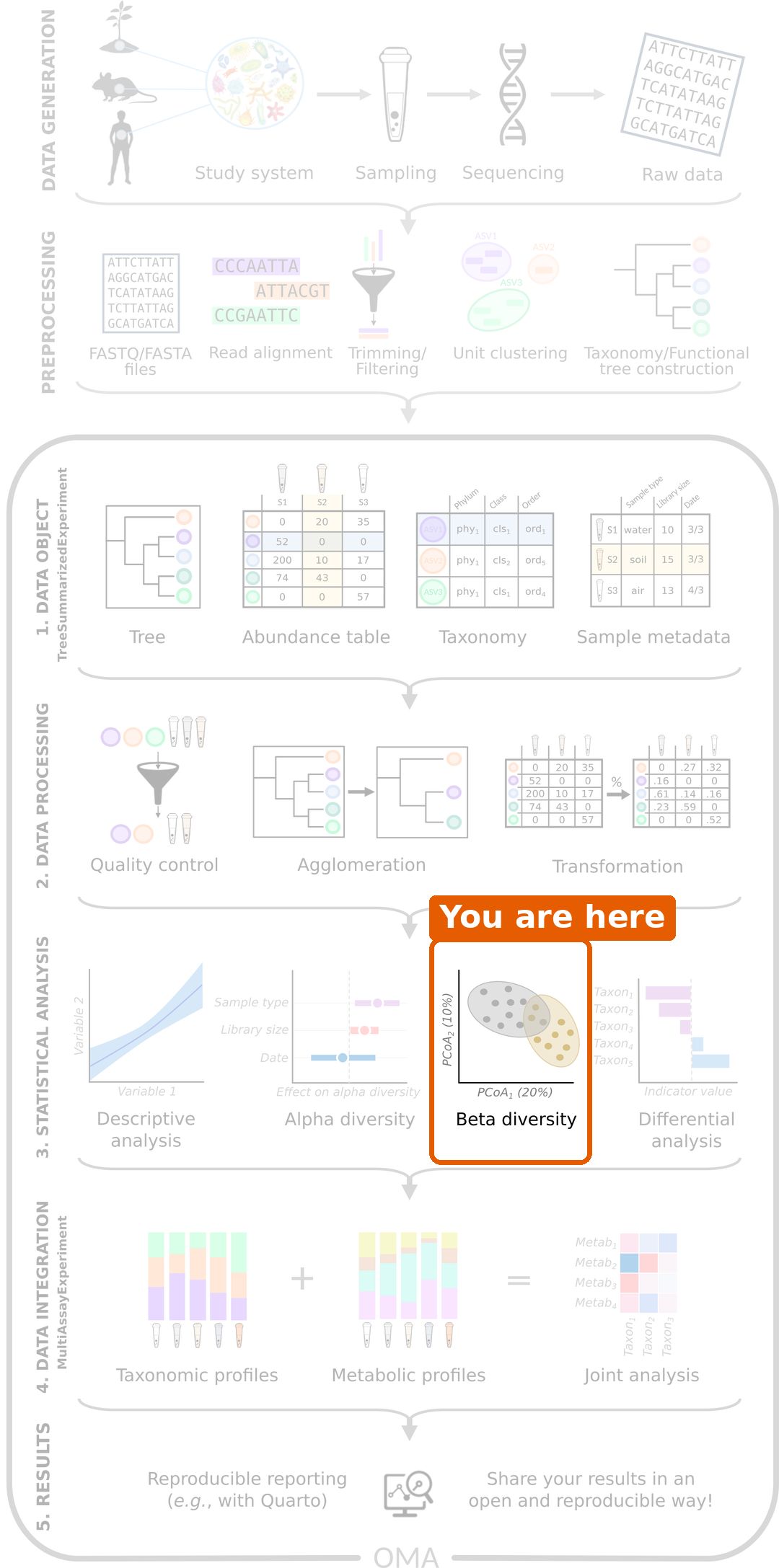
In the previous episode, we compared the diversity within samples. Now we compare whole communities between samples: is the overall composition of the gut microbiome different between people with CRC and healthy people?
Load packages and data
R
library(mia)
library(miaViz)
library(scater)
R
tse <- readRDS(file.path("data", "tse_processed.rds"))
What is beta diversity?
Alpha diversity summarizes each sample with a single number. Beta diversity compares whole communities: how different is the community of one sample from that of another?
Dissimilarity between two samples
We measure how different two samples are with a dissimilarity. The most common one in microbiome research is the Bray–Curtis dissimilarity. It goes from 0 (the samples have exactly the same composition) to 1 (the samples share no taxa at all).
Here is a small example with relative abundances of three taxa:
| Taxon A | Taxon B | Taxon C | |
|---|---|---|---|
| Sample 1 | 0.6 | 0.4 | 0.0 |
| Sample 2 | 0.2 | 0.4 | 0.4 |
For relative abundances, Bray–Curtis is half the sum of the absolute differences: (|0.6 − 0.2| + |0.4 − 0.4| + |0.0 − 0.4|) / 2 = (0.4 + 0 + 0.4) / 2 = 0.4.
Challenge 1: Calculate a dissimilarity
Calculate the Bray–Curtis dissimilarity between these two samples:
| Taxon A | Taxon B | Taxon C | |
|---|---|---|---|
| Sample 1 | 0.5 | 0.5 | 0.0 |
| Sample 3 | 0.0 | 0.0 | 1.0 |
What does the result mean?
(|0.5 − 0| + |0.5 − 0| + |0 − 1|) / 2 = 2 / 2 = 1. The two samples share no taxa, so they are as different as possible.
Ordination: a map of the samples
With 60 samples, there are 1770 pairs of samples, and so 1770 dissimilarities. That is far too many numbers to read. An ordination draws a map of the samples, in which samples that are similar are close to each other and samples that are different are far apart.
A common ordination method is the Principal Coordinate Analysis (PCoA), also called multidimensional scaling (MDS). It finds the directions that explain the most differences between the samples and uses them as the axes of the map.
PCoA with Bray–Curtis dissimilarity
The function addMDS() calculates the dissimilarities and
the PCoA in one step. We use the relative abundances, choose the
Bray–Curtis method, and name the result PCoA_BC:
R
tse <- addMDS(
    tse, assay.type = "relabundance", method = "bray", name = "PCoA_BC"
)
The result is stored in the reducedDim part of the
TreeSE. We plot it with the miaViz function
plotOrdination() and colour the samples by disease:
R
plotOrdination(tse, "PCoA_BC", colour.by = "disease")
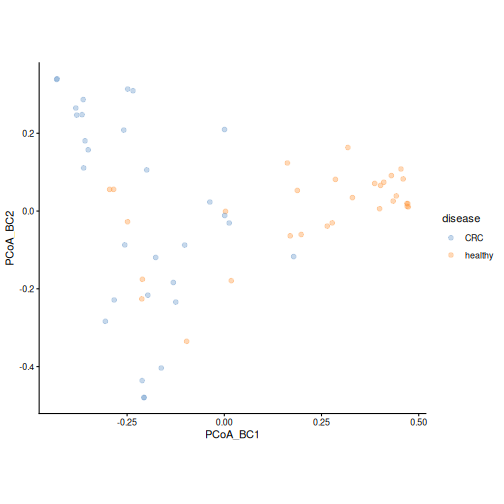
Each point is a sample. The axes have no units: what matters is how
far apart the points are. The first axis (PCoA_BC1) shows
the largest differences between the samples, the second axis the next
largest.
Result: healthy samples mostly lie on one side of the first axis and CRC samples on the other, although the groups overlap. The communities of CRC patients and healthy people seem to differ.
Challenge 2: What drives the first axis?
- Do the CRC and healthy samples separate completely?
- Which species could be driving the separation along the first axis? Hint: think back to episode 5.
- Check your idea: colour the points by the relative abundance of that
species. Hint: give the name of the species to
colour.by, and the table toassay.type.
- No. Most samples fall on “their” side, but there is clear overlap. The microbiome differs a lot between individuals, even within one group.
- Prevotella copri, which dominates many healthy samples.
- Samples with a lot of P. copri lie on one side of the first axis:
R
plotOrdination(
    tse, "PCoA_BC",
    colour.by = "species-Prevotella_copri", assay.type = "relabundance"
)
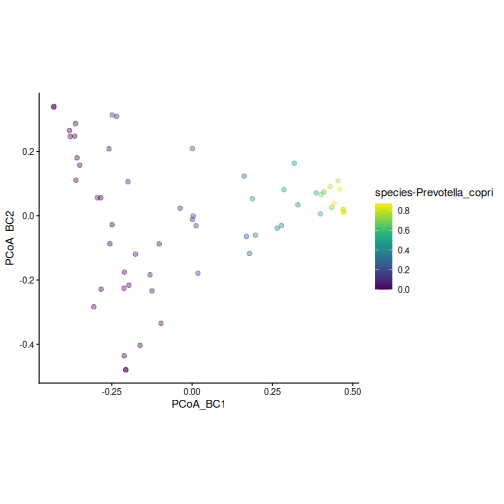
PCA on rclr data
Principal Component Analysis (PCA) is the most
widely used ordination method in data science in general. It works
directly on the values of the table rather than on a dissimilarity: its
axes, the principal components (PC1, PC2, …), are combinations
of the taxa. PCA works best with roughly normally distributed values,
such as the rclr table from episode
5. The function runPCA() from the scater package
calculates it:
R
tse <- runPCA(tse, assay.type = "rclr", name = "PCA", ncomponents = 5)
R
plotOrdination(tse, "PCA", colour.by = "disease")
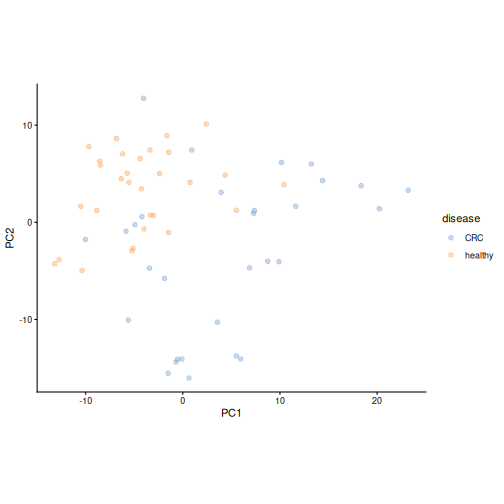
Result: the PCA also separates the two groups: the healthy samples gather in one part of the map, while the CRC samples are more spread out. The map looks different from the PCoA, because PCA looks at the data in a different way.
A big advantage of PCA is that it tells us which taxa drive each axis. Each taxon gets a loading for each axis: taxa with large positive or negative loadings pull samples towards that end of the axis.
Challenge 3: Which taxa drive the PCA?
- Plot the loadings of the first two axes with the miaViz function
plotLoadings(). Show the 10 taxa with the largest loadings (ncomponents = 2,n = 10). - Which taxa have the largest loadings on the first axis (PC1)?
- Compare with the PCA plot: on which side of PC1 are the healthy samples? Does this agree with what you know about Prevotella copri?
R
plotLoadings(tse, dimred = "PCA", ncomponents = 2, n = 10)
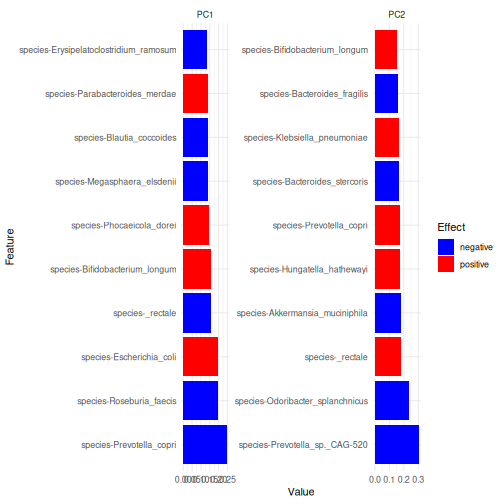
- The largest loadings on PC1 belong to species-Prevotella_copri, species-Roseburia_faecis, species-Escherichia_coli.
- Prevotella copri has a negative loading on PC1, so samples with a lot of P. copri lie on the negative side of PC1. These are mostly the healthy samples, which agrees with episode 5.
PCA and PCoA are complementary
PCoA can use any dissimilarity. Bray–Curtis on relative abundances is driven mostly by the abundant taxa. PCA on rclr values gives more weight to changes in rare taxa, and gives loadings that show which taxa drive the axes. (The straight-line distance between the rclr values of two samples is called the robust Aitchison distance; a PCA on rclr values gives the same map as a PCoA with this distance.) Because the two methods look at the data differently, they can reveal different patterns. Make both.
Using the tree: UniFrac
Bray–Curtis and PCA treat every taxon as unrelated to all the others. But two species can be genetically very similar and play similar roles in the gut. If one sample has species X and another has its close relative Y, the two samples are more similar than if they had two distant species. Standard distances miss this.
The UniFrac distance uses the phylogenetic tree to take this into account. It measures how much of the tree’s branch length is shared by two samples. Many studies ignore the phylogeny, even when it is available, so it is worth adding to your analyses.
addMDS() takes the tree from the rowTree of
the TreeSE. By default, it calculates the unweighted UniFrac,
which only uses whether a taxon is present in a sample or not:
R
tse <- addMDS(
    tse, assay.type = "counts", method = "unifrac", name = "PCoA_UniFrac"
)
WARNING
Warning: Pruning tree...R
plotOrdination(tse, "PCoA_UniFrac", colour.by = "disease")
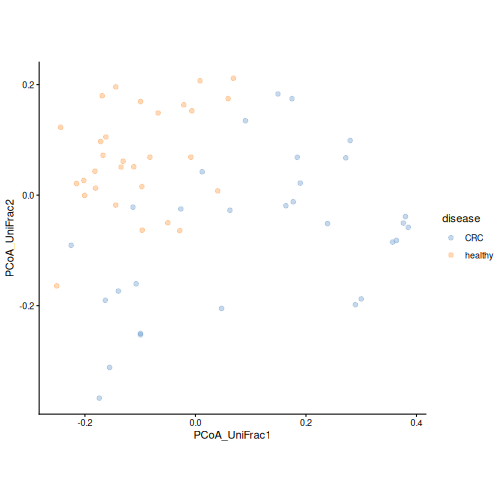
The warning Pruning tree... is harmless: the tree
contains many more taxa than our data, and it is trimmed to the taxa in
the data.
Result: the groups also tend to separate when the relatedness of the taxa is taken into account.
Challenge 4: Weighted UniFrac
The weighted UniFrac also takes the abundances of the taxa into account.
- Make a PCoA with weighted UniFrac: add
weighted = TRUEtoaddMDS()and name the resultPCoA_wUniFrac. - Colour the plot by disease. Do the groups separate as clearly as with unweighted UniFrac?
- Colour the plot by the relative abundance of Prevotella copri. What do you see?
R
tse <- addMDS(
    tse, assay.type = "counts", method = "unifrac",
    weighted = TRUE, name = "PCoA_wUniFrac"
)
WARNING
Warning: Pruning tree...R
plotOrdination(tse, "PCoA_wUniFrac", colour.by = "disease")
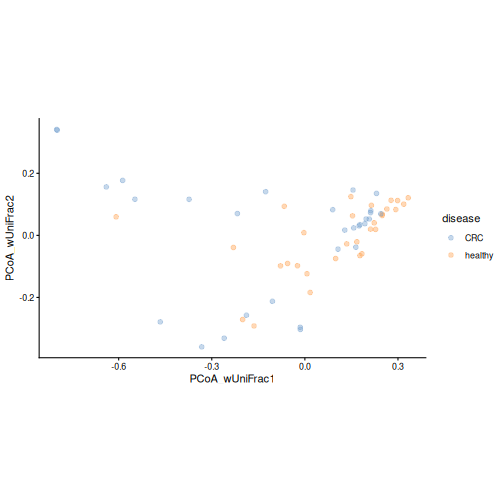
R
plotOrdination(
    tse, "PCoA_wUniFrac",
    colour.by = "species-Prevotella_copri", assay.type = "relabundance"
)
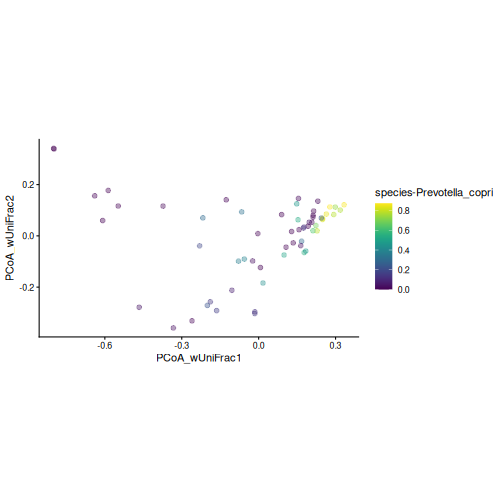
- The groups overlap more than with unweighted UniFrac.
- The samples with a lot of P. copri form a tight group. Weighted UniFrac is driven by the most abundant taxa, so the samples dominated by P. copri look very similar to each other. Unweighted UniFrac, in contrast, is sensitive to rare taxa. The two versions answer different questions, so it is useful to look at both.
Which distance should I use?
Bray–Curtis is the most common choice and a good default. The robust Aitchison distance (PCA on rclr) is designed for relative data. UniFrac uses the phylogenetic tree. Different distances answer slightly different questions, so it is good practice to compare a few. See the Community similarity chapter of OMA.
Is the difference real? PERMANOVA
A plot can suggest a difference, but we need a statistical test to evaluate it. PERMANOVA (permutational multivariate analysis of variance) tests whether the centres of the groups are further apart than we would expect by chance. It works directly on the dissimilarities.
R
permanova <- getPERMANOVA(
    tse, assay.type = "relabundance", method = "bray", formula = x ~ disease
)
permanova$permanova
OUTPUT
Permutation test for adonis under reduced model
Marginal effects of terms
Permutation: free
Number of permutations: 999

adonis2(formula = formula, data = data, method = ..1, by = by, na.action = na.action)
         Df SumOfSqs      R2      F Pr(>F)
disease   1   3.2088 0.16013 11.058  0.001 ***
Residual 58  16.8307 0.83987
Total    59  20.0395 1.00000
---
Signif. codes:  0 '***' 0.001 '**' 0.01 '*' 0.05 '.' 0.1 ' ' 1
In the formula, x stands for the abundance table and
disease is the variable we test. Two numbers are
important:
- R2: the share of the differences between samples that is explained by the variable.
- Pr(>F): the p-value.
Result: disease explains 16 % of the differences between samples (R2 = 0.16), with a p-value of 0.001. The communities of CRC patients and healthy people differ significantly. Still, most of the differences between people (84 %) are not explained by the disease.
PERMANOVA is a permutation test: it shuffles the group labels of the samples at random many times (999 by default) and checks how often the shuffled groups differ as much as the real ones. With 999 permutations, the smallest possible p-value is 0.001. Because the shuffling is random, your p-values may differ slightly from the ones shown here.
Check the spread of the groups
PERMANOVA assumes that the groups are about equally spread out
(homogeneity of dispersion). If one group is much more spread
out than the other, PERMANOVA can give a small p-value even when the
group centres do not differ. Always test this
assumption. getPERMANOVA() tests it for us:
R
permanova$homogeneity
OUTPUT
        Df    Sum Sq   Mean Sq        F N.Perm Pr(>F) Total variance
disease  1 0.2643238 0.2643238 8.957733    999   0.01       1.975781
        Explained variance
disease          0.1337819
We can also see the centre and the spread of each group on the PCoA
plot. With add.ellipse = TRUE,
plotOrdination() draws an ellipse around the samples of
each group:
R
plotOrdination(tse, "PCoA_BC", colour.by = "disease", add.ellipse = TRUE)
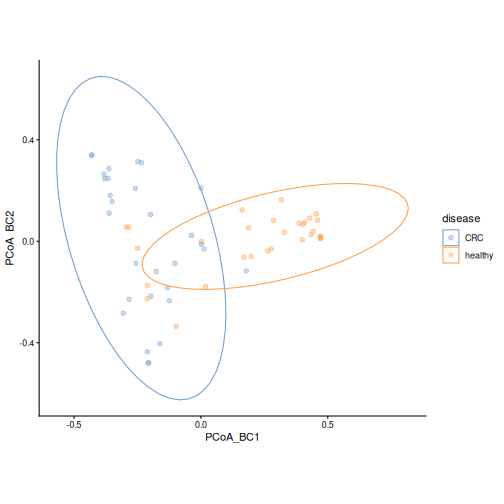
Result: the p-value is 0.01, so the groups differ in spread. The CRC samples are more spread out, while many healthy samples are close to each other, many of them being dominated by Prevotella copri. Our PERMANOVA result is therefore partly due to the difference in spread. The PCoA plot also shows that the group centres lie on different sides of the first axis, so the groups differ in both their centre and their spread. We should report both, and not the PERMANOVA p-value alone.
Challenge 5: Interpret PERMANOVA
PERMANOVA gives R2 = 0.16 and p = 0.001. Which statement is correct?
- Disease explains 84 % of the differences between samples.
- Disease explains a small but significant part of the differences between samples.
- Every CRC sample is different from every healthy sample.
- Disease explains 16 % of the differences, which is a small part, and the result is significant. Statement a) mixes up the explained and unexplained parts. Statement c) is wrong because the groups overlap in the PCoA plot.
Accounting for another variable
In episode 4, we noticed that most healthy people come from Bhopal. Could the difference we found be a difference between the two places instead? When another variable is linked to both the groups and the outcome, it can confound the comparison (episode 1).
Challenge 6: Colour by location
- Plot the Bray–Curtis PCoA, coloured by
location. - Compare it with the plot coloured by disease. What do you see?
R
plotOrdination(tse, "PCoA_BC", colour.by = "location")
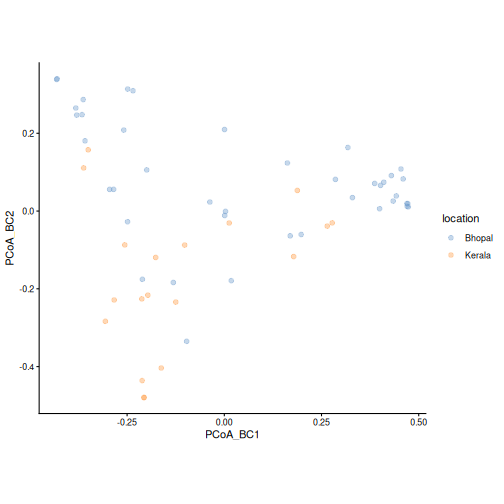
The samples from Kerala are mostly on the same side of the first axis as the CRC samples. This is expected, because most people from Kerala in this study have CRC. Many of them also lie in the lower part of the plot, along the second axis. From this plot alone, we cannot tell the effects of disease and location apart.
Distance-based redundancy analysis (dbRDA)
dbRDA is an ordination that includes variables from
colData. Like PERMANOVA, it starts from the dissimilarities
and uses a formula. Unlike PCoA, its axes are chosen to show the
differences that the variables explain. It tests how much each variable
explains while taking the other variables into account. We add
location to the formula:
R
tse <- addRDA(
    tse, assay.type = "relabundance", method = "bray",
    formula = x ~ disease + location, name = "dbRDA"
)
The miaViz function plotRDA() shows the samples together
with an arrow for each variable. The arrow points towards the samples of
the named group (for example, disease — healthy points
towards the healthy samples). Its label shows how much the variable
explains, and its p-value:
R
plotRDA(tse, "dbRDA", colour.by = "disease")
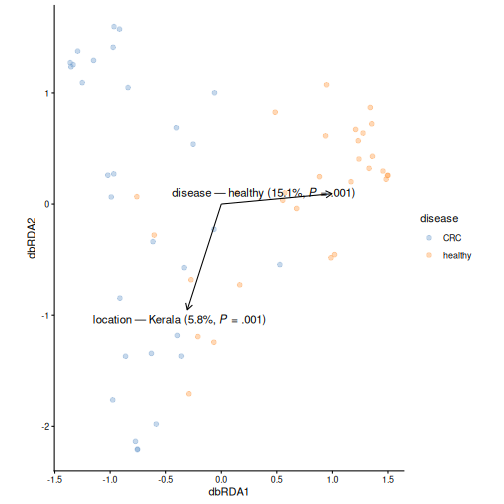
Result: disease explains 15 % (p = 0.001) and location 6 % (p = 0.001) of the differences between samples. The disease effect remains when the location is taken into account. The location also matters, so we will include it in the differential abundance analysis in the next episode.
Challenge 7: What about age?
In episode 6, we found that the CRC patients are older than the healthy people.
- Run the dbRDA again with
ageadded to the formula, and name the resultdbRDA_age. - Plot it with
plotRDA(). Does disease still explain a significant part of the differences? How much does age explain?
R
tse <- addRDA(
    tse, assay.type = "relabundance", method = "bray",
    formula = x ~ disease + location + age, name = "dbRDA_age"
)
plotRDA(tse, "dbRDA_age", colour.by = "disease")
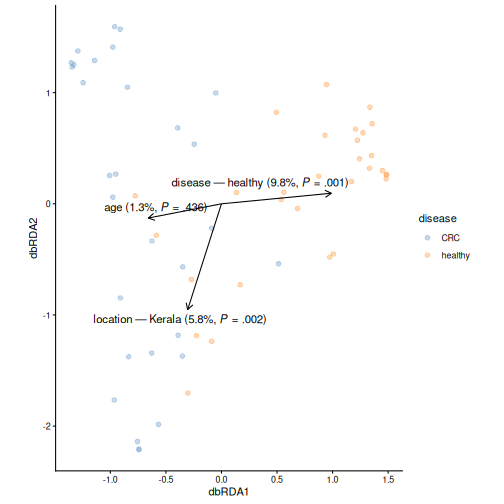
Disease now explains 10 % (p = 0.001), and age 1 % (p = 0.44). The share of disease is smaller than before, because disease and age are linked: part of the differences can be explained by either of them. Still, disease explains a significant part on its own, while age adds little. Because the two are confounded, the data cannot fully tell them apart.
Challenge 8: Beta diversity at genus level (30 minutes)
In this episode, we worked at the species level. Do the results hold at the genus level? And does gender matter?
- Agglomerate the data to the genus level with
agglomerateByRank(), and add relative abundances withtransformAssay(). - Make a Bray–Curtis PCoA of the genera and colour it by disease. Does it look like the species-level PCoA?
- Run PERMANOVA for disease at the genus level. How much does disease explain? Compare with the species level.
- Test the homogeneity of the group spreads at the genus level. Is the result different from the species level? What does this mean for the PERMANOVA result?
- Back at the species level: does gender explain differences in
composition? Run PERMANOVA with
formula = x ~ gender.
1.–2. Genus-level PCoA
R
tse_genus <- agglomerateByRank(tse, rank = "genus")
tse_genus <- transformAssay(
    tse_genus, assay.type = "counts", method = "relabundance"
)
tse_genus <- addMDS(
    tse_genus, assay.type = "relabundance", method = "bray", name = "PCoA_BC"
)
plotOrdination(tse_genus, "PCoA_BC", colour.by = "disease")
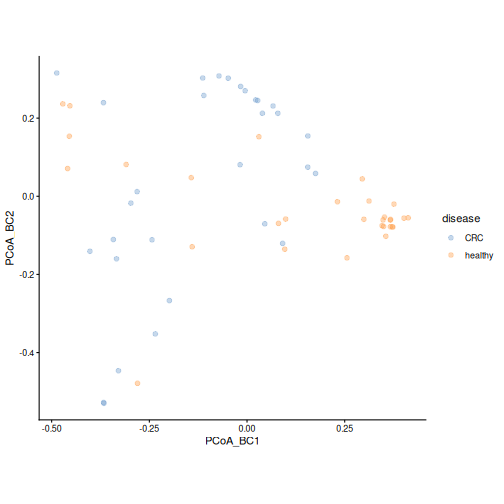
As at the species level, the groups tend to separate: many healthy samples form a tight cluster on one side. The overlap is somewhat larger.
3.–4. Genus-level PERMANOVA
R
permanova_genus <- getPERMANOVA(
    tse_genus, assay.type = "relabundance", method = "bray",
    formula = x ~ disease
)
permanova_genus$permanova
OUTPUT
Permutation test for adonis under reduced model
Marginal effects of terms
Permutation: free
Number of permutations: 999

adonis2(formula = formula, data = data, method = ..1, by = by, na.action = na.action)
         Df SumOfSqs      R2      F Pr(>F)
disease   1   1.4774 0.10404 6.7353  0.001 ***
Residual 58  12.7227 0.89596
Total    59  14.2001 1.00000
---
Signif. codes:  0 '***' 0.001 '**' 0.01 '*' 0.05 '.' 0.1 ' ' 1
R
permanova_genus$homogeneity
OUTPUT
        Df    Sum Sq   Mean Sq        F N.Perm Pr(>F) Total variance
disease  1 0.1127457 0.1127457 2.012595    999  0.165       3.361911
        Explained variance
disease          0.0335362
At the genus level, disease explains 10 % of the differences (16 % at the species level), so the effect is somewhat smaller but still clear. The homogeneity test gives p = 0.16: at the genus level, we find no evidence that the groups differ in spread. Here we can interpret the PERMANOVA result as a difference in the group centres.
5. Gender
R
permanova_gender <- getPERMANOVA(
    tse, assay.type = "relabundance", method = "bray", formula = x ~ gender
)
permanova_gender$permanova
OUTPUT
Permutation test for adonis under reduced model
Marginal effects of terms
Permutation: free
Number of permutations: 999

adonis2(formula = formula, data = data, method = ..1, by = by, na.action = na.action)
         Df SumOfSqs      R2      F Pr(>F)
gender    1   0.4765 0.02378 1.4129  0.149
Residual 58  19.5630 0.97622
Total    59  20.0395 1.00000
Gender explains only 2 % of the differences, and the result is not significant (p = 0.15).
Bonus: clustering, natural groups of samples
This section is optional.
So far, we have always started from the study groups, CRC and healthy. But would the samples fall into groups even if we did not know who has CRC?
Clustering sorts samples into groups, called clusters, so that samples in the same cluster are similar to each other and different from the samples in other clusters. It uses only the abundance table, not the sample information. This is called an unsupervised analysis. In microbiome research, clustering is used to find community types. A well-known example are enterotypes: gut microbiomes are often dominated by either Bacteroides or Prevotella.
We use hierarchical clustering. It starts with each
sample in its own group, and then joins the two most similar groups
again and again. Here, the similarity is the straight-line distance
between the rclr values of the samples (the robust Aitchison distance).
The result is a tree of samples, which we cut into the number of
clusters we want. The function addCluster() uses clustering
methods from the bluster package:
R
library(bluster)
We cluster the samples (by = "cols") on their rclr
values, join the groups with Ward’s method (ward.D2, which
keeps the clusters as compact as possible), and cut the tree into two
clusters (k = 2):
R
tse <- addCluster(
    tse,
    assay.type = "rclr",
    by = "cols",
    HclustParam(method = "ward.D2", cut.params = list(k = 2))
)
table(tse$cluster)
OUTPUT
 1  2
25 35
The cluster of each sample is stored in the colData
column cluster. We show the clusters on the PCA, with the
shape of each point showing the disease:
R
plotOrdination(tse, "PCA", colour.by = "cluster", shape.by = "disease")
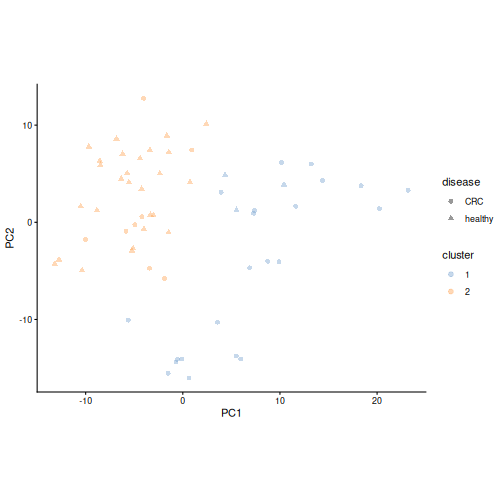
The clustering never saw the disease. Let’s compare the clusters with the study groups, and look at the species we have followed through the lesson:
R
table(cluster = tse$cluster, disease = tse$disease)
OUTPUT
       disease
cluster CRC healthy
      1  22       3
      2   8      27
R
plotBoxplot(
    tse, assay.type = "relabundance",
    features = "species-Prevotella_copri", x = "cluster"
)
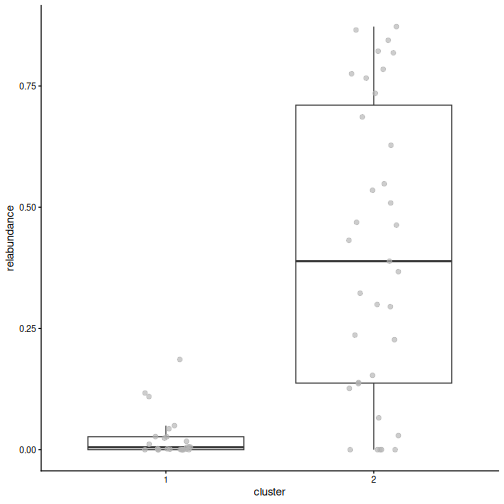
Result: cluster 2 contains 27 healthy people and 8 people with CRC, and Prevotella copri makes up a median of 39 % of their community. Cluster 1 contains 22 people with CRC and 3 healthy people, with a median of 1 % P. copri. The main structure in our data is a Prevotella community type versus a non-Prevotella type, and it is strongly linked to the disease.
Cluster the data, not the ordination
Cluster the data itself: the transformed abundance table, as above, or a dissimilarity. Do not cluster the PCA or PCoA axes. This is a common mistake: the first few axes keep only part of the variation, so the clusters would follow what the 2-D plot shows rather than the data. Use the ordination only to visualise the clusters.
Clustering also always returns clusters, even when the data has no real groups. Check whether the clusters hold up when you change the method or the number of clusters. See the Clustering chapter of OMA.
Challenge 9 (bonus): K-means clustering
K-means is another common clustering method. It
places k cluster centres and assigns each sample to the
nearest centre, then moves the centres until they settle.
- Cluster the samples with k-means and two clusters. Use
KmeansParam(centers = 2)instead ofHclustParam(), and store the result in a column calledkmeanswithclust.col = "kmeans". - Compare the k-means clusters with the hierarchical clusters using
table(). Do the two methods agree? - Try three clusters with hierarchical clustering
(
cut.params = list(k = 3),clust.col = "cluster_k3"). Which cluster is split, and how are the new clusters related to the disease?
R
tse <- addCluster(
    tse, assay.type = "rclr", by = "cols",
    KmeansParam(centers = 2), clust.col = "kmeans"
)
table(hclust = tse$cluster, kmeans = tse$kmeans)
OUTPUT
      kmeans
hclust  1  2
     1 16  9
2 28 7- The methods agree on 37 of the 60 samples. The cluster numbers themselves are arbitrary: cluster 1 of one method may be cluster 2 of the other. What matters is which samples end up together.
R
tse <- addCluster(
    tse, assay.type = "rclr", by = "cols",
    HclustParam(method = "ward.D2", cut.params = list(k = 3)),
    clust.col = "cluster_k3"
)
table(k2 = tse$cluster, k3 = tse$cluster_k3)
OUTPUT
   k3
k2   1  2  3
  1 16  0  9
  2  0 35  0
R
table(cluster = tse$cluster_k3, disease = tse$disease)
OUTPUT
       disease
cluster CRC healthy
      1  13       3
      2   8      27
3 9 0- The Prevotella cluster stays the same, and the other cluster is split in two. Cluster 3 contains only people with CRC (9 of them), so the non-Prevotella samples are not one uniform group.
- Beta diversity compares whole communities between samples, using a dissimilarity such as Bray–Curtis.
-
addMDS()calculates a PCoA from any dissimilarity,runPCA()a PCA from rclr values, andplotOrdination()draws them as a map of the samples. PCA and PCoA are complementary, and PCA loadings show which taxa drive the axes. - UniFrac uses the phylogenetic tree, so that closely related taxa count as similar. Unweighted UniFrac uses presence and absence; weighted UniFrac also uses the abundances.
- PERMANOVA (
getPERMANOVA()) tests whether groups differ in composition; R2 tells how much of the differences the group explains. Always check whether the groups differ in spread, because this affects the PERMANOVA result. - dbRDA (
addRDA()) takes other variables into account, which is important when groups differ in more than one way. - (Bonus) Clustering (
addCluster()) finds groups of similar samples without using the sample information. Cluster the data itself, never the ordination axes, and use the ordination only to show the clusters. - In our study, the gut microbiome of people with CRC differs from that of healthy people, even when the location is taken into account. The samples fall into a Prevotella and a non-Prevotella community type, which is strongly linked to the disease.
Content from Differential abundance and prevalence analysis
Last updated on 2026-10-20 | Edit this page
Estimated time: 150 minutes
Overview
Questions
- Which bacteria differ in abundance between people with colorectal cancer and healthy people?
- Which bacteria are found more often in one group than in the other?
- Why can we not test every taxon separately with a p-value threshold of 0.05?
Objectives
- Explain what differential abundance analysis does, using a t-test and a linear model on two taxa.
- Explain why we correct for multiple testing, and why dedicated methods are used for microbiome data.
- Run a differential abundance and prevalence analysis with MaAsLin 3, taking another variable into account.
- Interpret the coefficients and q-values, and plot the data behind the results.
Where are we?
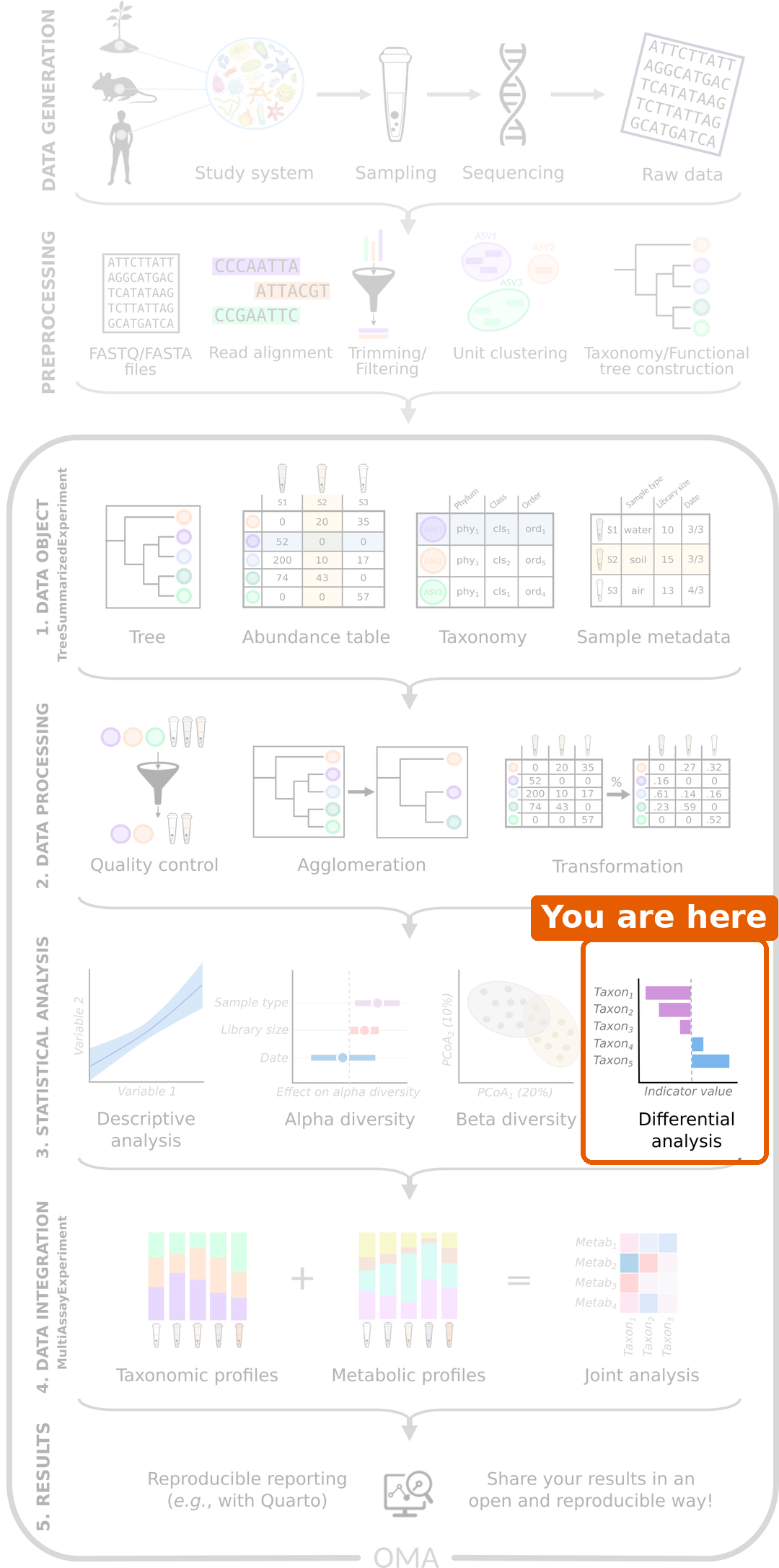
We now know that the gut microbiome of people with CRC differs from that of healthy people, both in diversity and in overall composition. The last question is: which bacteria differ?
Load packages and data
R
library(mia)
library(miaViz)
library(maaslin3)
For the tests, we use the daa package again. We used its
daa::getWilcoxonTest() in the alpha diversity episode to test a
colData column; here, its functions test the abundance of
each taxon. As before, we write daa:: in front of its
functions, for example daa::getTTest(), instead of loading
the package with library().
R
tse <- readRDS(file.path("data", "tse_processed.rds"))
We set healthy as the first level of the
disease factor. This makes it the reference group,
so the results below compare CRC to healthy people:
R
tse$disease <- factor(tse$disease, levels = c("healthy", "CRC"))
Prepare the data
Abundances are very skewed: most values are small, and a few are very
large. We therefore test the logarithm of the relative
abundance. The logarithm of zero is not defined, so we first add a
pseudocount of 1 to all counts. We do this in two steps
with transformAssay(): first we calculate relative
abundances from the counts plus one, and then we take their logarithm
(base 10):
R
tse <- transformAssay(
    tse, assay.type = "counts", method = "relabundance",
    pseudocount = 1, name = "relabundance_pseudo"
)
tse <- transformAssay(
    tse, assay.type = "relabundance_pseudo", method = "log10",
    name = "log_relabundance"
)
On the log10 scale, a difference of 1 means ten times more.
Start with two taxa
Before testing hundreds of taxa, let’s look at two that we have already met: Prevotella copri and Faecalibacterium prausnitzii, a well-known butyrate producer. We make a TreeSE with only these two taxa (rows):
R
tse_sub <- tse[
    c("species-Prevotella_copri", "species-Faecalibacterium_prausnitzii"),
]
We plot their log relative abundance in each group:
R
plotBoxplot(
    tse_sub, assay.type = "log_relabundance", x = "disease",
    facet.by = "rownames"
)
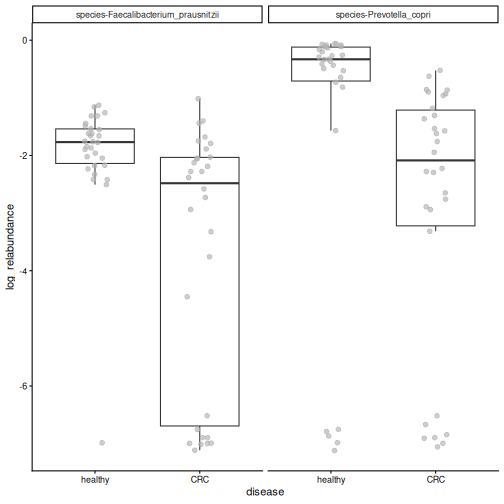
Both species tend to be more abundant in healthy people, but the groups overlap. The idea of differential abundance analysis (DAA) is to test whether differences like these are statistically significant, that is, larger than we would expect by chance.
A t-test
The simplest way to compare two groups is the
t-test. The daa function daa::getTTest()
runs one t-test per taxon. Its formula reads “the
log_relabundance values are explained by
disease”. var.equal = TRUE asks for the
classic Student’s t-test:
R
res_t <- daa::getTTest(tse_sub, log_relabundance ~ disease, var.equal = TRUE)
OUTPUT
Registered S3 method overwritten by 'car':
  method           from
  na.action.merMod lme4
R
res_t
OUTPUT
# A tibble: 2 × 9
  rownames               .y.   group1 group2    n1    n2 statistic    df       p
* <chr>                  <chr> <chr>  <chr>  <int> <int>     <dbl> <dbl>   <dbl>
1 species-Faecalibacter… log_… healt… CRC       30    30      3.79    58 3.62e-4
2 species-Prevotella_co… log_… healt… CRC       30    30      2.35    58 2.21e-2
Each row is one taxon (rownames), and the column
p holds its p-value.
Result: both species differ between the groups: P. copri (p = 0.022) and F. prausnitzii (p = 0.00036).
The t-test is a very elementary method, but it is a valid choice for microbiome data. A large comparison of DAA methods on 53 datasets found that simple methods, such as t-tests and linear models, give results that replicate better between datasets than many more complex methods (Pelto et al. 2025).
A linear model
A t-test can also be written as a linear model. The
daa function daa::getLm() fits one linear model per taxon,
with the same formula:
R
res_lm <- daa::getLm(tse_sub, log_relabundance ~ disease)
res_lm
OUTPUT
# A tibble: 2 × 5
  rownames                             variable   estimate  p_value  q_value
  <chr>                                <chr>         <dbl>    <dbl>    <dbl>
1 species-Prevotella_copri             diseaseCRC    -1.47 0.0221   0.0221
2 species-Faecalibacterium_prausnitzii diseaseCRC    -1.71 0.000362 0.000723
The p-values (p_value) are the same as those of the
t-test: a t-test is a linear model with one two-group
variable.
The advantage of the linear model is that we can add other
variables, called covariates. In the beta diversity episode, we saw that
the location also affects the microbiome. We add location
to the formula, so that the effect of disease is tested while taking
the location into account:
R
res_loc <- daa::getLm(tse_sub, log_relabundance ~ disease + location)
res_loc
OUTPUT
# A tibble: 4 × 5
  rownames                             variable       estimate  p_value  q_value
  <chr>                                <chr>             <dbl>    <dbl>    <dbl>
1 species-Prevotella_copri             diseaseCRC       -0.926 0.166    0.221
2 species-Prevotella_copri             locationKerala   -1.48  0.0420   0.0841
3 species-Faecalibacterium_prausnitzii diseaseCRC       -1.95  0.000204 0.000815
4 species-Faecalibacterium_prausnitzii locationKerala    0.634 0.234    0.234
The results now have two rows per taxon: one for
diseaseCRC and one for locationKerala.
Result: F. prausnitzii is still less abundant in CRC (p = 2e-04), but the disease effect of P. copri is no longer significant (p = 0.17). Most people from Kerala in our study have CRC, so part of the difference of P. copri may be due to the location rather than the disease.
Most DAA methods are based on this idea under the hood: they fit a model like this for every taxon, with the group of interest and the covariates.
Testing every taxon
So far we tested two taxa. In DAA, we usually test every taxon, and this brings a new problem.
Many tests, many false positives
With a p-value threshold of 0.05, we accept a 5 % chance of a false positive in each test. That is fine for one test, but with 100 taxa, about 5 of them would look significant by chance alone, even if nothing differed.
To avoid this, we correct for multiple testing. The corrected p-value is often called the q-value. The usual threshold is q < 0.05. The most common correction, the Benjamini–Hochberg method, controls the false discovery rate (FDR): if we report all taxa with q < 0.05, we expect at most 5 % of the reported taxa to be false positives.
Challenge 1: False positives
You test 200 taxa with a p-value threshold of 0.05, but in reality none of them differ between the groups. About how many taxa will look significant anyway?
About 200 × 0.05 = 10 taxa. This is why we correct for multiple testing.
Dedicated methods
The t-test and the linear model show what DAA does. Microbiome data has special features, though. The values are relative, so if one taxon increases, the shares of all others decrease. There are many zeros, as the box plot above shows: the samples at the bottom are those where the taxon was not detected at all. And the abundances are noisy: their spread changes with their level (the data is heteroscedastic).
Dedicated DAA methods extend the linear model to take these features into account. In this lesson we use MaAsLin 3. For each taxon, it fits two models:
- Abundance: when the taxon is present, is it more abundant in one group? This is a linear model on the log relative abundance, like the one above, but it uses only the samples where the taxon was detected.
- Prevalence: is the taxon present in more people of one group? This is a logistic regression on presence and absence. Much of the information in microbiome data is in the prevalence: whether a taxon is there at all is much less noisy than how much of it there is.
MaAsLin 3 also compares each taxon with the typical (median) taxon, because the data are relative, and it corrects the p-values for multiple testing. Many other methods exist, for example ANCOM-BC2 and ALDEx2, and they often give somewhat different results. See the Differential abundance chapter of OMA.
Run MaAsLin 3
As discussed in episode 5, we first remove rare taxa. They carry little information and add many tests:
R
tse <- subsetByPrevalent(
    tse, assay.type = "relabundance",
    detection = 0.001, prevalence = 0.1
)
nrow(tse)
OUTPUT
[1] 94We give maaslin3() our TreeSE and a formula with disease
and location. Unlike in daa::getLm(), the left side of the
formula is empty: MaAsLin 3 puts each taxon there in turn. It uses the
first table of the TreeSE (the counts) and transforms it itself. It
writes its results to the folder given in output. The last
three arguments switch off its own plots and most of its messages:
R
fit <- maaslin3(
    tse,
    formula = ~ disease + location,
    output = "maaslin3_output",
    plot_summary_plot = FALSE,
    plot_associations = FALSE,
    verbosity = "ERROR"
)
Differential abundance
The results of the abundance model are in
fit$fit_data_abundance$results. The table has one row per
taxon and variable, so we keep the rows for disease, and then the taxa
with q < 0.05:
R
res <- fit$fit_data_abundance$results
res <- res[res$metadata == "disease", ]
sig <- res[res$qval_individual < 0.05 & !is.na(res$qval_individual), ]
sig[, c("feature", "coef", "qval_individual")]
OUTPUT
                                feature      coef qval_individual
1              species-Prevotella_copri -4.322978    3.137211e-06
3                      species-_rectale -3.499477    4.484035e-03
4  species-Faecalibacterium_prausnitzii -2.130628    4.484035e-03
5      species-Odoribacter_splanchnicus  4.312470    4.484035e-03
6        species-Prevotella_sp._AM42-24 -4.155679    4.484035e-03
7     species-Dialister_succinatiphilus -4.144146    8.424146e-03
8              species-Roseburia_faecis -4.396711    1.138791e-02
12 species-Firmicutes_bacterium_CAG-791  3.996070    2.555267e-02
13    species-Oscillibacter_sp._CAG-241  3.791330    2.976652e-02
16   species-Parabacteroides_distasonis  2.664330    4.367687e-02
17        species-Klebsiella_pneumoniae  6.313643    4.896360e-02
The most important columns are:
-
feature: the taxon. -
coef: the effect size, the difference in log2 abundance. A positive value means the taxon is more abundant in CRC, a negative value that it is less abundant in CRC. -
stderr: the standard error ofcoef, that is, how uncertain it is. -
qval_individual: the q-value of this model, corrected for multiple testing.
Result: 11 of the 94 species differ in abundance between people with CRC and healthy people: 5 are more abundant and 6 less abundant in CRC. The strongest result is Prevotella copri. In the linear model above, its difference was weaker once the location was taken into account. MaAsLin 3 looks only at the people who carry it, and among them, P. copri is much less abundant in CRC.
A forest plot shows the coefficient of each
significant taxon, with an error bar for its uncertainty. The miaViz
function plotForest() draws it from the results table:
R
plotForest(
    sig, effect.var = "coef", err.var = "stderr",
    id.var = "feature", pval.var = "qval_individual"
)
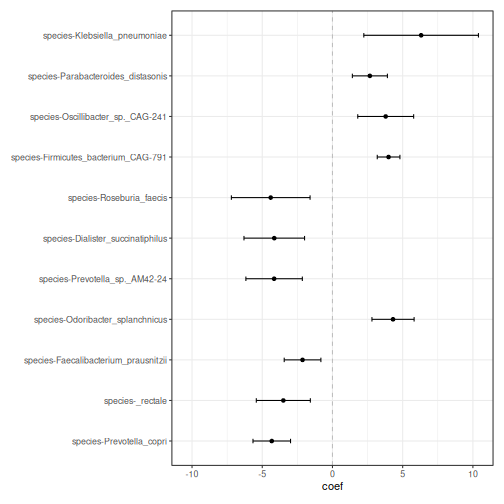
It is always a good idea to look at the data behind a result. We plot the relative abundances of the first four species of the list:
R
plotBoxplot(
    tse, assay.type = "relabundance", x = "disease",
    features = sig$feature[1:4], facet.by = "rownames"
)
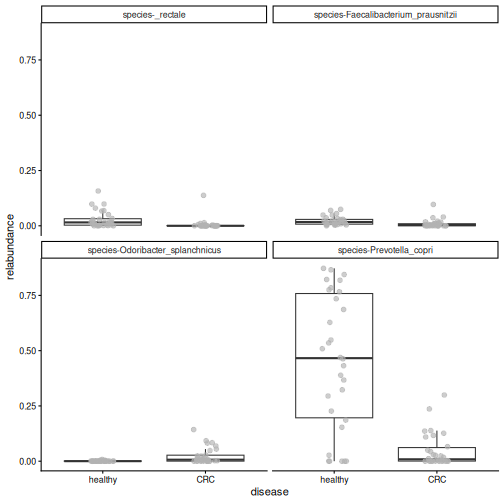
Result: the differences are clearly visible in the data, although the values of the two groups overlap.
Challenge 2: Read the forest plot
- Name two species that are more abundant in CRC, and two that are less abundant in CRC.
-
Faecalibacterium prausnitzii, Eubacterium rectale
(shown as
_rectale) and Roseburia faecis produce butyrate, a compound that helps to keep the gut lining healthy. In which group are they more abundant? Does this make sense?
- Species with a positive coefficient, such as Odoribacter splanchnicus, are more abundant in CRC. Species with a negative coefficient, such as Prevotella copri and Faecalibacterium prausnitzii, are less abundant in CRC.
- They have negative coefficients: they are more abundant in healthy people. This makes sense: butyrate producers are often found to be depleted in CRC.
Challenge 3: Without the location
- Run MaAsLin 3 again with only
diseasein the formula. Save the results in a different folder, for examplemaaslin3_output_disease_only. - How many species differ in abundance (q < 0.05)?
- How many of them were also significant in our first analysis?
Hint: intersect() gives the elements that two
vectors share.
R
fit2 <- maaslin3(
    tse,
    formula = ~ disease,
    output = "maaslin3_output_disease_only",
    plot_summary_plot = FALSE,
    plot_associations = FALSE,
    verbosity = "ERROR"
)
res2 <- fit2$fit_data_abundance$results
res2 <- res2[res2$metadata == "disease", ]
sig2 <- res2[res2$qval_individual < 0.05 & !is.na(res2$qval_individual), ]

nrow(sig2)
OUTPUT
[1] 12R
length(intersect(sig$feature, sig2$feature))
OUTPUT
[1] 9- 12 species are significant.
- 9 of them were also significant when the location was taken into account.
Some species are significant only when the location is ignored (3 here): their differences may be partly due to the location rather than the disease. Others are significant only when the location is in the formula (2 here): taking the location into account removes some of the noise, which makes a disease effect easier to detect. The choice of variables in the formula matters.
Differential prevalence
The results of the prevalence model are in
fit$fit_data_prevalence$results. We keep the results for
disease and the taxa with q < 0.05:
R
res_prevalence <- fit$fit_data_prevalence$results
res_prevalence <- res_prevalence[res_prevalence$metadata == "disease", ]
sig_prevalence <- res_prevalence[
    res_prevalence$qval_individual < 0.05 &
        !is.na(res_prevalence$qval_individual),
]
sig_prevalence[, c("feature", "coef", "qval_individual")]
OUTPUT
                                    feature      coef qval_individual
1             species-Bacteroides_eggerthii  3.815604     0.004484035
2              species-Bacteroides_fragilis  2.456524     0.004484035
4           species-Clostridium_sp._CAG-510  3.202124     0.004484035
5           species-Clostridium_sp._CAG-632  3.231433     0.004484035
6      species-Firmicutes_bacterium_CAG-238  3.788765     0.004484035
7            species-Flavonifractor_plautii  2.666713     0.004484035
8        species-Methanobrevibacter_smithii  3.145093     0.004484035
14          species-Bacteroides_sp._CAG-530  2.597764     0.011387908
15              species-Desulfovibrio_piger  2.572182     0.011387908
23     species-Bifidobacterium_adolescentis -2.035877     0.020664619
24                 species-Alistipes_shahii  2.028545     0.020883270
25            species-Klebsiella_pneumoniae -2.356969     0.021055323
26             species-Megasphaera_elsdenii -1.874297     0.021055323
29         species-Butyrivibrio_sp._CAG-318  2.258238     0.021186706
30           species-Roseburia_intestinalis -3.195097     0.021252854
35          species-Prevotella_sp._CAG-1092  2.031649     0.032098180
37 species-Intestinimonas_butyriciproducens  2.749107     0.032241998
38             species-Prevotella_stercorea  2.697288     0.036009251
41     species-Firmicutes_bacterium_CAG-110  1.956945     0.045155439
42            species-Mitsuokella_multacida -2.093394     0.048010635
3              species-Butyricimonas_virosa  2.922404     0.004484035
9                  species-Roseburia_faecis -2.894762     0.004484035
10  species-Ruthenibacterium_lactatiformans  2.758872     0.004484035
11              species-Veillonella_parvula  2.973239     0.004484035
12         species-Bacteroides_intestinalis  3.538988     0.006251335
13        species-Ligilactobacillus_ruminis -2.665089     0.011142771
17          species-Akkermansia_muciniphila  2.267651     0.014486316
18           species-Prevotella_sp._CAG-520  2.611054     0.016213310
19                         species-_rectale -2.209343     0.016605080
The prevalence model is a logistic regression: it models
whether the taxon is present or absent. Its coef is the
change in the log-odds of the taxon being present. The
odds are the number of people who carry the taxon
divided by the number who do not: 15 carriers and 15 non-carriers give
odds of 1, 3 carriers and 27 non-carriers give odds of 1/9. You do not
need to interpret the exact value. A positive value means that the taxon
is found more often in CRC, and a negative value that
it is found less often in CRC.
Result: 29 species differ in prevalence, of which 21 are found more often in CRC. Only 3 of them also differ in abundance. The prevalence model finds many results that the abundance model misses.
One of the prevalence results is Flavonifractor plautii.
This is the bacterium that the authors of our study highlighted in the
title of their paper. getPrevalence() gives the share of
samples in which it is present, in each group:
R
getPrevalence(tse[, tse$disease == "CRC"], assay.type = "counts")["species-Flavonifractor_plautii"]
OUTPUT
species-Flavonifractor_plautii
                     0.7333333
R
getPrevalence(tse[, tse$disease == "healthy"], assay.type = "counts")["species-Flavonifractor_plautii"]
OUTPUT
species-Flavonifractor_plautii
                     0.1333333
R
plotBoxplot(
    tse, assay.type = "relabundance", x = "disease",
    features = "species-Flavonifractor_plautii"
)
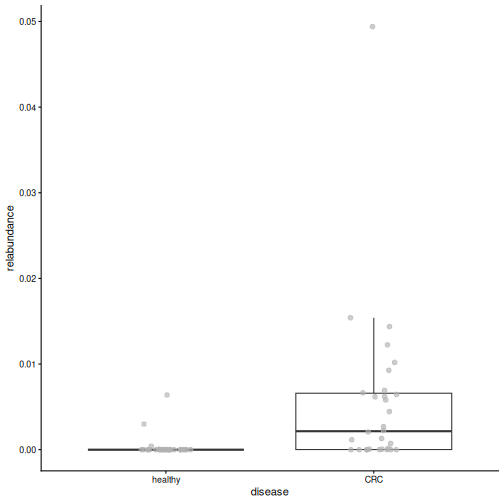
Result: F. plautii is present in 73 % of the CRC patients but in only 13 % of the healthy people. Its abundance is low in both groups: the clear difference is whether it is there.
Challenge 4: Bacteroides fragilis
Some strains of Bacteroides fragilis produce a toxin that has been linked to CRC.
- Find
species-Bacteroides_fragilisin the prevalence results. What are itscoefandqval_individual? - In what share of the CRC patients and of the healthy people is it present?
- Does the sign of its
coefagree with these shares?
R
res_prevalence[
    res_prevalence$feature == "species-Bacteroides_fragilis",
    c("feature", "coef", "qval_individual")
]
OUTPUT
                       feature     coef qval_individual
2 species-Bacteroides_fragilis 2.456524     0.004484035
R
getPrevalence(tse[, tse$disease == "CRC"], assay.type = "counts")["species-Bacteroides_fragilis"]
OUTPUT
species-Bacteroides_fragilis
                         0.8
R
getPrevalence(tse[, tse$disease == "healthy"], assay.type = "counts")["species-Bacteroides_fragilis"]
OUTPUT
species-Bacteroides_fragilis
                   0.2333333
B. fragilis is present in more CRC patients than healthy
people. Its coef is positive, which means “present more
often in CRC”, so the sign agrees with the shares.
Challenge 5 (optional): A famous CRC bacterium
Fusobacterium nucleatum is one of the bacteria most strongly linked to CRC in the literature, yet it is not in our results. Find out why.
Hint: load the unfiltered data from
data/tse_processed.rds and calculate the prevalence of
species-Fusobacterium_nucleatum with
getPrevalence().
R
tse_all <- readRDS(file.path("data", "tse_processed.rds"))
prevalence <- getPrevalence(tse_all, assay.type = "counts")
prevalence["species-Fusobacterium_nucleatum"]
OUTPUT
species-Fusobacterium_nucleatum
                     0.06666667
F. nucleatum was detected in only 7 % of the people, so our prevalence filter (at least 10 % of samples) removed it before the analysis. Filtering always involves a trade-off: it makes the analysis more robust, but it can remove taxa that are rare but interesting.
Challenge 6: How robust are the results? (30 minutes)
Our results depend on choices we made: the variables in the formula and the taxonomic rank. In this exercise, you test how robust they are.
The CRC patients in our study are older than the healthy people (median age 59 vs 40 years), and age also affects the gut microbiome.
- Plot
agebydiseasewithplotBoxplot(). Are there CRC patients under 40? - Run MaAsLin 3 with
formula = ~ disease + location + age(output foldermaaslin3_output_age). How many species differ in abundance by disease (q < 0.05)? Are any species associated with age itself? - Now repeat the analysis with
~ disease + locationat the genus level (output foldermaaslin3_output_genus). Load the full data again, agglomerate it withagglomerateByRank(), and prepare it as at the start of this episode. How many genera differ in abundance? - Is the genus Prevotella significant? Compare with the species-level result for Prevotella copri.
- Write two or three sentences: which findings are robust to these choices, and which are not?
1. Age by disease
R
plotBoxplot(tse, col.var = "age", x = "disease")
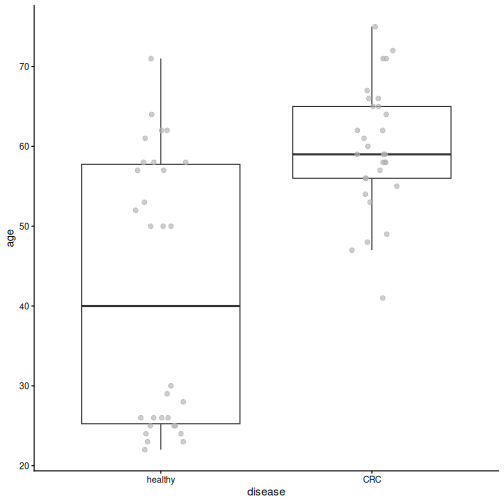
R
min(tse$age[tse$disease == "CRC"])
OUTPUT
[1] 41All CRC patients are at least 41 years old, while many healthy people are younger.
2. MaAsLin 3 with age
R
fit_age <- maaslin3(
    tse,
    formula = ~ disease + location + age,
    output = "maaslin3_output_age",
    plot_summary_plot = FALSE,
    plot_associations = FALSE,
    verbosity = "ERROR"
)
res_age <- fit_age$fit_data_abundance$results
res_age <- res_age[res_age$qval_individual < 0.05 & !is.na(res_age$qval_individual), ]

sig_age_disease <- res_age[res_age$metadata == "disease", ]
sig_age_disease[, c("feature", "coef", "qval_individual")]
OUTPUT
                               feature      coef qval_individual
1             species-Prevotella_copri -4.270148    0.0002874643
3 species-Faecalibacterium_prausnitzii -2.512047    0.0441288103
R
sum(res_age$metadata == "age")
OUTPUT
[1] 0With age in the formula, 2 species differ by disease (11 without age), and 0 species are associated with age. Age and disease are strongly linked in this study, so when both are in the model, it is hard to tell which of them explains a difference. The uncertainty of the disease effect grows and fewer results pass the threshold. To separate the effects of age and disease, we would need a study design in which the groups have similar ages (for example, age-matched controls).
3. and 4. Genus level
R
tse_genus <- readRDS(file.path("data", "tse_processed.rds"))
tse_genus <- agglomerateByRank(tse_genus, rank = "genus")
tse_genus$disease <- factor(tse_genus$disease, levels = c("healthy", "CRC"))
tse_genus <- transformAssay(
    tse_genus, assay.type = "counts", method = "relabundance"
)
tse_genus <- subsetByPrevalent(
    tse_genus, assay.type = "relabundance",
    detection = 0.001, prevalence = 0.1
)

fit_genus <- maaslin3(
    tse_genus,
    formula = ~ disease + location,
    output = "maaslin3_output_genus",
    plot_summary_plot = FALSE,
    plot_associations = FALSE,
    verbosity = "ERROR"
)
res_genus <- fit_genus$fit_data_abundance$results
res_genus <- res_genus[res_genus$metadata == "disease", ]
sum(res_genus$qval_individual < 0.05, na.rm = TRUE)
OUTPUT
[1] 7R
res_genus[res_genus$feature == "Prevotella", c("feature", "coef", "qval_individual")]
OUTPUT
      feature      coef qval_individual
12 Prevotella -1.388461      0.05567889
At the genus level, 7 genera differ in abundance. The genus Prevotella is not significant (q = 0.056), although Prevotella copri was the strongest species-level result. The genus also contains other Prevotella species, and some of them, such as Prevotella sp. CAG-520, tend to be more abundant in CRC. Summing them with P. copri blurs the difference.
5. Conclusion
Results that hold across formulas and ranks are the most robust, for example the lower abundance of Prevotella copri and of the butyrate producer Faecalibacterium prausnitzii in CRC, which remain significant when age is added. Other results change when age is added or when we move to the genus level. The rank you analyse changes the question: “which species?” and “which genera?” are not the same question.
- Differential abundance analysis tests whether the differences we see in plots are statistically significant.
- At its core, DAA is a simple test: a t-test is a linear model with one two-group variable, and a linear model can add covariates, such as the location. Most DAA methods are based on this under the hood.
- Testing many taxa produces false positives, so we use q-values that are corrected for multiple testing.
- Dedicated methods, such as MaAsLin 3, extend the linear model to take the specific nature of microbiome data into account: relative values, many zeros and noisy abundances.
- A taxon can differ in abundance, in prevalence (how often it is present), or both. MaAsLin 3 tests both.
- Look at the data behind the results, and treat significant taxa as candidates for further study.
- In our study, Prevotella copri and butyrate-producing species are less abundant in people with CRC, and Flavonifractor plautii is found much more often in CRC.
Content from Machine learning: predicting an outcome
Last updated on 2026-10-20 | Edit this page
Estimated time: 95 minutes
Overview
Questions
- How well can we predict an outcome, such as colorectal cancer, from the gut microbiome?
- Why do we split the data into training and test data?
- Which bacteria are the most important for the prediction?
Objectives
- Explain the terms feature, outcome, training data, test data, overfitting, cross-validation and AUC.
- Train a random forest model with mikropml to predict an outcome (here, the disease) from the abundance table.
- Evaluate a model with the cross-validation AUC and the test AUC, and explain why a single small test set is unreliable.
- Find the most important taxa of a model and compare them with the differential abundance results.
Where are we?
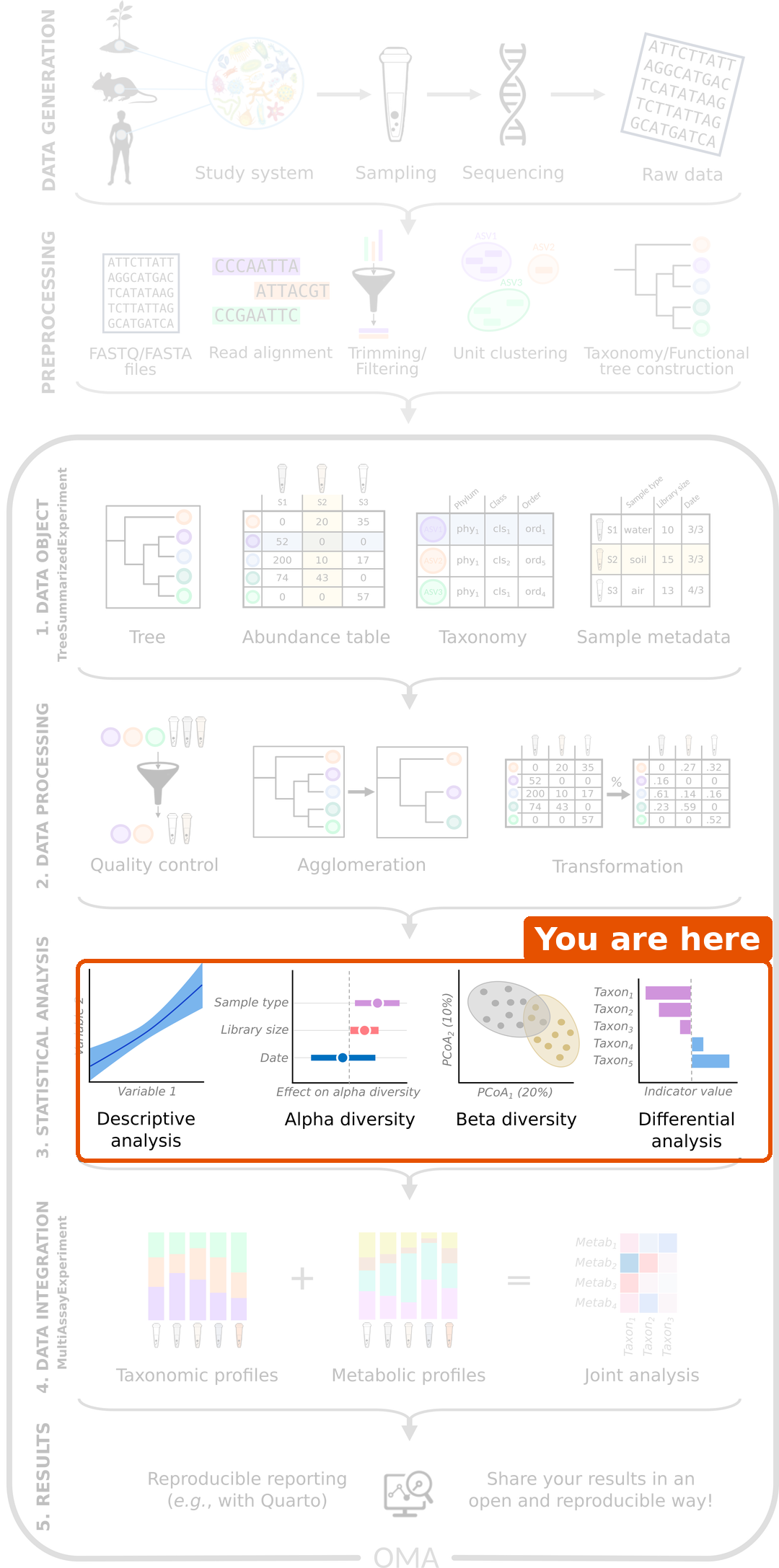
We are still in the statistical analysis step. In the beta diversity episode, the samples of people with CRC and healthy people largely separated in the ordination plots, and in the last episode we found which species differ between the groups. The next question is a practical one: if we only had a stool sample, how well could we tell whether the person has CRC? This is a prediction question, and machine learning is the usual tool for it. The outcome we predict can be anything we know about the samples, for example a disease, a treatment response or a diet; in our study, it is the disease.
Load packages and data
R
library(mia)
library(miaViz)
library(mikropml)
library(ggplot2)
R
tse <- readRDS(file.path("data", "tse_processed.rds"))
What is machine learning?
So far we have asked whether the groups differ. Machine learning asks whether we can predict the group of a new sample. A few terms:
| Term | Meaning | In our data |
|---|---|---|
| Outcome | What we want to predict |
disease: CRC or healthy |
| Features | What we use to predict it | The abundances of the taxa |
| Model | A set of rules learned from the data | A random forest |
| Hyperparameter | A setting of the model that is chosen before training, not learned from the data |
mtry of the random forest (see below) |
| Training data | The samples the model learns from | 80 % of the samples |
| Test data | Samples kept aside to check the model | The other 20 % |
Why keep test data aside?
A flexible model can learn the training data by heart, including its random noise. It then looks perfect on the training data but fails on new samples. This is called overfitting. To get an honest estimate of how well the model works, we test it on samples that it has never seen.
The data is used like this:
- The samples are split into training data (80 %) and test data (20 %).
- On the training data, the model is tuned with cross-validation: the training data is split into 5 parts (folds), the model is trained on 4 and checked on the 5th, and this is repeated so that each fold is used for checking once. This gives the cross-validation (CV) performance. Tuning means that this is done for several values of the hyperparameters, and the values with the best CV performance are kept.
- The final model is checked once on the test data. This gives the test performance.
Measuring performance: AUC
For each sample, the model gives a probability of CRC. The AUC (area under the ROC curve) measures how well these probabilities rank the samples:
- AUC = 1: every CRC sample gets a higher probability than every healthy sample.
- AUC = 0.5: no better than flipping a coin.
To turn the probabilities into a yes/no prediction, we need a cut-off, for example “CRC if the probability is above 0.5”. The ROC curve (receiver operating characteristic) shows what happens for every possible cut-off: how many of the CRC samples are found (the sensitivity), against how many of the healthy samples are wrongly called CRC (the false positive rate). The AUC is the area under this curve, so it does not depend on one chosen cut-off. Another common measure, the accuracy, is the share of samples predicted correctly at one cut-off.
Challenge 1: Training and test data
A student trains a model on all 60 samples and then checks it on the same samples. The model gets an AUC of 1.0. Should the student be happy? Why or why not?
No. The model was checked on the samples it learned from, so it may have memorized them (overfitting). The AUC of 1.0 says nothing about how the model works for new people. The model must be checked on samples it has not seen, such as a separate test set.
Prepare the data
We use the same taxa as in the differential abundance episode: the species that are found in at least 10 % of the samples.
R
tse_prevalent <- subsetByPrevalent(
    tse, assay.type = "relabundance",
    detection = 0.001, prevalence = 0.1
)
We use the raw counts as features: a random forest splits each feature into “high” and “low” values, so it does not need normally distributed or transformed data.
Train a random forest
A random forest is a collection of many decision trees. Each tree asks a series of questions such as “is the count of Prevotella copri above 10 000?” and ends with a prediction. The forest predicts by majority vote of its trees.
The most important hyperparameter of a random forest is
mtry: the number of randomly chosen features that each
question in a tree can pick from. A small mtry makes the
trees more different from each other; a large mtry makes
each tree stronger on its own. The best value depends on the data, so we
let cross-validation choose it.
The mikropml function run_ml() works directly with a
TreeSE. We give it the outcome as a column of colData
(outcome_colname) and the features as an abundance table
(assay.type). It then does all the steps from above: it
splits the data into training and test data, tunes mtry
with 5-fold cross-validation (kfold = 5, repeated
cv_times = 5 times with different folds), and tests the
final model. The seed makes the random split
reproducible.
R
rf_results <- run_ml(
    tse_prevalent, method = "rf", outcome_colname = "disease",
    assay.type = "counts", kfold = 5, cv_times = 5, seed = 123
)
The mikropml functions get_hp_performance() and
plot_hp_performance() show the CV AUC for each value of
mtry that was tried:
R
hp <- get_hp_performance(rf_results$trained_model)
plot_hp_performance(hp$dat, mtry, AUC)
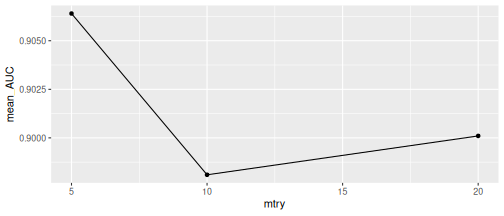
Result: all values of mtry give a
similar CV AUC (note the narrow range of the y-axis), and
run_ml() kept mtry = 5, the value with the
highest CV AUC.
Evaluate the model
The performance is stored in rf_results$performance. The
two most important columns are the cross-validation AUC of the chosen
model and the test AUC:
R
rf_results$performance[, c("cv_metric_AUC", "AUC")]
OUTPUT
# A tibble: 1 × 2
  cv_metric_AUC   AUC
          <dbl> <dbl>
1         0.906     1
The mikropml function calc_model_sensspec() predicts the
test data with the trained model and calculates the sensitivity and
false positive rate for every cut-off. We plot them as a ROC curve. The
dashed line is a model that guesses at random (AUC = 0.5):
R
sensspec <- calc_model_sensspec(
    rf_results$trained_model, rf_results$test_data, "disease"
)
OUTPUT
Using 'disease' as the outcome column.R
ggplot(sensspec, aes(x = fpr, y = sensitivity)) +
    geom_step() +
    geom_abline(linetype = "dashed") +
    labs(x = "False positive rate", y = "Sensitivity")
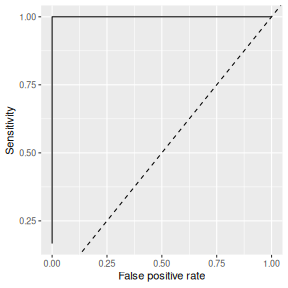
Result: the cross-validation AUC is 0.91, and the test AUC is 1. The gut microbiome predicts CRC very well in this study.
The CV AUC was used to choose mtry, so it is slightly
optimistic. The test data was not used for any choice, so the test AUC
is the honest estimate.
But the test set contains only 12 samples. With so few samples, a single lucky or unlucky split can change the test AUC a lot. Challenge 2 explores this.
run_ml() takes a few seconds. It loads the caret
package, which masks some functions, for example
mia::cluster(). This does not matter in this episode, but
in a session that also uses clustering, call such functions with
mia:: in front.
Challenge 2: How reliable is one test set?
The split into training and test data is random, and it is set by
seed. Let’s see how much the test AUC depends on it.
- Train the same random forest three more times, with
seed = 4,seed = 5andseed = 6. Store the results asrf_4,rf_5andrf_6. - Combine the performance tables of the four models
(
rf_resultsand the three new ones) withrbind(), and plot them with the mikropml functionplot_model_performance(). - What are the smallest and largest test AUCs? What does this tell you about reporting the AUC of a single split?
- Do the cross-validation AUCs vary as much? Why might that be?
R
rf_4 <- run_ml(
    tse_prevalent, method = "rf", outcome_colname = "disease",
    assay.type = "counts", kfold = 5, cv_times = 5, seed = 4
)
rf_5 <- run_ml(
    tse_prevalent, method = "rf", outcome_colname = "disease",
    assay.type = "counts", kfold = 5, cv_times = 5, seed = 5
)
rf_6 <- run_ml(
    tse_prevalent, method = "rf", outcome_colname = "disease",
    assay.type = "counts", kfold = 5, cv_times = 5, seed = 6
)
performance <- rbind(
    rf_results$performance, rf_4$performance,
    rf_5$performance, rf_6$performance
)
performance[, c("seed", "cv_metric_AUC", "AUC")]
OUTPUT
# A tibble: 4 × 3
   seed cv_metric_AUC   AUC
  <dbl>         <dbl> <dbl>
1   123         0.906 1
2     4         0.958 0.833
3     5         0.919 1
4     6         0.978 0.722
R
plot_model_performance(performance)
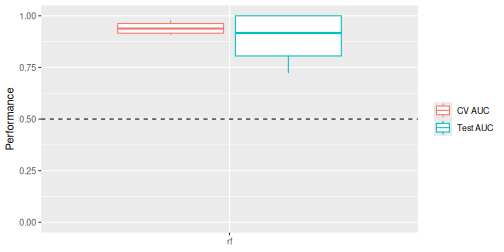
- The test AUC ranges from 0.72 to 1. A single split of a small dataset can make a model look perfect or mediocre by chance. Report the performance over many splits (for example the median and range), not from one split. In practice, people use many more splits, for example 100; the mikropml documentation shows how to run them efficiently.
- The cross-validation AUCs vary less (from 0.91 to 0.98), because each one is an average over 25 folds (5 folds, repeated 5 times) that together use all 48 training samples, while the test AUC comes from only 12 samples.
Which taxa matter most?
A model that predicts well is useful, but we also want to know
which features it relies on. A random forest measures the
importance of each feature: how much the questions
about this feature help the trees to separate CRC from healthy samples,
summed over all trees. mikropml trains the model with the caret package,
so we get the importances with the caret function varImp().
It scales them from 0 (least important) to 100 (most important) and
prints the most important features first:
R
importance <- caret::varImp(rf_results$trained_model)
importance
OUTPUT
rf variable importance

  only 20 most important variables shown (out of 94)

                                        Overall
species-Roseburia_faecis                 100.00
species-Prevotella_copri                  67.75
species-Odoribacter_splanchnicus          54.15
species-_rectale                          50.03
species-Bacteroides_fragilis              44.09
species-Flavonifractor_plautii            42.44
species-Parabacteroides_distasonis        42.16
species-Ruthenibacterium_lactatiformans   40.52
species-Ligilactobacillus_ruminis         39.92
species-Faecalibacterium_prausnitzii      36.55
species-Bacteroides_thetaiotaomicron      31.23
species-Bifidobacterium_adolescentis      30.58
species-Methanobrevibacter_smithii        29.87
species-Megasphaera_elsdenii              27.18
species-Alistipes_shahii                  24.88
species-Escherichia_coli                  23.32
species-Phocaeicola_vulgatus              20.12
species-Parabacteroides_merdae            19.54
species-Akkermansia_muciniphila           19.42
species-Bacteroides_intestinalis          18.99
caret also provides a ggplot() method for this object.
We plot the ten most important species:
R
ggplot(importance, top = 10)
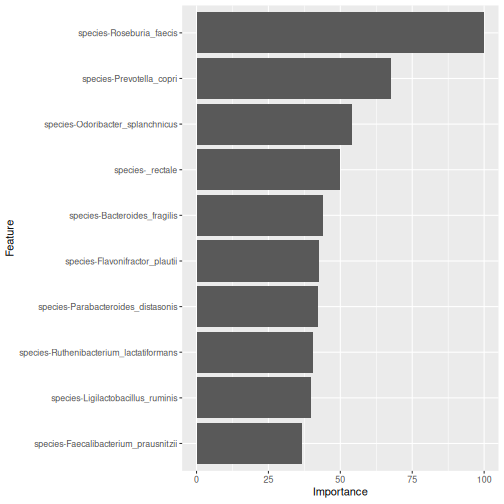
Result: the most important species is Roseburia faecis, followed by Prevotella copri and Odoribacter splanchnicus. Compare them with the differential abundance results of episode 8: many of the same species appear in both. Two very different methods point to the same bacteria.
Other importance measures
mikropml can also calculate permutation importance with
run_ml(..., find_feature_importance = TRUE): it shuffles
one feature at a time in the test data and measures how much the test
AUC drops. With only 12 test samples, this estimate is very noisy, so we
use the importance from the random forest itself. See the mikropml
documentation.
Importance is not a difference
Feature importance tells us that a taxon helps the model to
predict, but not in which direction: it does not say whether the
taxon is higher in CRC or in healthy people. For that, look at the
differential abundance results or plot the taxon by group with
plotBoxplot().
Challenge 3: A different model
mikropml supports other models too. A popular one is a regularized
logistic regression, method = "glmnet". Unlike a random
forest, it combines the features in a weighted sum, so it works best
when the features are on a similar scale.
- Prepare the relative abundances of
tse_prevalentwith the mikropml functionpreprocess_data()(outcome_colname = "disease",assay.type = "relabundance"). By default, it centres and scales each feature and removes features that carry no information. It adds the result to the TreeSE as a new table calledpreprocessed. - Train a
glmnetmodel on thepreprocessedtable with the same settings as before. - Compare its cross-validation AUC with the random forest.
R
tse_glm <- preprocess_data(
    tse_prevalent, outcome_colname = "disease", assay.type = "relabundance"
)
assayNames(tse_glm)
OUTPUT
[1] "counts" "relabundance" "rclr" "preprocessed"R
glm_results <- run_ml(
    tse_glm, method = "glmnet", outcome_colname = "disease",
    assay.type = "preprocessed", kfold = 5, cv_times = 5, seed = 123
)
glm_results$performance[, c("cv_metric_AUC", "AUC")]
OUTPUT
# A tibble: 1 × 2
  cv_metric_AUC   AUC
          <dbl> <dbl>
1         0.884     1
The glmnet model has a cross-validation AUC of 0.88, compared with 0.91 for the random forest. Both predict CRC well. With only 60 samples, a small difference between the models could change with another split. glmnet is much faster, which matters for large datasets.
If preprocess_data() removes features, it stores the
result as an alternative experiment instead, and you give
run_ml() also altexp = "preprocessed". See the
Machine
learning chapter of OMA.
Challenge 4: Genus level
Does the model work as well at the genus level?
- Agglomerate the data to the genus level with
agglomerateByRank(). - Filter and train a random forest as above.
- Compare the cross-validation AUC with the species-level model.
R
tse_genus <- agglomerateByRank(tse, rank = "genus")
tse_genus <- transformAssay(
    tse_genus, assay.type = "counts", method = "relabundance"
)
tse_genus <- subsetByPrevalent(
    tse_genus, assay.type = "relabundance",
    detection = 0.001, prevalence = 0.1
)
genus_results <- run_ml(
    tse_genus, method = "rf", outcome_colname = "disease",
    assay.type = "counts", kfold = 5, cv_times = 5, seed = 123
)
genus_results$performance[, c("cv_metric_AUC", "AUC")]
OUTPUT
# A tibble: 1 × 2
  cv_metric_AUC   AUC
          <dbl> <dbl>
1         0.931 0.944
With 52 genera, the cross-validation AUC is 0.93, about the same as with species (0.91). The signal is strong at both levels.
Challenge 5: Is it really the disease?
In our study, most people from Kerala have CRC (episode 4).
- Make a table of
locationagainstdisease. - Imagine a very simple “model”: predict CRC for everyone from Kerala and healthy for everyone from Bhopal. What share of the people would it classify correctly?
- What does this mean for our microbiome model?
R
location_table <- table(tse$location, tse$disease)
location_table
OUTPUT
         CRC healthy
  Bhopal  15      26
  Kerala  15       4
R
correct <- location_table["Kerala", "CRC"] + location_table["Bhopal", "healthy"]
correct / ncol(tse)
OUTPUT
[1] 0.6833333- The simple rule classifies 68 % of the people correctly, without looking at any bacteria.
- Part of what the model learns could be the difference between Bhopal and Kerala rather than the disease. The microbiome model is much better than the location alone, but to be sure, it should be tested on new people, ideally from other places, or trained within one place only.
Before trusting a prediction model
- Small data. With 60 samples, performance estimates are uncertain. Report results over many splits.
- Independent validation. A model should be tested on an independent cohort, collected by other people in another place. Models often perform worse there.
- Confounding. If the groups differ in other ways (location, age, medication), the model may learn those differences instead of the disease.
See the Machine learning chapter of OMA.
- Machine learning asks how well we can predict an outcome, such as a disease, from features, such as taxon abundances.
- Always evaluate a model on samples it has not seen: cross-validation on the training data and a separate test set.
- Hyperparameters, such as
mtryof a random forest, are chosen by cross-validation on the training data only. - mikropml works directly with a TreeSE:
run_ml()trains, tunes and tests a model in one call, andpreprocess_data()prepares the data when a model needs it. Random forests work on raw counts. - The AUC measures how well the predictions separate the groups. With a small test set, it varies a lot between random splits.
- Feature importance shows which taxa the model relies on. In our study, many of them, such as Roseburia faecis, also differ in abundance.
- Confounders and small sample sizes can make a model look better than it is; independent validation is needed.
Content from Capstone: analyse a new dataset
Last updated on 2026-10-20 | Edit this page
Estimated time: 60 minutes
Overview
Questions
- Can I run a complete microbiome analysis on my own?
- How do I report the results of a microbiome analysis?
Objectives
- Explore and prepare a new microbiome dataset.
- Compare alpha diversity, beta diversity and the abundance of single taxa between two groups, while taking a second variable into account.
- Interpret results that differ from those of the main study, including results that are not significant.
- Summarize an analysis in a short written report.
Where are we?
You now know every step of the workflow: import, exploration and preparation, alpha diversity, beta diversity and differential abundance. In this episode, you run the whole workflow on your own, on a dataset you have not seen before. The tasks below guide you. Try each task yourself before you open its solution, and use the earlier episodes as a reference.
Plan about 40 minutes for Tasks 1–5 and 10 minutes for the report in Task 7. Task 6 and the optional part of Task 3 are extras for those who have time. If you get stuck on a task, open its solution and continue: the report matters more than solving every task alone.
The dataset
The mia package includes several example datasets. We use
Tengeler2020, from a study of attention deficit
hyperactivity disorder (ADHD) (Tengeler et
al. 2020). The researchers transferred gut microbiota from people
with ADHD and from healthy controls into germ-free mice, to test whether
the microbiota can affect the brain. The dataset holds 27 gut microbiota
profiles. For each sample, we know:
-
patient_status: whether the microbiota came from a person with ADHD or from a control; -
cohort: in which of three experimental cohorts the sample was processed.
Unlike our main study, these data come from 16S amplicon
sequencing (episode 2). The
table holds real read counts, and the taxa are genus-level groups of
reads (for example Bacteroides_1,
Bacteroides_2).
The research question is:
Does the gut microbiota of people with ADHD differ from that of controls, and which bacteria differ?
Load packages and data
R
library(mia)
library(miaViz)
library(maaslin3)
R
data("Tengeler2020", package = "mia")
tse <- Tengeler2020
tse
OUTPUT
class: TreeSummarizedExperiment
dim: 151 27
metadata(0):
assays(1): counts
rownames(151): Bacteroides Bacteroides_1 ... Parabacteroides_8
  Unidentified_Lachnospiraceae_14
rowData names(6): Kingdom Phylum ... Family Genus
colnames(27): A110 A12 ... A35 A38
colData names(4): patient_status cohort patient_status_vs_cohort
  sample_name
reducedDimNames(0):
mainExpName: NULL
altExpNames(0):
rowLinks: a LinkDataFrame (151 rows)
rowTree: 1 phylo tree(s) (151 leaves)
colLinks: NULL
colTree: NULL
The data is already a TreeSE, with a phylogenetic tree. Note that the
taxonomic ranks in rowData are capitalized:
Phylum, Family, Genus.
Task 1: Who is in the study?
- How many samples are there from ADHD donors and from controls?
- How are the two groups spread over the three cohorts? Make a table and a bar plot.
- Could the cohort be a confounder, as the location was in our main study?
R
table(tse$patient_status, tse$cohort)
OUTPUT
          Cohort_1 Cohort_2 Cohort_3
  ADHD           4        5        4
  Control        6        5        3
R
plotBarplot(tse, col.var = "cohort", fill.by = "patient_status")
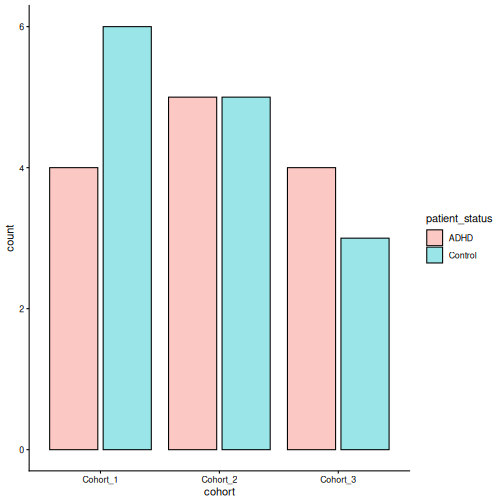
- There are 13 ADHD samples and 14 control samples.
- Every cohort has both ADHD and control samples, in roughly equal numbers.
- The cohort is not strongly linked to the patient status, so it is a
much smaller problem than the location was in the main study. Still,
samples processed together can be more similar to each other (a
batch effect), so it is good practice to include
cohortin the models.
Task 2: Explore and prepare the data
- Calculate the library size of each sample, store it in
colData, and plot it withplotHistogram(). How much do the library sizes differ? - Add relative abundances with
transformAssay(). - Plot the composition of each sample at phylum level, split by
patient_status. Which phyla dominate? - Which five taxa are the most abundant?
- Add rclr values with
transformAssay(). Why do we add them only after the composition plot?
R
tse$library_size <- colSums(assay(tse, "counts"))
summary(tse$library_size)
OUTPUT
   Min. 1st Qu.  Median    Mean 3rd Qu.    Max.
   1772   11804   16745   17997   21502   40584
R
plotHistogram(tse, col.var = "library_size", binwidth = 2000)
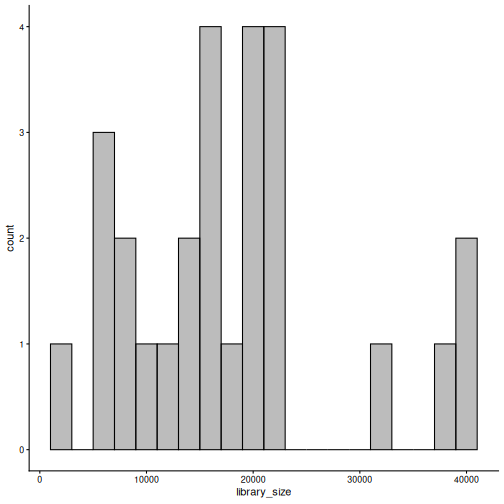
R
tse <- transformAssay(tse, assay.type = "counts", method = "relabundance")
R
plotAbundance(
    tse, assay.type = "relabundance", group = "Phylum",
    col.var = "patient_status", facet.cols = TRUE, scales = "free_x"
)
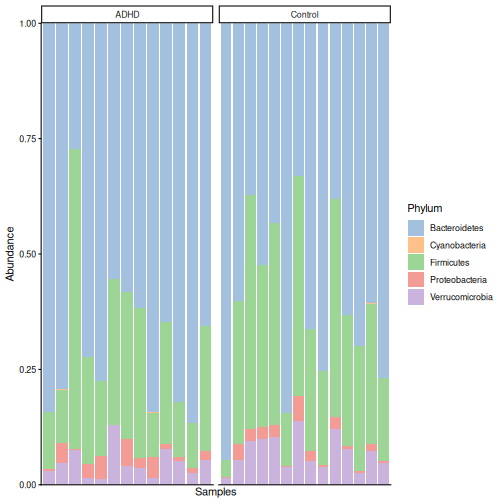
R
getTop(tse, top = 5)
OUTPUT
[1] "Bacteroides"     "Bacteroides_1"   "Parabacteroides" "Bacteroides_2"
[5] "Akkermansia"
R
tse <- transformAssay(tse, assay.type = "counts", method = "rclr")
assayNames(tse)
OUTPUT
[1] "counts" "relabundance" "rclr" - The largest library is about 23 times larger than the smallest. With real read counts, such differences matter for richness (see Task 3).
- Bacteroidetes dominate (on average 65 % of the community), followed
by Firmicutes (27 %) and Verrucomicrobia (6 %). By eye, the two groups
look similar. This dataset uses the older phylum name
Bacteroidetes for the phylum that is called
Bacteroidota in our main study.
plotAbundance()may warn about removed rows; as in episode 5, this is harmless. - Mostly Bacteroides groups, Parabacteroides and Akkermansia.
- With
group = "Phylum",plotAbundance()agglomerates all tables to phylum level, by summing. Summed rclr values are meaningless, andplotAbundance()would warn about them. Remember the rule from episode 5: agglomerate first, then transform.
Task 3: Alpha diversity
- Calculate observed richness, Shannon diversity and Faith’s
phylogenetic diversity with
addAlpha(). - Plot the Shannon diversity by
patient_status, and test the difference with the Wilcoxon test. Do the same for the other two indices. -
Optional: this is amplicon data with real read counts, and
the library sizes differ a lot. Calculate a rarefied richness with the
sampleandniterarguments ofaddAlpha()(rarefy to the smallest library size). Does the conclusion change?
R
tse <- addAlpha(
    tse, assay.type = "counts",
    index = c("observed_richness", "shannon_diversity", "faith_diversity")
)
R
plotBoxplot(tse, col.var = "shannon_diversity", x = "patient_status")
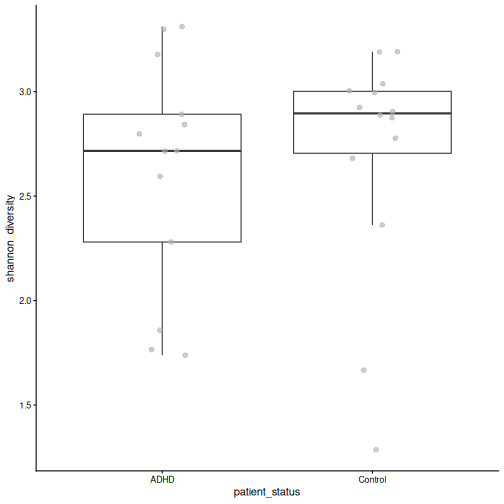
R
p_shannon <- wilcox.test(shannon_diversity ~ patient_status, data = colData(tse))$p.value
p_richness <- wilcox.test(observed_richness ~ patient_status, data = colData(tse))$p.value
p_faith <- wilcox.test(faith_diversity ~ patient_status, data = colData(tse))$p.value
c(shannon = p_shannon, richness = p_richness, faith = p_faith)
OUTPUT
  shannon  richness     faith
0.4879480 0.9333796 0.9809717
R
tse <- addAlpha(
    tse, assay.type = "counts", index = "observed_richness",
    sample = min(tse$library_size), niter = 10, name = "richness_rarefied"
)
p_rarefied <- wilcox.test(richness_rarefied ~ patient_status, data = colData(tse))$p.value
p_rarefied
OUTPUT
[1] 1- None of the indices differ between the groups (Shannon p = 0.49, richness p = 0.93, Faith p = 0.98).
- The rarefied richness does not differ either (p = 1). The conclusion is the same. Rarefying makes the richness values comparable across samples with different sequencing depths, which is why it is common for amplicon data.
Task 4: Beta diversity
- Make a PCoA with Bray–Curtis dissimilarity, and colour it by
patient_status. Then colour it bycohort. - Test with PERMANOVA whether the composition differs by
patient_status, takingcohortinto account (formula = x ~ patient_status + cohort). Addby = "margin", so that each variable is tested while the other is taken into account. - Check the homogeneity of the group spreads. Can you trust the PERMANOVA result?
R
tse <- addMDS(
    tse, assay.type = "relabundance", method = "bray", name = "PCoA_BC"
)
plotOrdination(tse, "PCoA_BC", colour.by = "patient_status")
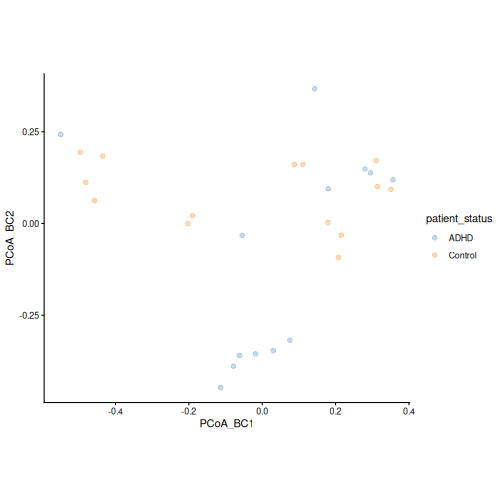
R
plotOrdination(tse, "PCoA_BC", colour.by = "cohort")
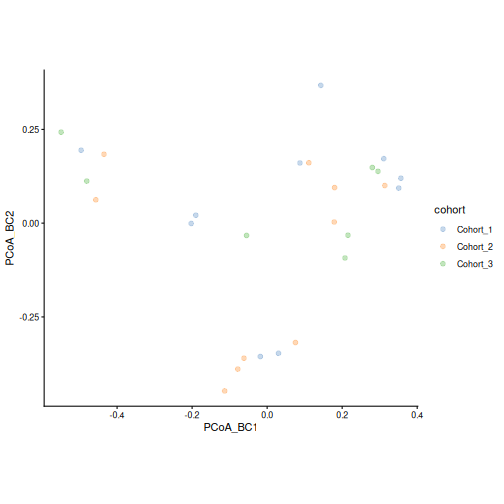
R
permanova <- getPERMANOVA(
    tse, assay.type = "relabundance", method = "bray",
    formula = x ~ patient_status + cohort, by = "margin"
)
permanova$permanova
OUTPUT
Permutation test for adonis under reduced model
Marginal effects of terms
Permutation: free
Number of permutations: 999

adonis2(formula = formula, data = data, method = ..1, by = by, na.action = na.action)
               Df SumOfSqs      R2      F Pr(>F)
patient_status  1   0.3790 0.06819 1.7880  0.104
cohort          2   0.3212 0.05780 0.7578  0.686
Residual       23   4.8748 0.87721
Total          26   5.5572 1.00000
R
permanova$homogeneity
OUTPUT
               Df      Sum Sq      Mean Sq          F N.Perm Pr(>F)
patient_status  1 0.001208740 0.0012087403 0.08912270    999  0.754
cohort          2 0.001793416 0.0008967079 0.07260098    999  0.927
               Total variance Explained variance
patient_status      0.3402751        0.003552244
cohort 0.2982218 0.006013699- ADHD and control samples are found on both sides of the first axis, so the groups overlap a lot. A tight group of ADHD samples lies at the bottom of the plot; it contains samples from two cohorts. The cohorts are spread over the whole plot.
- Patient status explains 7 % of the differences between samples, but this is not significant (p = 0.1). The cohort is not significant either (p = 0.69).
- The spreads do not differ (p = 0.75), so the assumption of PERMANOVA holds. We find no significant difference in overall composition, even though some ADHD samples form their own group in the plot.
Task 5: Differential abundance and prevalence
- Make
Controlthe reference level ofpatient_status, and turncohortinto a factor. - Keep the taxa with a relative abundance of at least 0.1 % in at least 10 % of the samples.
- Run MaAsLin 3 with
formula = ~ patient_status + cohortandoutput = "maaslin3_output_tengeler". - Which taxa differ in abundance between ADHD and controls (q < 0.05)? In which direction? Do any taxa differ in prevalence?
- Plot the relative abundance of the taxa that differ in abundance by
patient_status.
R
tse$patient_status <- factor(tse$patient_status, levels = c("Control", "ADHD"))
tse$cohort <- factor(tse$cohort)
tse_prevalent <- subsetByPrevalent(
    tse, assay.type = "relabundance",
    detection = 0.001, prevalence = 0.1
)
nrow(tse_prevalent)
OUTPUT
[1] 145R
fit <- maaslin3(
    tse_prevalent,
    formula = ~ patient_status + cohort,
    output = "maaslin3_output_tengeler",
    plot_summary_plot = FALSE,
    plot_associations = FALSE,
    verbosity = "ERROR"
)
res <- fit$fit_data_abundance$results
res <- res[res$metadata == "patient_status", ]
sig <- res[res$qval_individual < 0.05 & !is.na(res$qval_individual), ]
sig[, c("feature", "coef", "qval_individual")]
OUTPUT
            feature      coef qval_individual
1       Coprobacter  2.984114      0.01305400
2 Subdoligranulum_1 -2.378099      0.04089055
R
res_pa <- fit$fit_data_prevalence$results
res_pa <- res_pa[res_pa$metadata == "patient_status", ]
sig_pa <- res_pa[res_pa$qval_individual < 0.05 & !is.na(res_pa$qval_individual), ]
sig_pa[, c("feature", "coef", "qval_individual")]
OUTPUT
[1] feature         coef            qval_individual
<0 rows> (or 0-length row.names)
R
plotBoxplot(
    tse, assay.type = "relabundance", x = "patient_status",
    features = sig$feature, facet.by = "rownames"
)
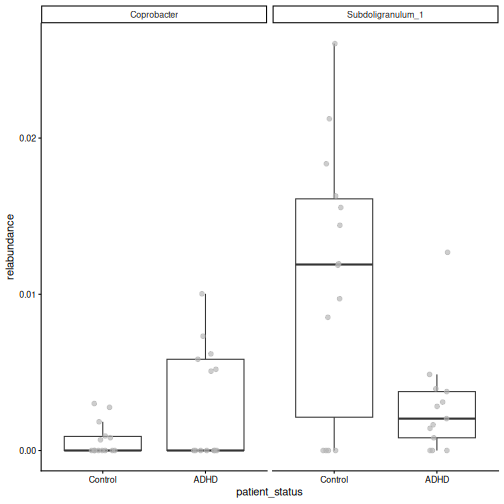
- 2 of the 145 taxa differ in abundance. More abundant in ADHD: Coprobacter. Less abundant in ADHD: Subdoligranulum_1. 0 taxa differ in prevalence.
- The box plots show the differences, but also a large overlap between the groups and many zeros. With only 27 samples, treat these taxa as candidates for further study.
Task 6 (optional): Clustering
Cluster the samples into two groups with hierarchical clustering on the rclr values, as in episode 7. Do the clusters match the patient status?
R
library(bluster)
tse <- addCluster(
    tse, assay.type = "rclr", by = "cols",
    HclustParam(method = "ward.D2", cut.params = list(k = 2))
)
table(tse$cluster, tse$patient_status)
OUTPUT
    Control ADHD
  1       8    5
  2       6    8
The clusters do not follow the patient status. This agrees with the PCoA and PERMANOVA: the main structure in these data is not related to ADHD.
Task 7: Write a short report
Write a short report (about half a page) of your analysis, as you would for a lab meeting. Answer the research question and include:
- The data: what was measured, in how many samples, in which groups.
- The methods: which tables, indices, distances and tests you used, and why.
- The results: one sentence each for alpha diversity, beta diversity and differential abundance, with the key numbers.
- The limitations: for example the sample size, the cohorts, and what a non-significant result does and does not mean.
- One figure that best supports your conclusion.
In a workshop, share your report in the shared notes and compare it with those of other learners.
An example report:
We analysed 16S amplicon profiles of 27 gut microbiota samples from a mouse study in which microbiota from people with ADHD (n = 13) and from controls (n = 14) were transferred to germ-free mice, in three cohorts. Alpha diversity (observed richness, Shannon and Faith’s index; Wilcoxon tests) did not differ between the groups (Shannon p = 0.49), also after rarefying. The overall composition did not differ either (Bray–Curtis PERMANOVA adjusted for cohort: R² = 0.07, p = 0.1; group spreads did not differ). MaAsLin 3, adjusted for cohort, found 2 of 145 taxa that differed in abundance and 0 that differed in prevalence (q < 0.05). The study is small, so it can only detect large differences: the lack of a significant difference in diversity or composition does not prove that there is none. Any taxa found are candidates that need confirmation in a larger study.
Not every study finds a difference
In our main study, CRC and healthy people differed clearly in diversity, composition and many taxa. In this dataset, most tests are not significant. This is a normal and useful result. Report it honestly, together with the sample size, rather than searching for a test that gives a small p-value.
- The same workflow (explore, alpha diversity, beta diversity, differential abundance) works for new datasets, including amplicon data.
- With real read counts and very different library sizes, rarefaction is an option for richness.
- Include technical variables such as the cohort or batch in the models.
- Non-significant results are results too. Report them together with the sample size and the limitations.
- A short written report forces you to state the question, the methods, the results and the limitations clearly.
Content from Next steps
Last updated on 2026-10-20 | Edit this page
Estimated time: 15 minutes
Overview
Questions
- What did we learn about our study?
- Where can I learn more?
Objectives
- Summarize the analysis workflow of this lesson.
- Find resources for further learning.
What we did
We have gone through the data object, data processing and statistical analysis steps of the microbiome data science workflow. We started with one question: is the gut microbiome of people with colorectal cancer different from that of healthy people, and which bacteria differ? Step by step, we found an answer:
| Episode | Step | What we learned about the study |
|---|---|---|
| 4 | Import | The data fits into one TreeSummarizedExperiment. Most
healthy people come from Bhopal. |
| 5 | Explore and prepare | Library sizes differ between samples. Prevotella dominates many healthy samples. |
| 6 | Alpha diversity | CRC patients have higher diversity, partly because many healthy samples are dominated by Prevotella and are therefore less even. |
| 7 | Beta diversity and clustering | The overall composition of the two groups differs, also when the location is taken into account. The samples fall into a Prevotella and a non-Prevotella community type. |
| 8 | Differential abundance and prevalence | Several species differ. Prevotella copri and butyrate producers such as Faecalibacterium prausnitzii are less abundant in CRC. Others differ in how often they are present, for example Flavonifractor plautii, which is found much more often in CRC. Others differ in how often they are present, for example Flavonifractor plautii, which is found much more often in CRC. |
| 9 | Machine learning | The microbiome predicts CRC well, but with only 60 people the estimate is uncertain and an independent cohort is needed. |
| 10 | Capstone | The same workflow works on a new dataset, even when it finds few differences. |
The same workflow works for most microbiome studies: import the data, explore and prepare it, analyse alpha diversity, beta diversity and differential abundance, and then go further with clustering, machine learning or multi-omics.
Where to go next
This lesson covered the basics. The online book Orchestrating Microbiome Analysis (OMA) goes deeper into each topic and covers many more. Good places to continue:
- Your own data: importing data from QIIME 2, MetaPhlAn, mothur, BIOM files and phyloseq objects (Import chapter).
- More about each step: quality control, other transformations, other diversity indices and distances, rarefaction, other differential abundance methods, and other clustering and machine learning methods.
-
Multi-omics: combining the microbiome with other
data types, such as metabolites, is the topic of the follow-up multi-omics
lesson. It covers
MultiAssayExperiment, exploratory methods (Mantel test, MiRKAT, pairwise associations), unsupervised methods (joint RPCA, MOFA) and supervised methods (IntegratedLearner, DIABLO). - Your own analysis: apply the workflow to your own data, and report it in a reproducible way, for example with Quarto.
Other resources:
- OMA framework: the R/Bioconductor packages for microbiome data science.
- Training slides: slides on many microbiome analysis topics.
-
Bioconductor support
site: ask questions about Bioconductor packages, using the tags
miaormiaViz.
- A typical microbiome analysis goes from import and preparation to alpha diversity, beta diversity and differential abundance.
- These three analyses are what most studies report. They are sometimes enough on their own, and they are always the first steps before more advanced analyses.
- The OMA book is the place to continue learning, and the follow-up multi-omics lesson shows how to combine the microbiome with other data types.